
Mazda 3 Service Manual: Front Center Speaker Removal/Installation
1. Disconnect the negative battery cable..
2. Remove the following parts:
a. Upper column cover.
b. Instrument cluster.
c. Center panel.
d. Center cover.
e. Dashboard upper panel.
3. Remove the screw.
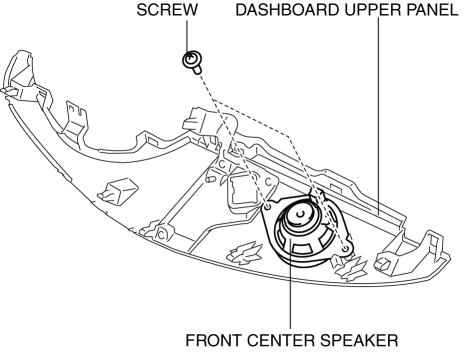
4. Remove the front center speaker.
5. Install in the reverse order of removal.
 Front Center Speaker Inspection
1. Disconnect the negative battery cable..
2. Remove the following parts:
a. Upper column cover.
b. Instrument cluster.
c. Center panel.
d. Center cover.
e. Dashboard upper panel.
f. Fro ...
 Front Door Speaker Inspection
1. Disconnect the negative battery cable..
2. Remove the inner garnish..
3. Remove the front door trim..
4. Remove the front door speaker..
5. Verify the resistance between the front door spea ...
Other materials:
Charging equipment
Charging equipment and names
AC charging inlet
Charging indicator and charging inlet light
DC charging inlet
Charging port lid
AC charging cable (if equipped)*
Charging port
*: For safe handling procedures and precautions related to the AC charging cable,
always refer to the ...
Tire Rotation
To equalize tread wear, rotate the tires every 12,000 km (7,500 miles) at the
latest or sooner
if irregular wear develops. Mazda recommends to rotate every 8,000 km (5,000
miles) to
help increase tire life and distribute wear more evenly.
Inspect the tires for uneven wear and damage. Abno ...
Operating Tips for CD Player
Condensation phenomenon
Immediately after turning on the heater
when the vehicle is cold, the CD or
optical components (prism and lens) in
the CD player may become clouded with
condensation. At this time, the CD will
eject immediately when placed in the unit.
A clouded CD can be corrected s ...
