
Mazda 3 Service Manual: Front Door Latch Switch Inspection
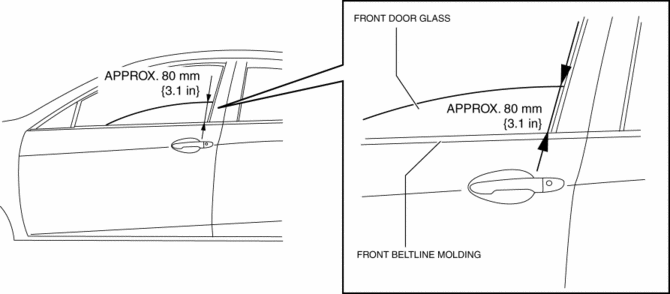
1. To access the glass installation bolt, position the front door glass so that the distance from the top of the front door glass to the upper part of the front beltline molding is approx. 80 mm {3.1 in}
.
2. Disconnect the negative battery cable..
3. Remove the following parts:
a. Inner garnish.
b. Front door trim.
c. Front door speaker.
d. Front door glass.
e. Front door module panel.
f. Front door latch and lock actuator.
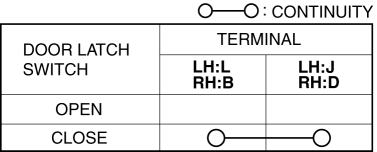
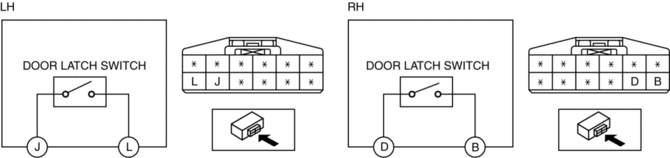
4. Verify that the continuity is as indicated in the table.
-
If not as indicated in the table, replace the front door latch and lock actuator.
NOTE:
-
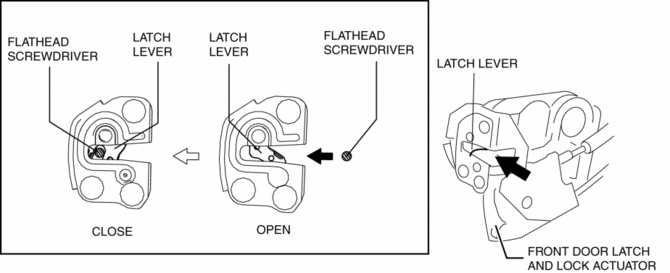
When inspecting the close condition of the front door latch switch, press in the latch lever using a flathead screwdriver.
 Front Door Latch And Lock Actuator Removal/Installation
1. To access the glass installation bolt, position the front door glass so that
the distance from the top of the front door glass to the upper part of the front
beltline molding is approx. 80 mm { ...
 Front Door Module Panel Removal/Installation
1. To access the glass installation bolt, position the front door glass so that
the distance from the top of the front door glass to the upper part of the front
beltline molding is approx. 80 mm { ...
Other materials:
Adjusting the Vents
Directing airflow
To adjust the direction of airflow, move the
adjustment knob.
NOTE
When using the air conditioner under
humid ambient temperature conditions,
the system may blow fog from the vents.
This is not a sign of trouble but a result
of humid air being suddenly cooled.
The ...
Push-Starting
Do not push-start your Mazda.
WARNING
Never tow a vehicle to start it:
Towing a vehicle to start it is
dangerous. The vehicle being towed
could surge forward when its engine
starts, causing the two vehicles to
collide. The occupants could be injured.
CAUTION
...
SRS airbags
The SRS airbag system in the Subaru Solterra is engineered to deploy
during specific types of severe impacts that may otherwise cause serious harm to
vehicle occupants. These advanced airbags function in combination with seat belts
to significantly reduce the risk of fatal or severe injuries.
...
