
Mazda 3 Service Manual: Front Shock Absorber Disposal
1. Place the front shock absorber on a level surface or with the piston pointing downwards.
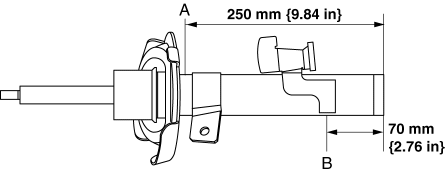
2. Drill a 2—3 mm {0.08—0.11 in}
hole at the point A shown in the figure so that the gas can escape.
WARNING:
-
Whenever drilling into a shock absorber, wear protective eye wear. The gas in the shock absorber is pressurized and could spray metal chips into the eyes and face.
3. Drill a 2—3 mm {0.08—0.11 in}
hole at the point B shown in the figure to drain the oil.
4. Turn the hole made in Step 3 downwards and drain the oil by pumping the piston rod up and down several times.
5. Cut off the end of the front shock absorber.
6. Dispose of waste oil according to local waste disposal laws.
 Front Shock Absorber And Coil Spring Removal/Installation
CAUTION:
Performing the following procedures without first removing the ABS wheel-speed
sensor may possibly cause an open circuit in the wiring harness if it is pulled
by mistake. Before ...
 Front Shock Absorber Inspection
1. Remove the front shock absorber..
2. Inspect for damage and oil leakage.
3. Compress and extend the front shock absorber piston rod at least three
times at a steady rate. From the fourth comp ...
Other materials:
Evaporator Temperature Sensor Inspection [Full Auto Air Conditioner]
NOTE:
Inspect the evaporator temperature sensor when it is installed to the A/C
unit.
1. Set the fan speed MAX HI.
2. Set the temperature control at MAX COLD.
3. Set the RECIRCULATE mode.
4. Turn the A/C switch off.
5. Close all doors and windows.
6. Wait for 5 min.
7. D ...
Oil Seal (Differential) Replacement [A26 M R]
1. On level ground, jack up the vehicle and support it evenly on safety stands.
2. Drain the oil from the transaxle..
3. Remove the front tires..
4. Remove the splash shield..
5. Remove the aerodynamic under cover No.2..
6. Separate the drive shaft and joint shaft from the transaxle..
7 ...
Clutch Fluid Inspection [C66 M R]
NOTE:
A common reserve tank is used for the clutch system and brake system.
1. Verify that the clutch fluid is between the MIN mark and the MAX mark.
Verify that there is no clutch fluid leakage then add clutch fluid to the
level between the MIN mark and the MAX mark..
...
