
Mazda 3 Service Manual: General Procedures (Suspension)
Wheel and Tire Installation
1. When installing the wheels and tires, tighten the wheel nuts in a criss-cross pattern to the following tightening torque.
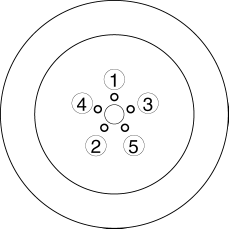
-
Tightening torque
-
88—118 N·m {9.0—12 kgf·m, 65—87 ft·lbf}
Suspension Links Removal/Installation
1. For the joint sections with rubber bushings, raise the vehicle using a lift, and then temporarily tighten the installation bolts and nuts. Lower the vehicle to the ground and tighten them completely with the specified torque.
Connector Disconnection
1. Disconnect the negative battery cable before performing any work that requires handling of connectors..
Power Steering Related Parts Installation
1. If any power steering fluid line has been disconnected, perform the following after installation of the power steering components..
-
Power steering fluid amount inspection
-
Power steering fluid leakage inspection
-
Air bleeding
Electro Hydraulic Power Assist Steering (EHPAS) Related Parts
CAUTION:
-
If the configuration procedure is not completed, the EHPAS will not operate properly and it might cause an unexpected accident. Therefore, when replacing or removing the electric power steering oil pump, make sure to perform the configuration procedure to ensure the proper EHPAS operation.
1. Make sure that there are no DTCs in the EHPAS memory after working on EHPAS related parts. If there are any codes in the memory, clear them.
2. When replacing or removing the electric power steering oil pump, perform the configuration procedures..
Headlight Auto Leveling System Initialization (Vehicle with Adaptive Front Lighting System (AFS))
1. Initialize the auto leveling sensor, when performing the following services..
-
Removing the auto leveling sensor
-
Disconnecting the auto leveling sensor link
-
Removing the suspension parts related the vehicle height
 Suspension
...
 Precaution
Intermittent Concern Troubleshooting
Vibration method
If malfunction occurs or becomes worse while driving on a rough road or when
the engine is vibrating, perform the steps below.
NO ...
Other materials:
No.16 Judder Upon Torque Converter Clutch (TCC) Operation [FS5 A EL]
16
Judder upon torque converter clutch (TCC) operation
DESCRIPTION
Vehicle jolts when TCC is engaged.
POSSIBLE CAUSE
Poor TCC engagement due to either slippage because the TCC is stuck
...
Rear Wiper Motor Inspection
1. Disconnect the negative battery cable..
2. Remove the following parts:
a. Rear wiper arm and blade.
b. Liftgate upper trim.
c. Liftgate side trim.
d. Liftgate lower trim.
3. Disconnect the rear wiper motor connector.
4. Apply battery positive voltage to rear wiper motor connector te ...
Anchor Bracket
Anchor brackets for securing childrestraint
systems are equipped in the
vehicle. Locate each anchor position using
the illustration.
To install a child-restraint system,
always follow the instruction manual
accompanying the child-restraint system.
Anchor bracket location
Use the indicated ...
