
Mazda 3 Service Manual: Headlight Leveling Switch Removal/Installation
1. Disconnect the negative battery cable..
2. Remove the switch panel in the direction of the arrow shown in the figure.
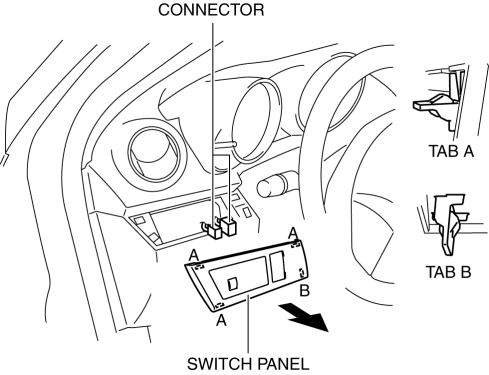
3. Disconnect the connector.
4. Remove the headlight leveling switch in the direction of the arrow (2) shown in the figure while pressing the tabs in the direction of the arrow (1).
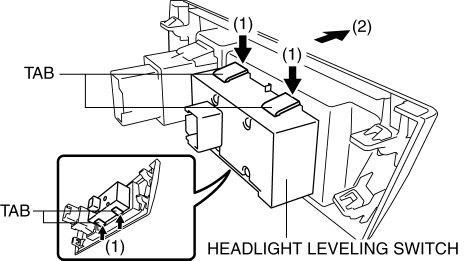
5. Remove the headlight leveling switch.
6. Install in the reverse order of removal.
 Headlight Leveling Switch Inspection
1. Disconnect the negative battery cable..
2. Remove the headlight leveling switch..
3. Verify that the resistance and continuity between the headlight leveling switch
terminals is as indicated ...
 No.6 Bsm Indicator Light Flashes While Not Under Bsm Indicator Light Flashing
Conditions (No Combination Switch Operation (Turn Signal Switch)) [Blind Spot Monitoring
(Bsm)]
No.6 Bsm Indicator Light Flashes While Not Under Bsm Indicator Light Flashing
Conditions (No Combination Switch Operation (Turn Signal Switch)) [Blind Spot Monitoring
(Bsm)]
6
BSM indicator light flashes while not under BSM indicator light-flashing
conditions (no combination switch operation (turn signal switch)
Description
...
Other materials:
Front Door Glass Removal/Installation
1. To access the glass installation bolt, position the front door glass so that
the distance from the top of the front door glass to the upper part of the front
beltline molding is approx. 80 mm {3.1 in}.
2. Disconnect the negative battery cable..
3. Remove the inner garnish..
4. Remov ...
Radio Reception
AM characteristics
AM signals bend around such things as
buildings or mountains and bounce off the
ionosphere.
Therefore, they can reach longer distances
than FM signals.
Because of this, two stations may
sometimes be picked up on the same
frequency at the same time.
FM characterist ...
Parking Support Brake function (moving vehicles rear of the vehicle)
In the Subaru Solterra, the Parking Support Brake system utilizes
rear radar sensors to continuously monitor traffic approaching from either side
behind the vehicle. When a moving vehicle is detected and the system determines
that the likelihood of a collision is significant, automatic brake c ...
