
Mazda 3 Service Manual: Hydraulic Variable Valve Timing Actuator Inspection [Skyactiv G 2.0]
WARNING:
-
A hot engine can cause severe burns. Turn off the engine and wait until it is cool before servicing.
CAUTION:
-
Do not disassemble the hydraulic variable valve timing actuator because it is a precision unit.
1. Remove the battery cover..
2. Disconnect the negative battery cable..
3. Remove the plug hole plate..
4. Remove the ignition coil/ion sensors..
5. Remove the cylinder head cover..
6. Verify that the notch of the rotor and projection of the cover on the hydraulic variable valve timing actuator are aligned and fitted.
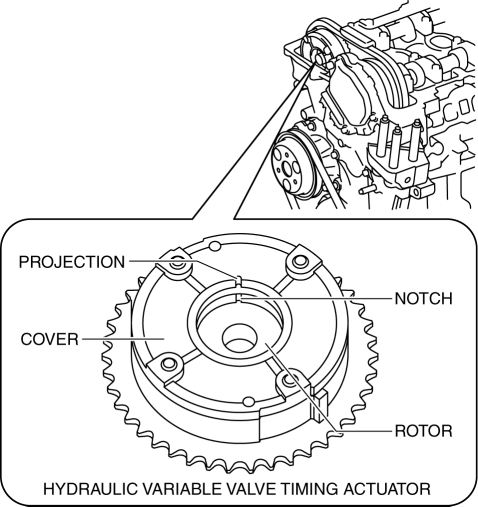
-
If the notch of the rotor and projection of the cover are not aligned, rotate the crankshaft in the direction the engine rotates two turns and verify that they are aligned.
-
If the notch of the rotor and projection of the cover are still not aligned, replace the hydraulic variable valve timing actuator..
-
If, when turning the crankshaft, there is a hitting noise from the hydraulic variable valve timing actuator each time before the cam reaches its maximum lift, it means that the actuator is not secured. Replace the hydraulic variable valve timing actuator..
7. Install in the reverse order of removal.
 Variable Valve Timing Actuator Removal/Installation [Mzr 2.3 Disi Turbo]
WARNING:
Fuel vapor is hazardous. It can very easily ignite, causing serious injury
and damage. Always keep sparks and flames away from fuel.
Fuel line spills and leakage are danger ...

Other materials:
Body Control Module (Bcm) Inspection
1. Remove the following parts:
a. Front scuff plate (LH).
b. Front side trim (LH).
c. Upper panel.
d. Shift knob (MTX).
e. Selector lever knob (ATX).
f. Shift panel.
g. Side wall.
h. Console.
2. Set the hood release lever out of the way..
3. Remove the lower panel. (driver-side). ...
Spare Tire
Your Mazda has a temporary spare tire.
The temporary spare tire is lighter and
smaller than a conventional tire, and is
designed only for emergency use and
should be used only for VERY short
periods. Temporary spare tires should
NEVER be used for long drives or
extended periods.
WAR ...
Front Door Speaker Inspection
1. Disconnect the negative battery cable..
2. Remove the inner garnish..
3. Remove the front door trim..
4. Remove the front door speaker..
5. Verify the resistance between the front door speaker terminals.
If not within the specification, replace the front door speaker.
...
