
Mazda 3 Service Manual: Relay Inspection [Mzr 2.0, Mzr 2.5, Mzr 2.3 Disi Turbo]
Relay Type
|
Connector type |
Part name |
|
Type A |
|
|
Type B |
|
|
Type C |
|
|
Type D |
|
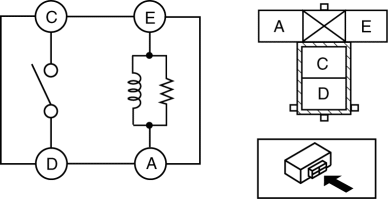
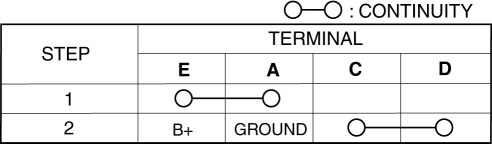
Type A
1. Verify that the continuity is as indicated in the table.
-
If not as indicated in the table, replace the relay.
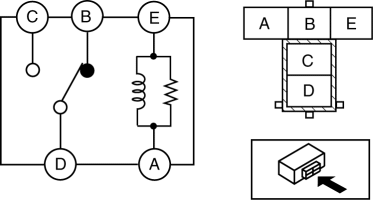
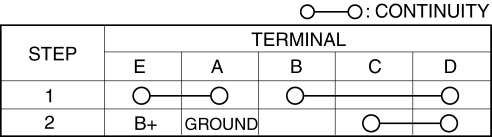
Type B
1. Verify that the continuity is as indicated in the table.
-
If not as indicated in the table, replace the relay.
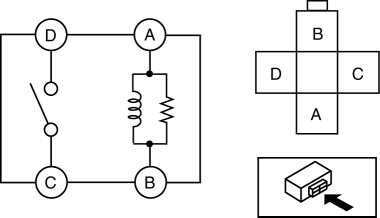
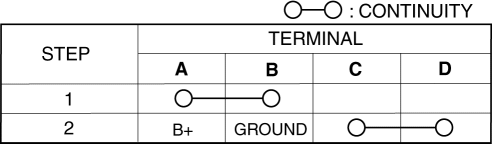
Type C
1. Verify that the continuity is as indicated in the table.
-
If not as indicated in the table, replace the relay.
Type D
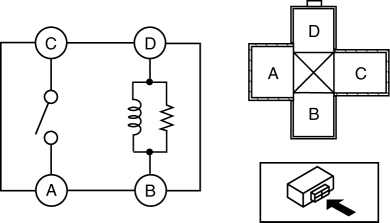
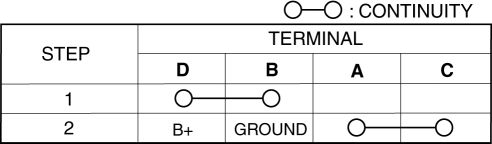
1. Verify that the continuity is as indicated in the table.
-
If not as indicated in the table, replace the relay.
 Relay Block Removal/Installation [With Advanced Keyless Entry And Push Button
Start System]
Relay Block Removal/Installation [With Advanced Keyless Entry And Push Button
Start System]
1. Disconnect the negative battery cable..
2. Remove the following parts:
a. Driver-side front scuff plate.
b. Driver-side front side trim.
c. Hood release lever.
d. Upper panel.
e. Shift ...
 Relay Inspection [Skyactiv G 2.0]
Relay Type
Connector type
Part name
Type A
Front fog light relay
Headlight relay (HI)
Headlight rel ...
Other materials:
Transaxle Oil Inspection [G35 M R]
1. Park the vehicle on level ground.
2. Remove the aerodynamic under cover No.2..
3. Remove the oil level plug and washer.
4. Verify that the oil is near the brim of the plug port.
If the oil level is lower than the low level, add the specified amount and
type of oil through the ...
Antenna (5-Door)
AM/FM Radio Antenna *
The AM/FM radio antenna receives both
AM and FM signals.
(Type A)
To remove the antenna, turn it
counterclockwise.
To install the antenna, turn it clockwise.
Make sure the antenna is securely
installed.
CAUTION
To prevent damage to the antenna,
r ...
Commander switch operation
NOTE
For safety reasons, some operations are disabled while the vehicle is being
driven.
Volume dial operation
Press the volume dial to switch the audio MUTE on and off.
Turn the volume dial to adjust the volume. The volume increases by turning the
dial
clockwise, and decreases by tur ...
