
Mazda 3 Service Manual: Vehicle Speed Sensor (VSS) Inspection [FS5 A EL]
On-Vehicle Inspection
1. Inspect the power supply circuit for the VSS.
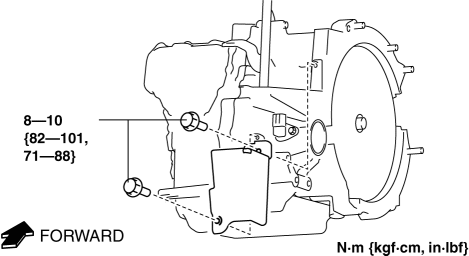
a. Remove the insulator from the transaxle.
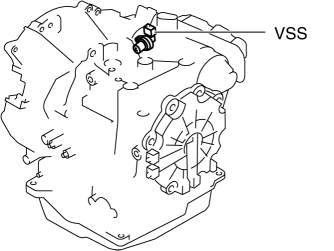
b. Disconnect the VSS connector.
c. Switch the ignition to ON (engine off).
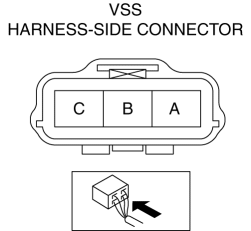
d. Measure the voltage at VSS connector terminal A (harness-side).
-
If there is any malfunction, repair wiring harness between VSS and AT main relay.
-
VSS specification
-
B+
e. Switch the ignition to off.
f. Connect the VSS connector.
2. Inspect the GND circuit for the VSS.
a. Switch the ignition to off.
b. Measure the voltage at VSS connector terminal C (harness-side).
-
If there is any malfunction, repair wiring harness between VSS and GND.
-
VSS specification
-
Below 1.0 V
3. Inspect the signal circuit for the VSS.
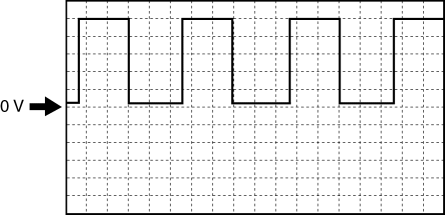
a. Connect the oscilloscope to the following TCM connector terminals and set it as below.
-
(+) lead: TCM terminal Z
-
(-) lead: battery negative terminal
-
Oscilloscope setting: 1 V/DIV (Y), 2 ms/DIV (X), DC range
b. Start the engine.
c. Measure the wave form when the following conditions are met.
-
Gear position: 3GR
-
Vehicle speed: 30 km/h {19 mph}
-
If there is any malfunction, replace the VSS..

 Vehicle Speed Sensor (VSS) Removal/Installation [FS5 A EL]
CAUTION:
If foreign materials are stuck to the sensor, disturbance by magnetic flux
can cause sensor output to be abnormal and thereby negatively affect control.
Make sure that foreign m ...
Other materials:
Brake Hose (Rear) Removal/Installation [Mzr 2.5, Mzr 2.3 Disi Turbo]
1. Remove in the order indicated in the table.
2. Install in the reverse order of removal.
3. Add brake fluid, bleed the brakes, and inspect for leakage after the installation
has been completed..
1
Brake pipe
(See Clip and Brake Pipe Installation Note.)
...
Steering Gear And Linkage Inspection
Steering Rack Inspection
1. Inspect for cracking, damage, and tooth wear.
If there is any malfunction, replace the steering rack.
2. Measure the steering rack warp.
If it exceeds the maximum specification, replace the steering rack.
Steering rack runout
Large ...
Precaution [Dynamic Stability Control (DSC)]
1. The ABS warning light and/or brake system warning light and/or DSC indicator
light and/or DSC OFF light illuminate even when the system is normal.
Warning lights that may illuminate and/or flash
Cases in which the light may illuminate
Conditions in ...
