
Mazda 3 Service Manual: Input/Turbine Speed Sensor Removal/Installation [FS5 A EL]
CAUTION:
-
Always use a new bolt. If the removed input/turbine speed sensor installation bolt is reused, it may cause oil leakage.
-
A sealant coating is applied to the input/turbine speed sensor installation bolt to prevent oil leakage from the installation bolt hole which passes through the component.
1. Perform the following procedures.
a. Remove the battery cover..
b. Disconnect the negative battery cable.
c. Remove the air cleaner component..
2. Remove in the order indicated in the table.
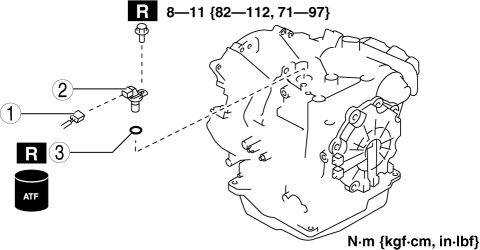
|
1 |
Connector |
|
2 |
Input/turbine speed sensor |
|
3 |
O-ring |
3. Install in the reverse order of removal.
 Input/Turbine Speed Sensor Inspection [FS5 A EL]
CAUTION:
Water or foreign objects entering the connector can cause a poor connection
or corrosion. Be sure not to drop water or foreign objects on the connector
when disconnecting it.
...
 Manifold Absolute Pressure (Map) Sensor/Boost Air Temperature Sensor Removal/Installation
[Mzr 2.3 Disi Turbo]
Manifold Absolute Pressure (Map) Sensor/Boost Air Temperature Sensor Removal/Installation
[Mzr 2.3 Disi Turbo]
NOTE:
Because the boost air temperature sensor is integrated in the MAP sensor,
replacing the boost air temperature sensor includes replacement of the MAP sensor/boost
air temperature se ...
Other materials:
Clutch Fluid Leakage Inspection [C66 M R]
CAUTION:
Do not allow clutch fluid get on a painted surface. Clutch fluid contains
properties which can dissolve the paint. If clutch fluid gets on a painted surface,
wash it off with water immediately and wipe the area off completely.
1. Pump the clutch pedal a few times.
2. I ...
Rear Seat Back Removal/Installation
1. Remove the rear seat cushion..
2. Remove the rear buckle installation bolt..
3. Fold the rear seat back.
4. Remove the bolts.
5. Remove the rear seat back from the rear seat back bracket by pulling the rear
seat back in the direction of the arrow shown in the figure.
6. Remove ...
Inside Trunk Release Lever
(4-Door)
Your vehicle is equipped with an inside
trunk release lever that provides a means
of escape for children and adults in the
event they become locked inside the trunk.
No matter how careful adults might be
with keys and locking their cars, parents
should be aware that children may be
tempted ...
