
Mazda 3 Owners Manual: Interior Equipment (View B)
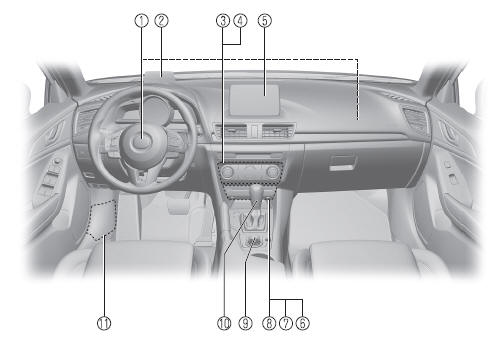
- SRS air bags
- Active driving display
- Climate control system
- Rear window defogger switch
- Audio system
- CD player
- Accessory sockets
- External input terminal
- Commander switch
- Shift lever/Selector lever
- Fuse block (Left side)
 Interior Equipment (View A)
Door-lock knob
Turn and lane-change signal
Lighting control
Wiper and washer lever
DSC OFF switch
Tire pressure monitoring system set switch
LDWS switch
AFS OFF switch
BSM OFF ...
 Interior Equipment (View C)
Seat belts
SRS air bag
Bottle holder
Overhead lights
Moonroof switch
Sunvisor
Vanity mirror
Rearview mirror
Glove compartment
Parking brake
Cup holders
Front seat
Ce ...
Other materials:
Identification Numbers
Vehicle Identification Number
The vehicle identification number legally
identifies your vehicle. The number is on a
plate attached to the cowl panel located on
the left corner of the dashboard. This plate
can easily be seen through the windshield
Motor Vehicle Safety Standard Label (U.S.A. ...
Operating the Satellite Radio
What is satellite radio?
With over 130 channels, SiriusXM
Satellite Radio brings you more of what
you love. Get channels and channels of
commercial-free music, plus sports, news,
talk, entertainment and more.
Commercial-free music from nearly
every genre — rock to pop, hip-hop to
country ...
Power Brake Unit Inspection
NOTE:
The following inspection methods are simple inspection methods to judge the
function of the power brake unit.
If there is any malfunction in the power brake unit, replace the power brake
unit as a single unit.
Without Using SST
Operation inspection
1. With the eng ...
