
Mazda 3 Service Manual: Joint Shaft Assembly [Mzr 2.5 (ATX)]
1. Assemble in the order indicated in the table.
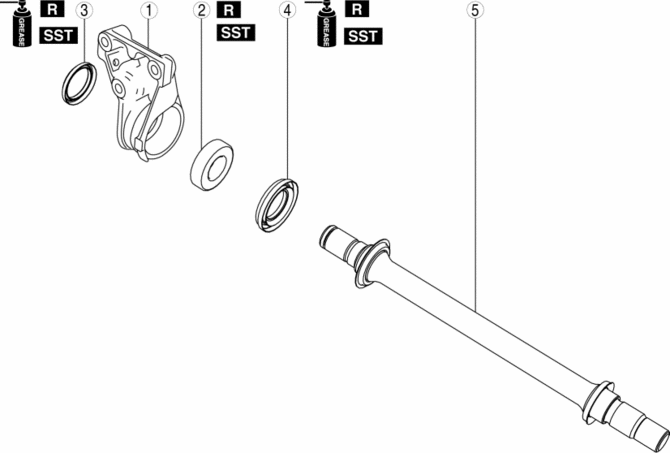
|
1 |
Bracket |
|
2 |
Bearing . |
|
3 |
Dust seal (RH) . |
|
4 |
Dust seal (LH) . |
|
5 |
Joint shaft . |
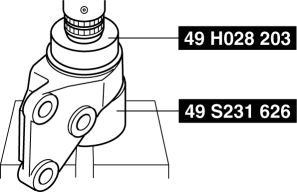
Bearing Assembly Note
1. Install a new bearing using the SSTs
.
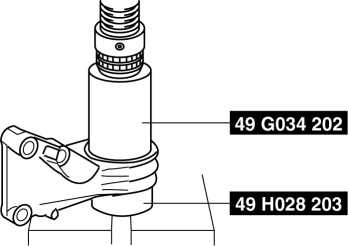
Dust Seal (RH) Assembly Note
1. Apply grease to a new dust seal lip.
2. Install the dust seal (RH) using the SSTs
.
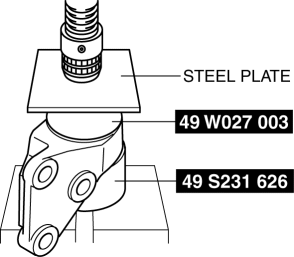
Dust Seal (LH) Assembly Note
1. Apply grease to a new dust seal lip.
2. Install a new dust seal (LH) using the steel plate and the SSTs
.
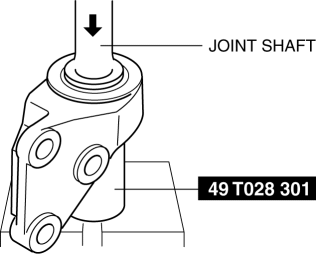
Joint Shaft Assembly Note
1. Press fit the joint shaft using the SST
and a press.
 Intermediate Sensor Removal/Installation [FS5 A EL]
CAUTION:
If foreign materials are stuck to the sensor, disturbance by magnetic flux
can cause sensor output to be abnormal and thereby negatively affect control.
Make sure that foreign m ...
 Judder Upon Torque Converter Clutch (TCC) Operation [Fw6 A EL]
TROUBLESHOOTING ITEM
Judder upon torque converter clutch (TCC) operation
DESCRIPTION
Vehicle jolts when TCC is engaged.
...
Other materials:
Front Door Key Cylinder Switch Inspection
1. To access the glass installation bolt, position the front door glass so that
the distance from the top of the front door glass to the upper part of the front
beltline molding is approx. 80 mm {3.1 in}.
2. Disconnect the negative battery cable..
3. Remove the following parts:
a. Inne ...
Starter Disassembly/Assembly [Mzr 2.0, Mzr 2.5]
1. Disassemble in the order indicated in the table.
2. Assemble in the reverse order of disassembly.
1
Magnetic switch
2
Adjustment washer
3
Rear housing
4
Brush and brush holder
...
Recommended Oil
U.S.A., Canada, and Puerto Rico
Use SAE 0W-20 engine oil.
Mazda Genuine Oil is used in your
Mazda vehicle. Mazda Genuine 0W-20
Oil is required to achieve optimum fuel
economy.
For maintenance service, Mazda
recommends Mazda Genuine Parts and
Castrol ® (U.S.A. only).
Only use SAE 0W ...
