
Mazda 3 Owners Manual: Maintenance Monitor (Type A audio)
“Oil Change” with a flexible setting *1 is available. Consult your Authorized Mazda Dealer when you want to change the setting *2 . Once the system turns on, the wrench indicator light in the instrument cluster will be illuminated when remaining oil life becomes less than 500 km (300 mile), or remaining days are less than 15 (whichever comes first).
Reset method
Press and hold the selector with the ignition switched off, then switch it on. Keep pressing the selector for more than 5 seconds. The master warning light will flash for a few seconds when the reset is completed.
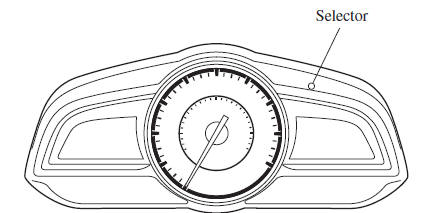
*1 The flexible setting is available in the United States and Puerto Rico. Based on the engine operating conditions, the onboard computer in your vehicle calculates the remaining oil life. Mazda Genuine 0W-20 oil and Castrol ® 0W-20 oil are required to achieve optimum calculation performance.
*2 Once the Flexible Oil Maintenance Setting is selected, the system must be reset whenever replacing the engine oil.

 Maintenance Monitor (Type B audio)
Select the icon on the
home screen to display the “Applications” screen.
Select “Maintenance” to display the maintenance list screen.
Switch the tab and select the setting item you ...
Other materials:
EGR Pipe Removal/Installation [Mzr 2.3 Disi Turbo]
1. Remove the battery cover..
2. Disconnect the negative battery cable..
3. Remove the battery and battery tray..
4. Remove the following parts..
Fresh-air duct
Air cleaner
Charge air cooler
Air hose
Air duct
5. Set the throttle body out of the way ...
Battery Recharging [Mzr 2.0, Mzr 2.5]
Using GR8-1291:
(See GR8-1291 INSTANT TRAINING MODULE (VIDEO) .)
WARNING:
Keep all flames away from the battery, otherwise evaporated gas from the
battery fluid may catch fire and cause serious injury.
1. Remove the battery filler caps and check the water level. If necessary, add ...
Aerodynamic Under Cover No.2 Removal/Installation
Except SKYACTIV-G 2.0
1. Lift up the vehicle.
2. Remove the fasteners and bolts.
3. Move the aerodynamic under cover No.2 in the direction of the arrow shown
in the figure and remove it.
CAUTION:
Be careful not to damage the aerodynamic under cover No.2 during removal.
4. ...
