
Mazda 3 Service Manual: Neutral Switch Removal/Installation [A26 M R]
1. Disconnect the negative battery cable.
2. Disconnect the neutral switch connector.
3. Remove the aerodynamic under cover No.2..
4. Remove the neutral switch with the gasket.
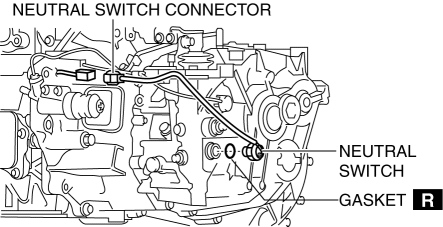
5. Install a new gasket and the neutral switch to the transaxle case.
-
Tightening torque
-
29—39 N·m {3.0—3.9 kgf·m, 22—28 ft·lbf}
6. Install the aerodynamic under cover No.2..
7. Connect the neutral switch connector.
8. Connect the negative battery cable.
 Manual Transaxle Shift Mechanism Removal/Installation [G66 M R]
1. Remove the battery cover..
2. Disconnect the negative battery cable.
3. Remove the battery component. (ex: battery, battery tray and PCM component).
4. Remove the air cleaner component..
5 ...
 Neutral Switch Removal/Installation [C66 M R]
1. Remove the battery cover..
2. Disconnect the negative battery cable..
3. Remove the aerodynamic under cover No.2..
4. Install in the reverse order of removal.
5. Remove in the order indicat ...
Other materials:
Rear Wiper And Washer Switch Inspection
1. Disconnect the negative battery cable..
2. Remove the following parts:
a. Front scuff plate (Driver‘s side).
b. Front side trim (Driver‘s side).
c. Hood release lever.
d. Lower panel.
e. Column cover.
f. Wiper and washer switch.
3. Verify that the continuity between the rear w ...
Removing a Flat Tire
If your vehicle is equipped with a
wheel cover, pry off the wheel cover
with the beveled end of the jack lever.
NOTE
Force the end of the jack lever firmly
between wheel and cover, or removal will
be difficult.
CAUTION
Align the notch on the wheel cover
with the valve ...
Sunvisor Removal/Installation
1. Disconnect the negative battery cable..
2. Remove the screw.
3. Rotate the sunvisor in the direction of the arrow.
4. Unhook and remove the sunvisor.
5. Disconnect the vanity mirror illumination connector. (Vehicles with vanity
mirror illumination)
6. Press the center adaptor tabs ...
