
Mazda 3 Service Manual: Oil Seal Replacement [FS5 A EL]
1. Remove the aerodynamic under cover No. 2..
2. Remove the oil seal.
a. Drain the ATF..
b. Remove the drive shaft and/or joint shaft..
CAUTION:
-
The oil seal is easily damaged by the sharp edges of the drive shaft splines. Do not let the splines contact the oil seal.
c. Remove the oil seal using a flathead screwdriver.
3. Using the SSTs and a hammer, tap a new oil seal in evenly until the SST (body) contacts the transaxle case.
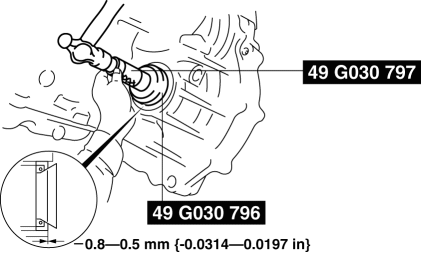
4. Coat the lip of the oil seal with ATF.
5. Install the drive shaft and/or joint shaft..
6. Add the ATF..
7. Install the aerodynamic under cover No. 2..
8. Perform the “Mechanical System Test”..
 Oil Seal (Differential) Replacement [G66 M R]
1. On level ground, jack up the vehicle and support it evenly on safety stands.
2. Remove the aerodynamic under cover No.2..
3. Drain the oil from the transaxle..
4. Remove the front splash shi ...
 Rear Oil Seal Replacement [Mzr 2.0, Mzr 2.5]
1. Remove the transaxle..
2. Remove the flywheel (MTX) or the drive plate (ATX)..
3. Remove in the order indicated in the table.
4. Install in the reverse order of removal.
1
...
Other materials:
Precaution [ABS]
1. Any one or a combination of the ABS warning and brake system warning lights
illuminates even when the system is normal.
Warning lights that may illuminate and/or flash
Cases in which the light may illuminate
Conditions in which the light will go ou ...
High Mount Brake Light Removal/Installation
4SD
1. Disconnect the negative battery cable..
2. Remove the trunk lid trim..
3. Disconnect the connector.
4. Remove the nuts.
5. While pressing the tabs shown in the figure, pull the high-mount brake light
outward and remove it.
6. Remove the high-mount brake light.
7. Instal ...
Antenna Feeder No.7 Inspection
1. Disconnect the negative battery cable..
2. Remove the liftgate upper trim..
3. Disconnect the connector A and B..
4. Verify that the continuity between antenna feeder No.7 terminals is as indicated
in the table.
If not as indicated in the table, replace antenna feeder No.7.
...
