
Mazda 3 Owners Manual: Outside Mirrors
| WARNING Be sure to look over your shoulder before changing lanes: Changing lanes without taking into account the actual distance of the vehicle in the convex mirror is dangerous. You could have a serious accident. What you see in the convex mirror is closer than it appears. |
Mirror type
Flat type (driver's side)
Flat surface mirror.
Convex type (front passenger side)
The mirror has single curvature on its surface.
Power mirror adjustment
The ignition must be switched to ACC or ON position.
To adjust:
- Rotate the mirror switch to the left or right to choose the left or right side mirror.
- Press the mirror switch in the appropriate direction.
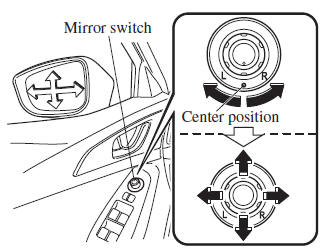
After adjusting the mirror, lock the control by rotating the switch in the center position.
Folding mirror
| WARNING Always return the outside mirrors to the driving position before you start driving: Driving with the outside mirrors folded in is dangerous. Your rear view will be restricted, and you could have an accident. |
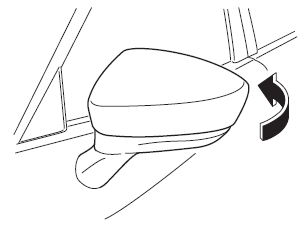
Fold the outside mirror rearward until it is flush with the vehicle.
 Mirrors
Before driving, adjust the inside and
outside mirrors. ...
 Rearview Mirror
WARNING
Do not stack cargo or objects higher
than the seatbacks:
Cargo stacked higher than the
seatbacks is dangerous. It can block
your view in the rearview mirror, which
mig ...
Other materials:
Caliper (Front) Disassembly/Assembly [Mzr 2.0, Skyactiv G 2.0, Mzr 2.5]
1. Disassemble in the order indicated in the table.
1
Bleeder cap
2
Bleeder screw
3
Piston
(See Piston Disassembly Note.)
(See Piston Assembly Note.)
4
Dust seal
(See Dust Seal ...
Tire Inflation Pressure
WARNING
Always infl ate the tires to the correct
pressure:
Overinfl ation or underinfl ation of tires
is dangerous. Adverse handling or
unexpected tire failure could result in a
serious accident.
Refer to Tires on .
Use only a Mazda-genuine tire valve
cap:
Use ...
Auto Dimming Mirror Inspection
1. Measure the voltage at each terminal.
If the voltage is not as specified in the Terminal Voltage Table (Reference),
inspect the parts under “Inspection item (s)” and related wiring harnesses.
If the system does not work properly even though the inspection items
or ...
