
Mazda 3 Service Manual: Rear Combination Light Removal/Installation
4SD
1. Disconnect the negative battery cable..
2. Remove the following parts:
a. Trunk mat.
b. Trunk board.
c. Trunk end trim.
d. Trunk side trim.
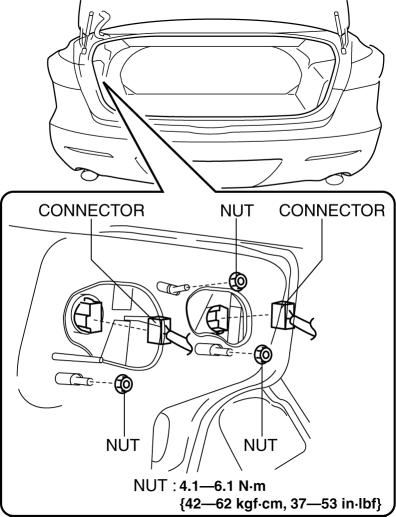
3. Disconnect the connectors shown in the figure and remove the nuts.
4. Pull the rear combination light in the direction of the arrow to detach it from the hook.
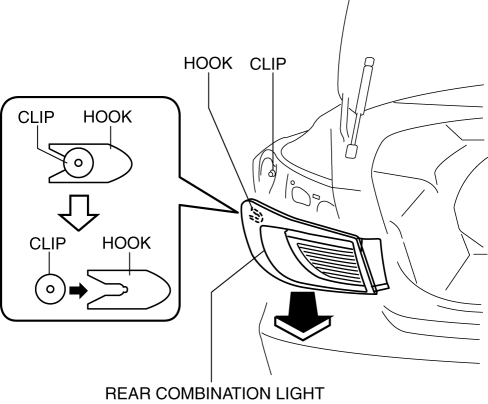
5. Remove the rear combination light.
6. Install in the reverse order of removal.
5HB
1. Disconnect the negative battery cable..
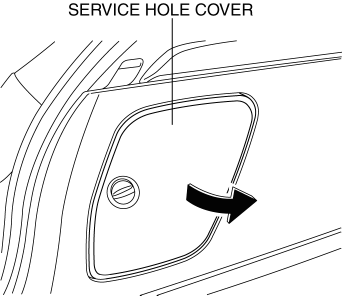
2. Remove the service hole cover.
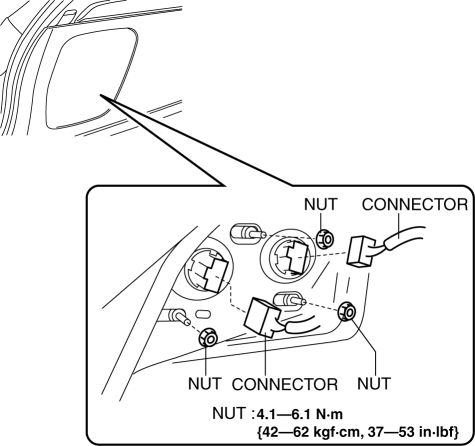
3. Disconnect the connectors shown in the figure and remove the nuts.
4. Pull the rear combination light in the direction of the arrow to detach it from the hook.
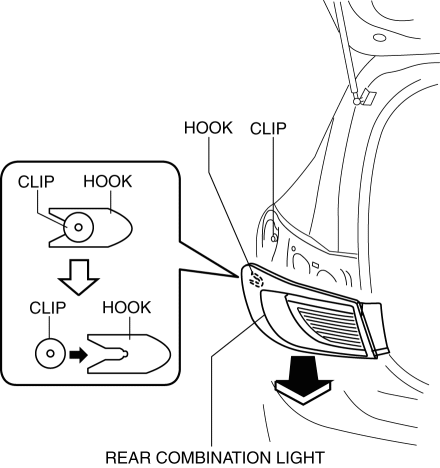
5. Remove the rear combination light.
6. Install in the reverse order of removal.
 Parking/Front Side Marker/Front Turn Light Bulb Removal/Installation
1. Disconnect the negative battery cable..
2. Slightly bend back the front mudguard..
3. Rotate the parking/front side marker/front turn light socket in the direction
of the arrow shown in the f ...
 Back Up Light Switch Inspection
1. Disconnect the negative battery cable..
2. Remove the battery component. (ex: battery, battery tray and PCM component)
(G35-MR,G66M-R).
3. Remove the aerodynamic under cover No.2. (G35-MR,G66 ...
Other materials:
Rear Door Pad Removal/Installation
1. Fully open the rear door glass.
2. Disconnect the negative battery cable..
3. Remove the following parts:
a. Rear door trim.
b. Rear door speaker.
c. Rear power window motor.
d. Rear door quarter glass.
e. Rear door glass.
f. Rear door module panel.
4. Remove the service hole co ...
Ignition Switch Inspection [Without Advanced Keyless Entry And Push Button Start
System]
1. Disconnect the negative battery cable..
2. Remove the column cover..
3. Remove the ignition switch..
4. Verify that the continuity between the ignition switch terminals is as indicated
in the table.
If not as indicated in the table, replace the ignition switch.
...
Air Bag Module And Pre Tensioner Seat Belt Deployment Procedures [Two Step Deployment
Control System]
WARNING:
A live (undeployed) air bag module or pre-tensioner seat belt may accidentally
operate (deploy) when it is disposed of and cause serious injury. Do not dispose
of a live (undeployed) air bag module and pre-tensioner seat belt. If the SSTs
(Deployment tool and Adapter harnes ...
