
Mazda 3 Service Manual: Front Stabilizer Removal/Installation [Mzr 2.3 Disi Turbo]
1. Remove the joint cover..
2. Disconnect the steering shaft from the steering gear and linkage..
3. Remove the front crossmember component..
4. Remove in the order indicated in the table.
5. Install in the reverse order of removal.
6. Inspect the wheel alignment and adjust it if necessary..
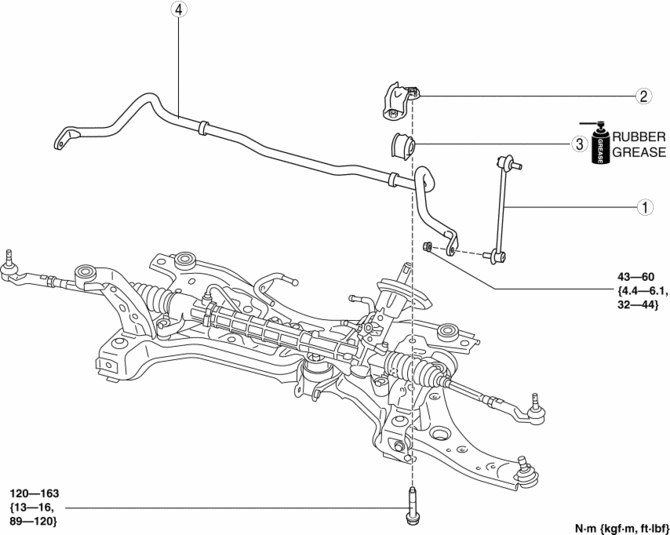
|
1 |
Front stabilizer control link |
|
2 |
Front stabilizer bracket (See Front Stabilizer, Front Stabilizer Bushing and Front Stabilizer Bracket Installation Note.) |
|
3 |
Front stabilizer bushing (See Front Stabilizer, Front Stabilizer Bushing and Front Stabilizer Bracket Installation Note.) |
|
4 |
Front stabilizer (See Front Stabilizer, Front Stabilizer Bushing and Front Stabilizer Bracket Installation Note.) |
Front Stabilizer, Front Stabilizer Bushing and Front Stabilizer Bracket Installation Note
CAUTION:
-
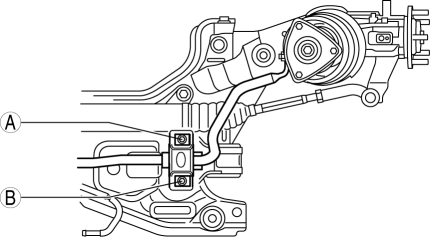
Verify that the front stabilizer bushings are not caught between the front stabilizer bracket and the front crossmember, and install the front stabilizer bracket using the following procedure.
1. Temporarily tighten bolts A and B shown in the figure.
2. Tighten bolt A.
3. Tighten bolt B.
4. Tighten bolt A.
 Front Stabilizer Removal/Installation [Mzr 2.0, Skyactiv G 2.0, Mzr 2.5]
1. Remove the joint cover..
2. Disconnect the steering shaft from the steering gear and linkage..
3. Remove the front crossmember component..
4. Remove in the order indicated in the table.
5. ...
 Front Wheel Hub Bolt Replacement
1. Remove the brake calliper component and disc plate..
2. Remove the wheel hub bolt using the SST as shown in the figure.
NOTE:
When removing the wheel hub bolts, perform the work bet ...
Other materials:
Bluetooth® Audio (Type A)
Applicable Bluetooth ® specification
(Recommended)
Ver. 2.0
Response profile
A2DP (Advanced Audio Distribution
Profile) Ver. 1.0/1.2
AVRCP (Audio/Video Remote Control
Profile) Ver. 1.0/1.3
A2DP is a profile which transmits only
audio to the Bluetooth ® unit. If your
Bluetooth ® ...
Engine Disassembly/Assembly [Mzr 2.3 Disi Turbo]
1. Remove the engine from the transaxle..
2. Remove the intake-air system..
3. Remove the exhaust system..
4. Remove the generator..
5. Remove the EGR valve..
6. Remove the ignition coils..
7. Remove the high pressure fuel pump and high pressure fuel pump cover..
8. Remove the fuel inj ...
Battery
WARNING
Wash hands after handling the battery and related accessories:
Battery posts, terminals and related accessories contain lead and lead
compounds,
chemicals known to the State of California to cause cancer and
reproductive harm.
Read the following
precautions ...
