
Mazda 3 Service Manual: Rear Door Glass Removal/Installation
1. Fully lower the rear door glass.
2. Disconnect the negative battery cable..
3. Remove the rear door trim..
4. Remove the rear door speaker..
5. Remove the rear power window motor..
6. Remove the service hole cover.
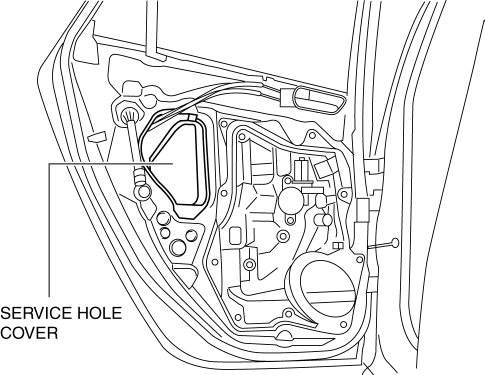
7. Remove the rear door glass guide..
8. Remove the rear door quarter glass..
9. Remove the hole plug and bolt.
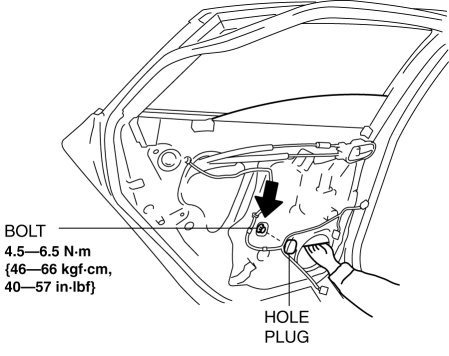
CAUTION:
-
If the bolts are removed without supporting the rear door glass, the rear door glass may fall off and be damaged. Remove the bolts while inserting your hand into the rear door speaker installation hole to support the rear door glass.
10. Lift the rear door glass up and remove while tilting it.
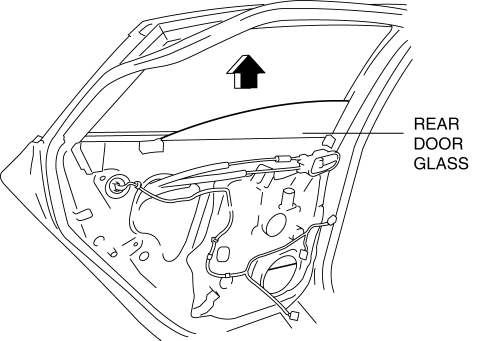
11. Install in the reverse order of removal.
CAUTION:
-
If the bolts are installed without supporting the rear door glass, the rear door glass may fall off and be damaged. When installing the rear door glass, align the glass edge with the rear door glass guide by hand through the speaker installation hole, and then install the bolts.
 Quarter Window Glass Removal
1. Remove the following parts:
a. Rear seat cushion.
b. Rear scuff plate.
c. Tire house trim.
d. Trunk side upper trim.
e. C-pillar trim.
2. Apply protective tape along the edge of the bod ...
 Rear Door Quarter Glass Removal/Installation
1. Fully lower the rear door glass.
2. Disconnect the negative battery cable..
3. Remove the rear door trim..
4. Remove the service hole cover.
5. Remove the hole plug.
6. Remove the ...
Other materials:
Rear Door Latch Switch Inspection
1. Fully open the rear door glass.
2. Disconnect the negative battery cable..
3. Remove the following parts:
a. Rear door trim.
b. Rear inner handle.
c. Rear door speaker.
d. Rear power window motor.
e. Rear door glass.
f. Rear door latch and lock actuator.
4. Verify that the conti ...
Brake/Clutch Fluid
Inspecting Brake/Clutch Fluid Level
WARNING
If the brake/clutch fl uid level is low, have
the brakes inspected:
A low brake/clutch fl uid level is
dangerous.
A low level could indicate brake lining
wear or a brake system leak which
could cause the brakes to fail and lead ...
Air Filter Inspection [Mzr 2.3 Disi Turbo]
Airflow Inspection
1. Remove the air filter..
2. Blow from port A and verify that there is airflow from port B.
If there is no airflow, replace the air filter..
3. Blow from port B and verify that there is airflow from port A.
If there is no airflow, replace the air filt ...
