
Mazda 3 Service Manual: Rear Door Pad Removal/Installation
1. Fully open the rear door glass.
2. Disconnect the negative battery cable..
3. Remove the following parts:
a. Rear door trim.
b. Rear door speaker.
c. Rear power window motor.
d. Rear door quarter glass.
e. Rear door glass.
f. Rear door module panel.
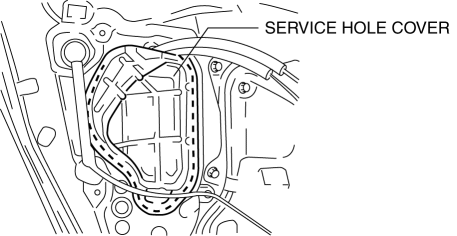
4. Remove the service hole cover.
5. Remove the fasteners A.
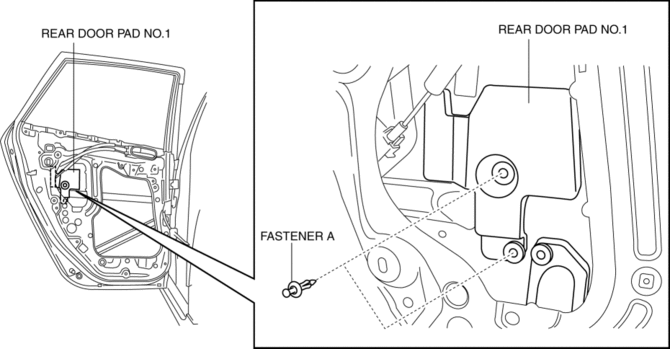
6. Remove the rear door pad No.1.
7. Remove the fasteners B.
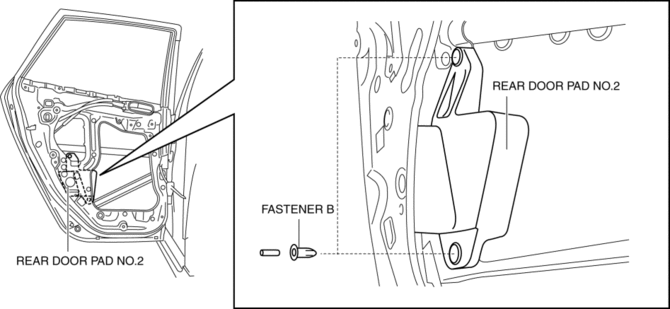
8. Remove the rear door pad No.2.
9. Install in the reverse order of removal.
 Rear Door Module Panel Removal/Installation
1. Fully open the rear door glass.
2. Disconnect the negative battery cable..
3. Remove the following parts:
a. Rear door trim.
b. Rear door speaker.
c. Rear power window motor.
d. Rear do ...
 Rear Door Removal/Installation
WARNING:
Removing the rear door without supporting it could cause the rear door to
fall and cause serious injury. Always perform the procedure with at least another
person to prevent the ...
Other materials:
Intake Air Temperature (Iat) Sensor Inspection [Mzr 2.0, Mzr 2.5]
Resistance Inspection
NOTE:
Because the IAT sensor is integrated in the MAF sensor, replacing the IAT
sensor includes replacement of the MAF/IAT sensor.
1. Remove the battery cover..
2. Disconnect the negative battery cable..
3. Disconnect the MAF/IAT sensor connector.
4. Mea ...
Starter Removal/Installation [Mzr 2.0, Mzr 2.5]
WARNING:
Remove and install all parts when the engine is cold, otherwise they can
cause severe burns or serious injury.
When the battery cables are connected, touching the vehicle body with starter
terminal B will generate sparks. This can cause personal injury, fire, and d ...
Emergency assistance
SUBARU SOLTERRA CONNECT
SUBARU SOLTERRA CONNECT is an advanced subscription-based telematics
system designed for the Subaru Solterra, utilizing Global Positioning System (GPS)
technology along with integrated cellular communication to deliver enhanced safety,
security, and convenience feature ...
