
Mazda 3 Service Manual: Rear Door Module Panel Removal/Installation
1. Fully open the rear door glass.
2. Disconnect the negative battery cable..
3. Remove the following parts:
a. Rear door trim.
b. Rear door speaker.
c. Rear power window motor.
d. Rear door quarter glass.
e. Rear door glass.
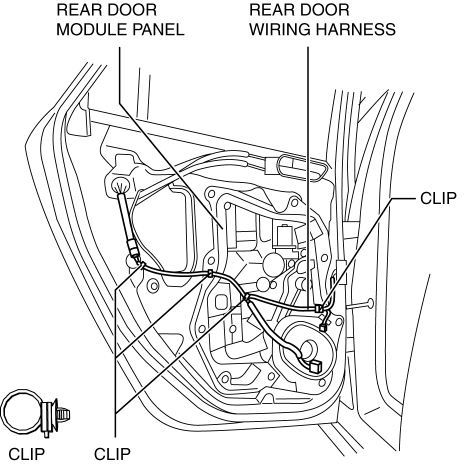
4. Remove the clips securing the rear door wiring harness from the rear door module panel.
5. Remove the bolts.
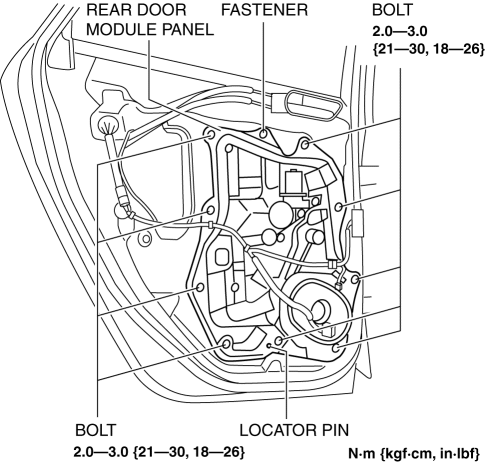
6. Remove the fastener.
7. Remove the rear door module panel.
8. Remove the rear power window regulator..
9. Install in the reverse order of removal.
 Rear Door Latch Switch Inspection
1. Fully open the rear door glass.
2. Disconnect the negative battery cable..
3. Remove the following parts:
a. Rear door trim.
b. Rear inner handle.
c. Rear door speaker.
d. Rear power wi ...
 Rear Door Pad Removal/Installation
1. Fully open the rear door glass.
2. Disconnect the negative battery cable..
3. Remove the following parts:
a. Rear door trim.
b. Rear door speaker.
c. Rear power window motor.
d. Rear do ...
Other materials:
Reporting Safety Defects
(U.S.A.)
If you believe that your vehicle has a defect which could cause a crash or
could cause
injury or death, you should immediately inform the National Highway Traffic
Safety
Administration (NHTSA) in addition to notifying Mazda Motor Corporation (Your
Mazda
Importer/Distributor).
If NHTSA re ...
Luggage compartment features
Cargo hooks
In the Subaru Solterra, cargo hooks are designed to provide convenient anchoring
points for securing loose items within the luggage compartment, helping to prevent
movement during driving.
Lift the hooks upward when needed for use, ensuring proper positioning before
attaching str ...
Auto Leveling Sensor Inspection
1. Disconnect the negative battery cable..
2. Remove the auto leveling sensor..
3. Connect the three dry cell batteries (1.5 V) in a series.
4. Connect auto leveling sensor terminal A to the battery’s minus terminal, and
terminal C to the battery’s plus terminal, and apply 4.5 V of v ...
