
Mazda 3 Service Manual: Rear Seat Belt Removal/Installation
CAUTION:
-
The ELR (emergency locking retractor) has a spring that will unwind if the retractor cover is removed. The spring cannot be rewound by hand. If this occurs, the ELR will not work properly. Therefore, do not disassemble the retractor.
4SD
1. Remove the following parts:
a. Rear scuff plate.
b. Rear seat cushion.
c. Rear seat back.
d. Tire house trim.
e. C-pillar trim..
f. Rear package trim..
2. Remove the bolts.
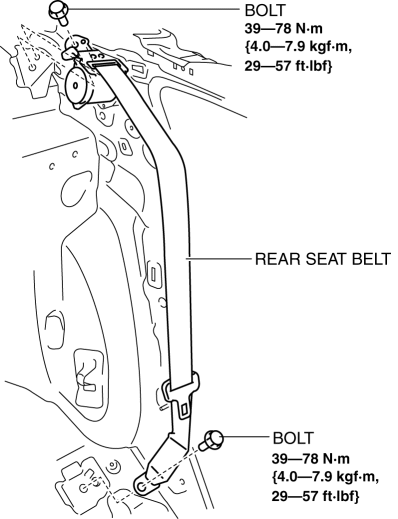
3. Remove the rear seat belt.
4. Install in the reverse order of removal.
5HB
1. Remove the following parts:
a. Rear scuff plate.
b. Rear seat cushion.
c. Rear seat back.
d. Tire house trim.
e. Trunk side upper trim..
f. C-pillar trim..
2. Remove the bolts.
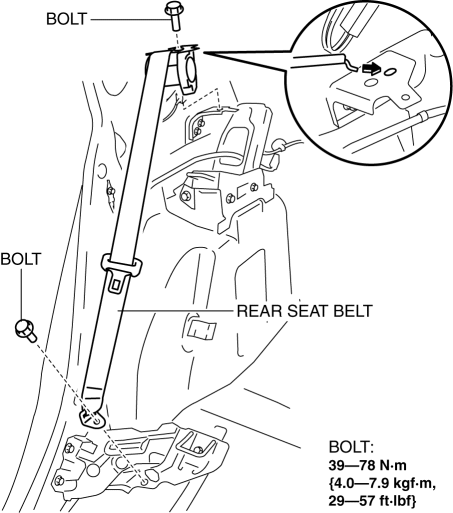
3. Remove the rear seat belt.
4. Install in the reverse order of removal.
 Rear Buckle Removal/Installation
Rear Buckle (RH) and Rear Buckle (Center)
1. Remove the rear seat cushion..
2. Remove the bolt.
3. Remove the rear buckle (RH) and rear buckle (center).
4. Install in the reverse order of ...
 Seat Belt Inspection
Belt
1. Verify that the belt is installed properly with no twists or kinks.
2. Verify that there is no damage to the seat belt and no deformation of the
metal fittings.
If there is any ...
Other materials:
Windshield Washer Nozzle Removal/Installation
1. Remove the following parts:
a. Windshield wiper arm and blade.
b. Front fender molding.
c. Cowl grille.
2. Remove the windshield washer hose from the windshield washer nozzle.
3. Squeeze the tabs of the windshield washer nozzle.
4. Pull the windshield washer nozzle out to remove it.
...
Variable Tumble Shutter Valve Actuator Inspection [Mzr 2.0, Mzr 2.5]
Operation Inspection
1. Remove the air hose..
2. Disconnect the vacuum hose from the variable tumble shutter valve actuator.
3. Connect a vacuum pump to the variable tumble shutter valve actuator.
NOTE:
Covered with a hood, the rod of the variable tumble shutter valve actuator
...
Air Bag/Front Seat Belt
Pretensioner System Warning
Beep
If there is a problem with the air bag/seat
belt pretensioner systems and the warning
light illumination, a warning beep sound
will be heard for about 5 seconds every
minute.
The air bag and seat belt pretensioner
system warning beep sound will continue
to be heard for approximately 35
min ...
