
Mazda 3 Service Manual: Transaxle Range (TR) Switch Removal/Installation [FS5 A EL]
CAUTION:
-
Water or foreign objects entering the connector can cause a poor connection or corrosion. Be sure not to drop water or foreign objects on the connector when disconnecting it.
1. Engage the parking brake and use wheel chocks at the front and rear of the wheels.
2. Shift the selector lever to the N position.
3. Perform the following procedures.
a. Remove the battery cover..
b. Disconnect the negative battery cable.
c. Remove the air cleaner component..
4. Remove in the order indicated in the table.
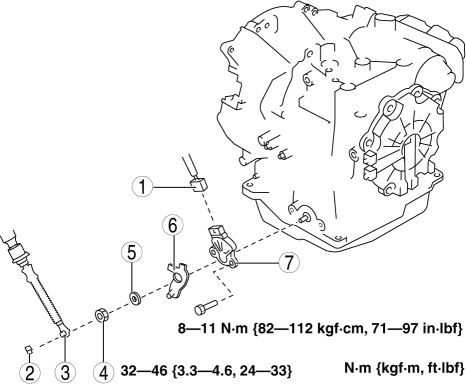
|
1 |
Connector |
|
2 |
Clip |
|
3 |
Selector cable |
|
4 |
Manual shaft nut (See Manual Shaft Nut Removal Note.) (See Manual Shaft Nut Installation Note.) |
|
5 |
Washer |
|
6 |
Manual shaft lever |
|
7 |
TR switch (See TR switch Installation Note.) |
5. Install in the reverse order of removal.
6. Inspect the TR switch..
Manual Shaft Nut Removal Note
1. Set the adjustable wrench as shown to hold the manual shaft lever and loosen the manual shaft nut.
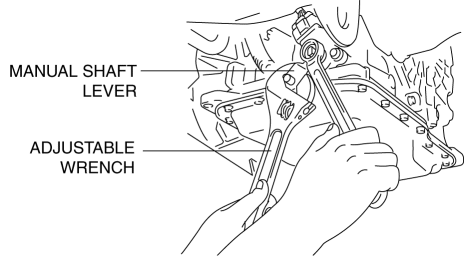
CAUTION:
-
Do not use an impact wrench. Hold the manual shaft lever when removing the manual shaft nut, or the transaxle may be damaged.
TR switch Installation Note
1. Verify that the manual shaft is aligned with the N position.
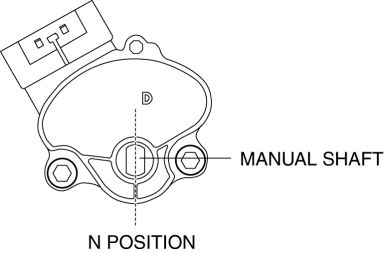
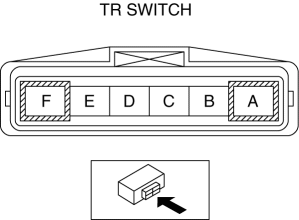
2. Adjust the TR switch between terminals B and C until the resistance becomes specification.
-
TR switch specification
-
713—787 ohms
3. Tighten the TR switch installation bolts.
-
Tightening torque
-
8—11 N·m {82—112 kgf·cm, 71—97 in·lbf}
Manual Shaft Nut Installation Note
1. Set the adjustable wrench as shown to hold the manual shaft lever and tighten the manual shaft nut.
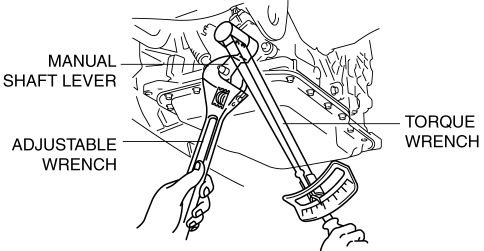
CAUTION:
-
Do not use an impact wrench. Hold the manual shaft lever when installing the manual shaft nut, or the transaxle may be damaged
-
Tightening torque
-
32—46 N·m {3.3—4.6 kgf·m, 24—33 ft·lbf}
 Transaxle Range (TR) Switch Inspection [FS5 A EL]
CAUTION:
Water or foreign objects entering the connector can cause a poor connection
or corrosion. Be sure not to drop water or foreign objects on the connector
when disconnecting it.
...
 Automatic
...
Other materials:
SUBARU Safety Sense
The SUBARU Safety Sense suite in the Subaru Solterra integrates a
range of advanced driver assistance technologies designed to support the driver
and enhance both safety and comfort during everyday driving. These intelligent systems
work together to help reduce collision risk, improve awarenes ...
Generator Disassembly/Assembly [Mzr 2.0, Mzr 2.5]
CAUTION:
Melt the solder quickly, otherwise the diodes (rectifier) and regulator will
be damaged by excessive heat.
1. Disassemble in the order indicated in the table.
2. Assemble in the reverse order of disassembly.
MZR 2.0
1
Rotor component
...
Accelerator Pedal Position (App) Sensor Inspection [Mzr 2.0, Mzr 2.5]
Voltage Inspection
NOTE:
Because the APP sensor is integrated in the accelerator pedal, replacing
the APP sensor includes replacement of the accelerator pedal.
1. Connect the M-MDS to the DLC–2.
2. Switch the ignition to ON.
3. Verify that the APP sensor output voltage (P ...
