
Mazda 3 Service Manual: Trunk Lid Key Cylinder Removal/Installation
1. Disconnect the negative battery cable..
2. Remove the trunk lid trim..
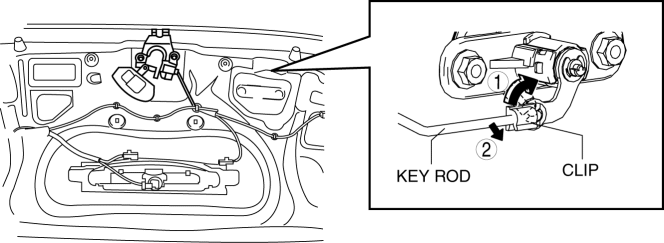
3. Lift the clip in the direction of the arrow (1), and pull out the key rod in the direction of the arrow (2).
4. Remove the nuts.
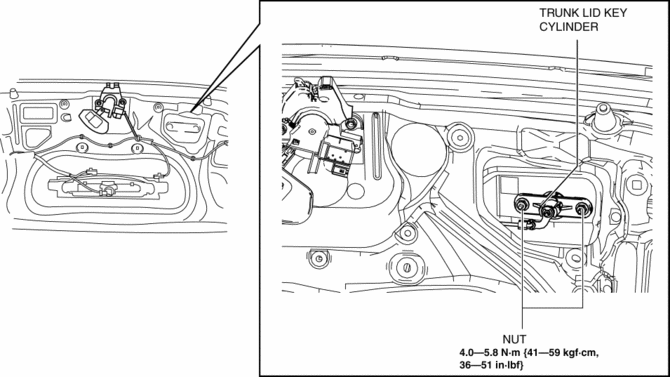
5. Remove the trunk lid key cylinder.
6. Install in the reverse order of removal.
 Front Door Key Cylinder Switch Inspection
1. To access the glass installation bolt, position the front door glass so that
the distance from the top of the front door glass to the upper part of the front
beltline molding is approx. 80 mm { ...
 Ignition Switch Inspection [Without Advanced Keyless Entry And Push Button Start
System]
Ignition Switch Inspection [Without Advanced Keyless Entry And Push Button Start
System]
1. Disconnect the negative battery cable..
2. Remove the column cover..
3. Remove the ignition switch..
4. Verify that the continuity between the ignition switch terminals is as indicated
in t ...
Other materials:
Drive Belt Auto Tensioner Inspection [Mzr 2.3 Disi Turbo]
1. Remove the aerodynamic under cover No.2 and splash shield as a single unit..
2. Remove the drive belt..
3. Verify that the drive belt auto tensioner moves smoothly in the operational
direction.
Replace the drive belt auto tensioner if necessary..
4. Rotate the drive belt ...
SRS airbags
The SRS airbag system in the Subaru Solterra is engineered to deploy
during specific types of severe impacts that may otherwise cause serious harm to
vehicle occupants. These advanced airbags function in combination with seat belts
to significantly reduce the risk of fatal or severe injuries.
...
Keyless Antenna Removal/Installation
Interior, Front
1. Disconnect the negative battery cable..
2. Remove the following parts:
a. Upper panel.
b. Shift knob (MTX).
c. Selector lever knob (ATX).
d. Shift panel.
e. Side wall.
f. Center panel.
g. Audio unit.
h. Rear heat duct (1).
3. Disconnect the connector.
4. ...
