
Mazda 3 Owners Manual: Warning Light
The warning light turns on when the system has a malfunction.
Refer to Warning Lights on .
Brake Pad Wear Indicator
When the disc brake pads become worn, the built-in wear indicators contact the disc plates. This causes a screeching noise to warn that the pads should be replaced.
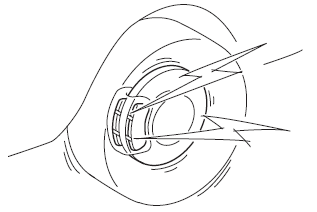
When you hear this noise, consult an Authorized Mazda Dealer as soon as possible.
| WARNING Do not drive with worn disc pads: Driving with worn disc pads is dangerous. The brakes could fail and cause a serious accident. As soon as you hear a screeching noise consult an Authorized Mazda Dealer. |
 Parking Brake
CAUTION
Driving with the parking brake on
will cause excessive wear of the brake
parts.
NOTE
For parking in snow, refer to Winter Driving regarding parking
brake use.
Setting ...
 Brake Assist
During emergency braking situations
when it is necessary to depress the brake
pedal with greater force, the brake assist
system provides braking assistance, thus
enhancing braking performance.
...
Other materials:
Down Switch Inspection [FS5 A EL]
1. Perform the following procedures.
a. Remove the battery cover..
b. Disconnect the negative battery cable.
c. Remove the console..
d. Disconnect the selector lever component connector.
2. Inspect the continuity between the selector lever component terminals C and
H.
If ...
Radar Sensor (Front)
Your vehicle is equipped with a radar sensor (front).
The following systems also use the radar sensor (front).
Mazda Radar Cruise Control (MRCC)
Forward Obstruction Warning (FOW)
The radar sensor (front) functions by detecting the radio waves reflected off
a vehicle ahead
or an obstru ...
Body And Accessories SST
49 L067 001
Reflector
49 L067 002
Tripod
49 L067 003
Plum-bob
49 L067 006
Plum-bob
—
—
...
