
Mazda 3 Owners Manual: Parking Brake
| CAUTION Driving with the parking brake on will cause excessive wear of the brake parts. |
NOTE For parking in snow, refer to Winter Driving regarding parking brake use.
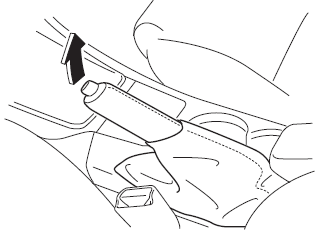
Setting the parking brake
Depress the brake pedal and then firmly pull the parking brake lever fully upwards with sufficient force to hold the vehicle in a stationary position.
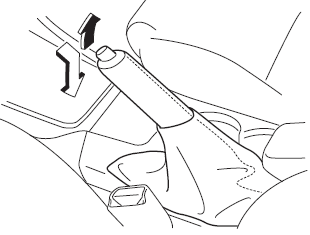
Releasing the parking brake
Depress the brake pedal and pull the parking brake lever upwards, then press the release button. While holding the button, lower the parking brake lever all the way down to the released position.
 Foot Brake
This vehicle has power-assisted brakes
that adjust automatically through normal
use.
Should power-assist fail, you can stop by
applying greater force than normal to the
brake pedal. But the dis ...
 Warning Light
The warning light turns on when the
system has a malfunction.
Refer to Warning Lights on .
Brake Pad Wear Indicator
When the disc brake pads become worn,
the built-in wear indicators contact th ...
Other materials:
Engine Tune Up [Mzr 2.0, Mzr 2.5]
NOTE:
If the accelerator pedal is depressed continuously for a specified time,
the engine speed may decrease to the idle speed. This is due to the fuel cut
control operation, which prevents overheating, and it does not indicate a malfunction.
Engine Tune-up Preparation
1. Verify ...
BSM OFF Indicator Light
This indicator light illuminates for a few
seconds when the ignition is switched ON.
The BSM OFF indicator light illuminates
when the BSM system is turned off by
pressing the BSM OFF switch.
The indicator light flashes if the BSM
system has a malfunction. Consult an
Authorized Mazda D ...
Rear Scuff Plate Removal/Installation
1. Detach tab A while pulling the rear scuff plate in the direction of the arrow
(1) shown in the figure, then detach hook B, clips C, pins D while pulling in the
direction of the arrow (2).
2. Detach tab E while pulling the rear scuff plate in the direction of the arrow
(3) shown in the fig ...
