
Mazda 3 Service Manual: Water Pump Removal/Installation [Mzr 2.0, Mzr 2.5]
WARNING:
-
Never remove the cooling system cap or loosen the radiator drain plug while the engine is running, or when the engine and radiator are hot. Scalding engine coolant and steam may shoot out and cause serious injury. It may also damage the engine and cooling system.
-
Turn off the engine and wait until it is cool. Even then, be very careful when removing the cap. Wrap a thick cloth around it and slowly turn it counterclockwise 2.5 turns. Step back while the pressure escapes.
-
When you are sure all the pressure is gone, turn the cap using the cloth, and remove it.
NOTE:
-
Coolant may have accumulated depending on how many years the water pump has been in use. However, this does not indicate a malfunction if the accumulated coolant does not cover the vapor escape hole.
1. Remove the battery cover..
2. Disconnect the negative battery cable..
3. Remove the plug hole plate..
4. Remove the aerodynamic under cover No.2 and splash shield as a single unit..
5. Drain the engine coolant..
6. Loosen the water pump pulley bolts before removing the drive belt.
7. Remove the generator drive belt with the A/C drive belt still installed and set it out of the way. (MZR 2.0).
8. Remove the drive belt. (MZR 2.5).
9. Remove the drive belt auto tensioner. (MZR 2.0).
10. Remove the idler pulley. (MZR 2.5).
11. Remove in the order indicated in the table.
12. Install in the reverse order of removal.
13. Refill the engine coolant..
14. Inspect for engine coolant leakage..
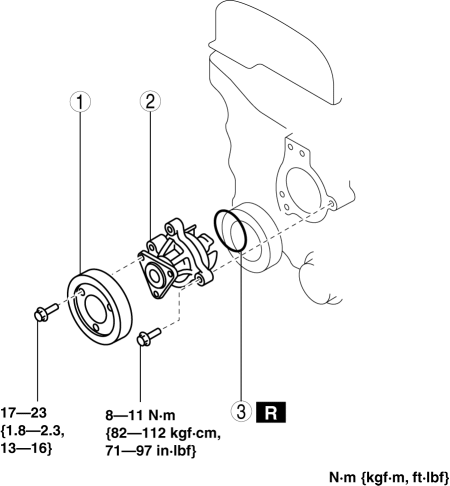
|
1 |
Water pump pulley |
|
2 |
Water pump |
|
3 |
O-ring (See O-ring Installation Note.) |
O-ring Installation Note
1. Apply engine coolant to a new O-ring.
2. Install the O-ring.
 Shroud Panel Removal/Installation
CAUTION:
Because the shroud panel is installed to the bumper reinforcement, support
the shroud panel using a jack before removing the bumper reinforcement so as
not to apply excessive fo ...
 Thermostat Inspection [Mzr 2.0, Mzr 2.5]
1. Remove the thermostat..
2. Visually check that the thermostat valve is closed.
3. Place the thermostat in water.
WARNING:
During inspection, the thermostat and water are extremely hot ...
Other materials:
Passenger Compartment Temperature Sensor Removal/Installation [Full Auto Air
Conditioner]
1. Disconnect the negative battery cable..
2. Remove the following parts:
a. Front scuff plate.
b. Front side trim.
c. Dashboard under cover.
d. Upper panel.
e. Shift lever knob (MTX).
f. Selector lever knob (ATX).
g. Shift panel.
h. Side wall.
i. Console.
j. Hood release lever ...
On/Off Solenoid Removal/Installation [Fw6 A EL]
WARNING:
A hot transaxle and ATF can cause severe burns. Turn off the engine and wait
until they are cool.
Always wear protective eye wear when using the air compressor. If the air
compressor is used, any particles of dirt or soiling could spatter and get into
the eyes.
...
If You Must Use the Front Seat for
Children
If you cannot put all children in the rear
seat, at least put the smallest children
in the rear and be sure the largest child
up front uses the shoulder belt over the
shoulder.
NEVER put a rear-facing child-restraint
system on the front passenger seat whether
your vehicle is equipped with a ...
