
Mazda 3 Service Manual: Ambient Temperature Sensor Removal/Installation [Full Auto Air Conditioner]
1. Disconnect the negative battery cable..
2. Remove the aerodynamic under cover No.2..
3. Remove the aerodynamic under cover No.1..
4. Disconnect the connector.
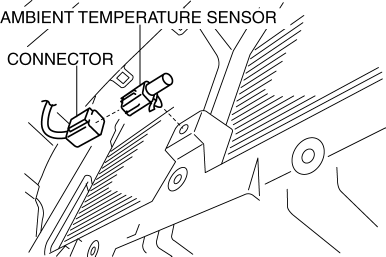
5. Remove the ambient temperature sensor.
6. Install in the reverse order of removal.
 Ambient Temperature Sensor Inspection [Manual Air Conditioner]
1. Measure the temperature around the ambient temperature sensor and measure
the resistance between the ambient temperature sensor terminal.
If the characteristics of the ambient tempera ...
 Ambient Temperature Sensor Removal/Installation [Manual Air Conditioner]
1. Disconnect the negative battery cable..
2. Remove the aerodynamic under cover No.2..
3. Remove the aerodynamic under cover No.1..
4. Disconnect the connector.
5. Remove the ambient temp ...
Other materials:
Vehicle Loading
WARNING
Do not tow a trailer with this vehicle:
Towing a trailer with this vehicle is dangerous because it has not been
designed to tow a
trailer and doing so will aff ect the drive system which could result in
vehicle damage.
This section will guide you in the proper l ...
Key Reminder Switch Removal/Installation
1. Disconnect the negative battery cable. (See BATTERY REMOVAL/INSTALLATION [MZR
2.0, MZR 2.5].)(See BATTERY REMOVAL/INSTALLATION [MZR 2.3 DISI Turbo].)(See BATTERY
REMOVAL/INSTALLATION [SKYACTIV-G 2.0].)
2. Remove the column cover. (See COLUMN COVER REMOVAL/INSTALLATION.)
3. Disconnect the ...
Operating Tips for iPod
This unit supports playback of music files
recorded to an iPod.
iPod is a trademark of Apple Inc.,
registered in the U.S. and other
countries.
The iPod may not be compatible
depending on the model or OS version. In
this case, an error message is displayed.
CAUTION
Remove the iPo ...
