
Mazda 3 Owners Manual: Locking, Unlocking
Locking, Unlocking with Transmitter
All doors and the liftgate can be locked/ unlocked by operating the keyless entry system transmitter, refer to Keyless Entry System .
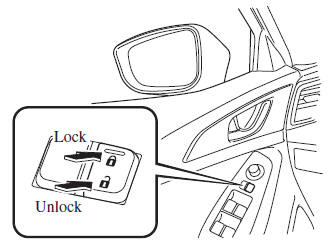
Locking, Unlocking with Door- Lock Switch
All doors and the liftgate lock automatically when the lock side is pressed. They unlock when the unlock side is pressed.
Driver's door
Front passenger's door
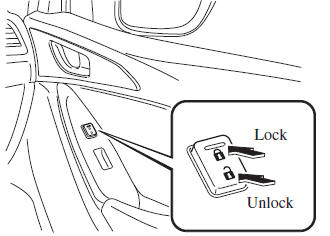
To lock all the doors and the liftgate from an open front door, press the lock side of the door lock switch and then close the door.
NOTE When locking the doors this way, be careful not to leave the key inside the vehicle.
 Locking, Unlocking with Request
Switch (With the advanced keyless
function)
Locking, Unlocking with Request
Switch (With the advanced keyless
function)
All doors and the liftgate can be locked/
unlocked by pressing the request switch
on the front doors while the key is being
carried.
(5–door)
The request switch on the liftgate can only
be use ...
 Auto Lock/Unlock Function
WARNING
Do not pull the inner handle on a front
door:
Pulling the inner handle on a front
door while the vehicle is moving
is dangerous. Passengers can fall
out of the vehicle ...
Other materials:
Antenna Feeder No.3 Removal/Installation
4SD (With Audio Unit (With Display))
1. Disconnect the negative battery cable..
2. Remove the rain sensor cover. (Vehicles with auto light/wiper system).
3. Disconnect the rain sensor connector. (Vehicles with auto light/wiper system)
4. Partially peel back the seaming welts.
5. Remove the ...
Boost Air Temperature Sensor Inspection [Mzr 2.3 Disi Turbo]
Resistance Inspection
NOTE:
Because the boost air temperature sensor is integrated in the MAP sensor,
replacing the boost air temperature sensor includes replacement of the MAP sensor/boost
air temperature sensor.
1. Remove the battery cover..
2. Disconnect the negative batter ...
Trunk End Trim Removal/Installation
4SD
1. Remove the trunk mat..
2. Remove the trunk board..
3. Remove the fasteners.
4. Pull the trunk end trim indicated in the arrow shown in the figure, then detach
clips A, pins B, pin C, D and tabs E.
5. Remove the trunk end trim.
6. Install in the reverse order of removal.
5HB ...
