
Mazda 3 Service Manual: Auto Dimming Mirror Removal
1. Disconnect the negative battery cable.
2. Remove the screw.
3. Disconnect the auto-dimming mirror connector.
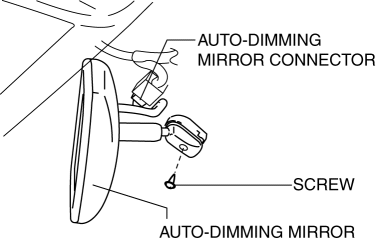
4. Pull out the rearview mirror toward the vehicle rear.
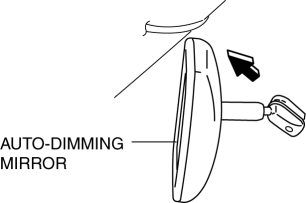
CAUTION:
-
When removing the rearview mirror, it may hit the headliner and cause damage.
-
Hold the rearview mirror with hands and be careful not to contact it with the headliner.
 Auto Dimming Mirror Installation
1. Install the auto-dimming mirror onto the base.
2. Install the screw.
3. Connect the auto-dimming mirror connector.
4. Connect the negative battery cable.. ...
 Base Installation
1. Cut away all of the original sealant using a razor.
WARNING:
Using a razor with bare hands can cause injury. Always wear gloves when using
a razor.
2. Clean and degrease the cera ...
Other materials:
Windshield Wiper Motor Disassembly/Assembly
1. Disassemble in the order indicated in the table.
1
Wiper link No.1
(See Ball Joint Assembly Note.)
2
Wiper link No.2
(See Ball Joint Assembly Note.)
3
Nut
4
Washer
...
RCTA (Rear Cross Traffic Alert)
The Subaru Solterra RCTA (Rear Cross Traffic Alert) system utilizes
rear side radar sensors integrated behind the rear bumper. This advanced feature
is designed to assist the driver by monitoring areas that are difficult to see while
reversing, significantly improving situational awareness.
W ...
Intermediate Sensor Removal/Installation [FS5 A EL]
CAUTION:
If foreign materials are stuck to the sensor, disturbance by magnetic flux
can cause sensor output to be abnormal and thereby negatively affect control.
Make sure that foreign materials such as iron filings are not stuck to the sensor
during installation.
1. Perform t ...
