
Mazda 3 Service Manual: Base Installation
1. Cut away all of the original sealant using a razor.
WARNING:
-
Using a razor with bare hands can cause injury. Always wear gloves when using a razor.
2. Clean and degrease the ceramic coating on the glass and the base.
CAUTION:
-
Keep the area free of dirt and grease, and do not touch the surface. Otherwise, the primer may not properly bond to the surface of the glass.
3. Apply primer to the bonding area of the glass and the base.
4. Use only glass primer on the glass, and body primer on the base. Allow the primer to dry for approx. 30 min.
5. Apply 3.0 mm {0.12 in}
layer of sealant to the base.
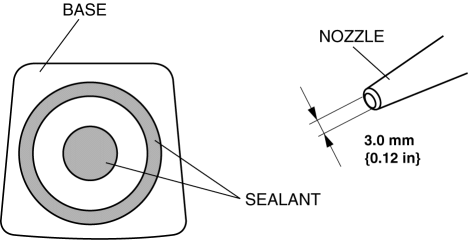
6. Center the base in the ceramic coating and press it onto the glass.
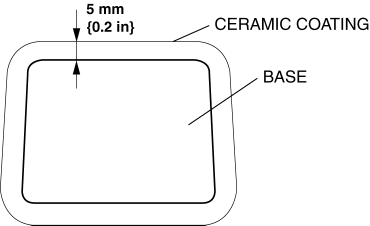
7. Use isopropyl alcohol to remove any excess repair sealant. Hardening time of sealant
|
Temperature |
Surface hardening time |
Time required until car can be put into service |
|
5 °C {41 °F} |
Approx. 1.5 h |
Approx. 12 h |
|
20 °C {68 °F} |
Approx. 1 h |
Approx. 4 h |
|
35 °C {95 °F} |
Approx. 10 min |
Approx. 2 h |
8. Install the rearview mirror.
9. Connect the negative battery cable..
 Auto Dimming Mirror Removal
1. Disconnect the negative battery cable.
2. Remove the screw.
3. Disconnect the auto-dimming mirror connector.
4. Pull out the rearview mirror toward the vehicle rear.
CAUTION:
...
 Base Removal
1. Remove the rearview mirror..
2. Wind each end of a wire around a bar.
WARNING:
Using the piano wire with bare hands can cause injury. Always wear gloves
when using the piano wire ...
Other materials:
Combination Switch Removal/Installation
CAUTION:
Handling the air bag module improperly can accidentally deploy the air bag
module, which may seriously injure you. Read the air bag system service warnings
and cautions before handling the air bag module..
1. Switch the ignition to off.
2. Disconnect the negative batte ...
Oil Pressure Switch Inspection [FS5 A EL]
CAUTION:
Water or foreign objects entering the connector can cause a poor connection
or corrosion. Be sure not to drop water or foreign objects on the connector
when disconnecting it.
On-Vehicle Inspection
1. Perform the following procedures.
a. Remove the aerodynamic under co ...
Front Lower Arm Removal/Installation
CAUTION:
Performing the following procedures without first removing the ABS wheel-speed
sensor may possibly cause an open circuit in the wiring harness if it is pulled
by mistake. Before performing the following procedures, disconnect the ABS wheel-speed
sensor wiring harness connec ...
