
Mazda 3 Service Manual: B Pillar Upper Trim Removal/Installation
1. Remove the following parts:
a. Adjuster anchor cover.
b. Upper anchor installation bolts on the front seat belt.
c. Front scuff plate.
d. Rear scuff plate.
2. Partially peel back the seaming welt.
3. Remove the B-pillar lower trim..
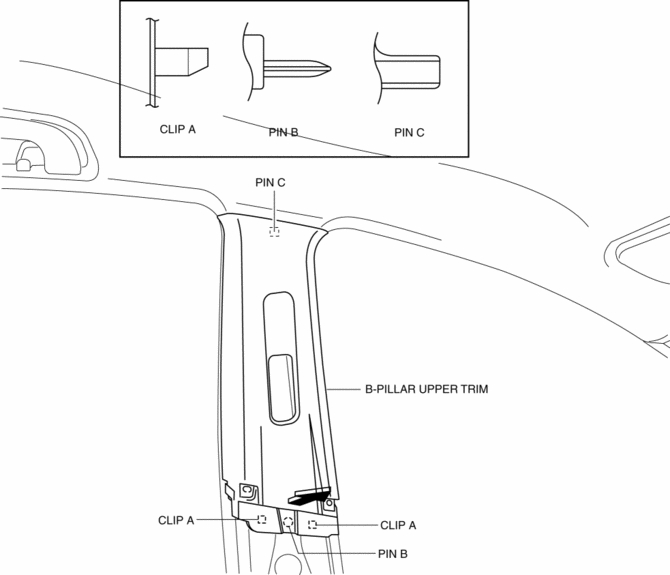
4. Grasp the lower end of the B-pillar upper trim, pull it in the direction of the arrow shown in the figure, and remove clips A, pin B, and pin C.
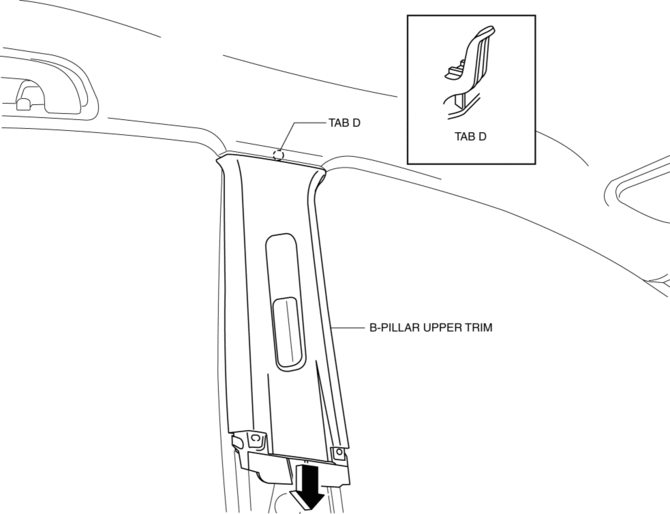
5. Remove the B-pillar upper trim in the direction of the arrow shown in the figure.
CAUTION:
-
When removing the B-pillar upper trim, be careful not to damage the tab D.
6. Install in the reverse order of removal.
 B Pillar Lower Trim Removal/Installation
1. Remove the front scuff plate..
2. Remove the rear scuff plate..
3. Partially peel back the seaming welt.
4. Pull the B-pillar lower trim in the direction of the arrow (1), (2) shown
in the ...
 C Pillar Trim Removal/Installation
4SD
1. Remove the following parts:
a. Rear seat cushion.
b. Rear scuff plate.
c. Tire house trim.
2. Partially peel back the seaming welt.
3. Pull the C-pillar trim in the direction of the ...
Other materials:
Advanced Park
Function description
The Advanced Park system in the Subaru Solterra is designed to deliver a refined
and highly controlled parking experience by assisting the driver during both parking
and exiting maneuvers. Using a combination of sensors and cameras, the Subaru Solterra
provides a comprehe ...
Entertainment System
Outline
Auxiliary jack/USB port has been adopted.
USB adapter has been adopted.
An audio unit which supports USB devices such as USB memory or iPods has
been adopted.
911 assist function has been added to the Bluetooth unit.
RDS-TMC (Radio Data System-Traffi ...
Heating
Set the mode selector dial to the
position.
Set the air intake selector to the outside
air position.
Set the temperature control dial to the
hot position.
Set the fan control dial to the desired
speed.
If dehumidified heating is desired, turn
on the air conditioner.
NOTE
...
