
Mazda 3 Service Manual: Brake Fluid Air Bleeding
CAUTION:
-
Brake fluid will damage painted surfaces. Be careful not to spill any on painted surfaces. If it is spilled, wipe it off immediately.
NOTE:
-
Keep the fluid level in the reserve tank at 3/4 full or more during the air bleeding.
-
Begin air bleeding with the brake caliper that is furthest from the master cylinder.
-
Brake fluid type
-
SAE J1703 or FMVSS116 DOT-3
1. Remove the cap from the brake fluid reserved tank and add brake fluid.
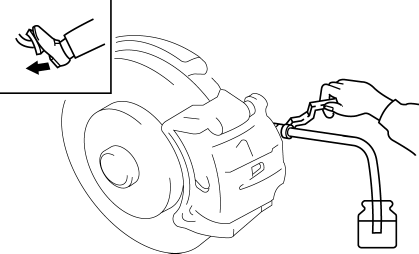
2. Remove the bleeder cap on the brake caliper, and attach a vinyl tube to the bleeder screw.
3. Place the other end of the vinyl tube in a clear container and fill the container with fluid during air bleeding.
4. Working with two people, one should pump the brake pedal several times and depress and hold the pedal down.
5. While the brake pedal is depressed, the other should loosen the bleeder screw using a commercially available flare nut wrench, drain out any fluid containing air bubbles, and tighten the bleeder screw.
-
Tightening torque
-
Front (MZR 2.0, SKYACTIV-G 2.0, MZR 2.5): 7.0—9.0 N·m {72—91 kgf·cm, 62—79 in·lbf}
-
Front (MZR 2.3 DISI Turbo): 12—16 N·m {123—163 kgf·cm, 107—141 in·lbf}
-
Rear: 12—16 N·m {123—163 kgf·cm, 107—141 in·lbf}
6. Repeat Steps 4 and 5 until no air bubbles are seen.
7. Perform air bleeding as described in the above procedures for all brake calipers.
8. After air bleeding, inspect the following:
-
Brake operation
-
Fluid leakage
-
Fluid level
 General
...
 Brake Fluid Inspection
1. Verify that the brake fluid level in the reserve tank is between the MAX and
MIN marks.
If the brake fluid level is below the MIN mark, add brake fluid.
...
Other materials:
Electric Power Steering Oil Pump Component Disassembly/Assembly
CAUTION:
The internal parts of the EHPAS control module and motor could be damaged
if they receive an impact. Be careful when handling the EHPAS control module
and motor to prevent the component from getting hit. Replace the electric power
steering oil pump component if it has recei ...
Rear Shock Absorber Disposal
1. Clamp a rear shock absorber on a flat surface or with the piston pointing
downwards.
2. Drill a 2—3 mm {0.08—0.11 in} hole at a point 40—50 mm {1.6—1.9
in} from the bottom of the tube, so that the gas can escape.
WARNING:
Whenever drilling into a rear shock absorber, w ...
Ignition Switch Inspection [Without Advanced Keyless Entry And Push Button Start
System]
1. Disconnect the negative battery cable..
2. Remove the column cover..
3. Remove the ignition switch..
4. Verify that the continuity between the ignition switch terminals is as indicated
in the table.
If not as indicated in the table, replace the ignition switch.
...
