
Mazda 3 Service Manual: Brake/Taillight Bulb Removal/Installation
4SD
1. Disconnect the negative battery cable..
2. Remove the following parts:
a. Trunk mat.
b. Trunk board.
c. Trunk end trim.
3. Partially peel back the trunk side trim..
4. Remove in the order indicated in the table.
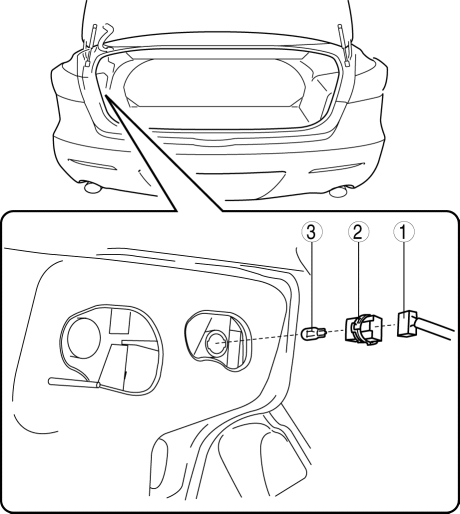
|
1 |
Connector |
|
2 |
Socket |
|
3 |
Brake/taillight bulb |
5. Install in the reverse order of removal.
5HB
1. Disconnect the negative battery cable..
2. Remove the service hole cover.
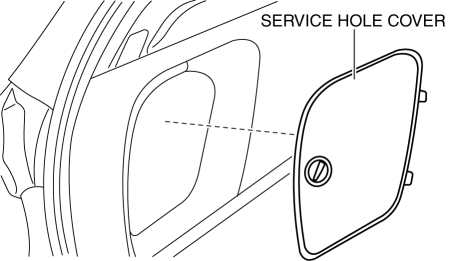
3. Remove in the order indicated in the table.
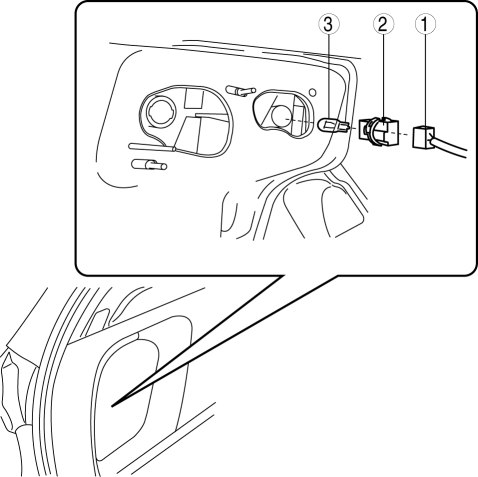
|
1 |
Connector |
|
2 |
Socket |
|
3 |
Brake/taillight bulb |
4. Install in the reverse order of removal.
 Brake Pedal Removal/Installation
CAUTION:
The clearance between the brake switch and the brake pedal is automatically
adjusted to the correct amount when the brake switch is inserted into the installation
hole on the br ...
 Brakes SST
49 D043 0A0
Adapter set
49 U043 0A0A
Oil pressure gauge set
49 0221 600C
Disc brake expand tool
...
Other materials:
Ignition Switch Inspection [Without Advanced Keyless Entry And Push Button Start
System]
1. Disconnect the negative battery cable..
2. Remove the column cover..
3. Remove the ignition switch..
4. Verify that the continuity between the ignition switch terminals is as indicated
in the table.
If not as indicated in the table, replace the ignition switch.
...
Utility vehicle precautions
The Subaru Solterra belongs to the utility vehicle category, engineered
with increased ground clearance and a comparatively narrower track width relative
to its center of gravity height. This design allows the Subaru Solterra to perform
effectively across a wide range of off-road environments ...
Vehicle Engine Control Unit Reset Procedure
NOTE
This procedure is intended for vehicles with the engine oil flexible
maintenance setting
selected.
After replacing the engine oil, have a repair shop such as an Authorized
Mazda Dealer
perform the initialization (engine oil data resetting) of the recorded value. If
the value
recorded ...
