
Mazda 3 Service Manual: Charge Air Cooler Inspection [Mzr 2.3 Disi Turbo]
1. Remove the charge air cooler cover..
2. Remove the charge air cooler..
3. Remove the air bypass valve..
4. Plug ports A and B.
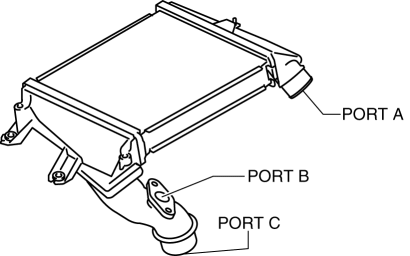
5. Verify that there is no air leakage when air is sent from port C.
-
If there is leakage, replace the charge air cooler..
 Forced Induction
...
 Input/Turbine Speed Sensor Inspection [FS5 A EL]
CAUTION:
Water or foreign objects entering the connector can cause a poor connection
or corrosion. Be sure not to drop water or foreign objects on the connector
when disconnecting it.
...
Other materials:
Audio System
NOTE:
“iPod” is a registered trademark of Apple Inc. in the United States and other
countries.
Outline
An Auxiliary jack/USB port unit has been adopted which can connect to commercially-available
portable audio/USB devices/iPod, and output sound from the speakers via t ...
Positive Crankcase Ventilation (PCV) Valve Removal/Installation [Mzr 2.0, Mzr
2.5]
1. Remove the battery cover..
2. Disconnect the negative battery cable..
3. Remove the intake manifold and the fuel distributor component as a single
unit..
4. Remove in the order indicated in the table.
1
Oil separator
2
Retainer
...
Replacing a Wheel
WARNING
Always use wheels of the correct size on
your vehicle:
Using a wrong-sized wheel is
dangerous. Braking and handling
could be aff ected, leading to loss of
control and an accident.
CAUTION
A wrong-sized wheel may adversely
aff ect:
Tire fit
...
