
Mazda 3 Owners Manual: Customer Assistance (Canada)
Satisfaction Review Process
Your complete and permanent satisfaction is of primary concern to Mazda. All Authorized Mazda Dealers have both the knowledge and tools to keep your Mazda in top condition.
In our experience, any questions, problems, or complaints regarding the operation of your Mazda or any other general service transactions are most effectively resolved by your dealer.
If the cause of your dissatisfaction cannot adequately be addressed by normal dealership procedures, we recommend that you take the following steps:
STEP 1: Contact the Mazda Dealer
Discuss the matter with a member of dealership management. If the Service Manager has already reviewed your concerns, contact the owner of the dealership or its General Manager.
STEP 2: Contact the Mazda Regional Office
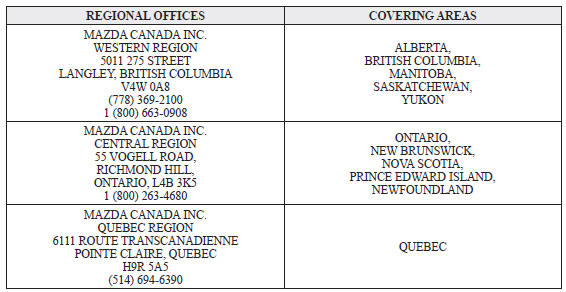
If you feel that you still require assistance, ask the dealer Service Manager to arrange for you to meet the local Mazda Service Representative. If more expedient, contact Mazda Canada Inc. Regional Office nearest you for such arrangements. Regional Office address and phone numbers are shown .
STEP 3: Contact the Mazda Customer Relations Department
If still not substantially satisfied, contact the Customer Relations Department, Mazda Canada Inc., 55 Vogell Road, Richmond Hill, Ontario, L4B 3K5 Canada TEL: 1 (800) 263- 4680.
Provide the Department with the following information:
- Your name, address and telephone number
- Year and model of vehicle
- Vehicle Identification Number (VIN). Refer to the “Vehicle Identification Labels” page of section 9 of this manual for the location of the VIN.
- Purchase date
- Present odometer reading
- Your dealer's name and location
- The nature of your problem and/or cause of dissatisfaction
The Department, in cooperation with the local Mazda Service Representative, will review the case to determine if everything possible has been done to ensure your satisfaction.
Please recognize that the resolution of service problems in most cases requires the use of your Mazda dealer's service facilities, personnel and equipment. We urge you to follow the above three steps in sequence for most effective results.
Mediation/Arbitration Program
Occasionally a customer concern cannot be resolved through Mazda's Customer Satisfaction Program. If after exhausting the procedures in this manual your concern is still not resolved, you have another option.
Mazda Canada Inc. participates in an arbitration program administered by the Canadian Motor Vehicle Arbitration Plan (CAMVAP). CAMVAP will advise you about how your concern may be reviewed and resolved by an independent third party through binding arbitration.
Your complete satisfaction is the goal of Mazda Canada Inc. and our dealers.
Mazda's participation in CAMVAP makes a valuable contribution to our achieving that goal.
There is no charge for using CAMVAP. CAMVAP results are fast, fair and final as the award is binding on both you and Mazda Canada Inc.
Canadian Motor Vehicle Arbitration Plan (CAMVAP)
If a specific item of concern arises, where a solution cannot be reached between an owner, Mazda, and/or one of its dealers (that all parties cannot agree upon), the owner may wish to use the services offered by the Canadian Motor Vehicle Arbitration Plan (CAMVAP).
CAMVAP uses the services of Provincial Administrators to assist consumers in scheduling and preparing for their arbitration hearings. However, before you can proceed with CAMVAP you must follow your Mazda dispute resolution process as outlined previously.
CAMVAP is fully implemented in all provinces and territories.
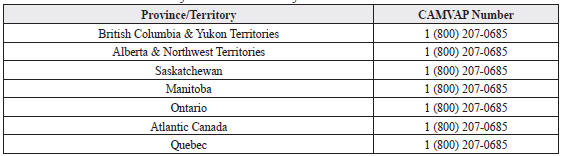
Consumers wishing to obtain further information about the Program should contact the Provincial Administrator at 1 (800) 207-0685, or by contacting the Canadian Motor Vehicle Arbitration Plan Office at:
Canadian Motor Vehicle Arbitration Plan
235 Yorkland Boulevard, suite 300
North York, Ontario
M2J 4Y8
http://camvap.ca
Provincial Administrators may be reached locally as listed below:
Regional Offices
 Customer Assistance (U.S.A.)
Your complete and permanent satisfaction is our business. We are here to
serve you. All
Authorized Mazda Dealers have the knowledge and the tools to keep your Mazda
vehicle in
top condition.
...
 Customer Assistance
(Puerto Rico)
Customer Assistance
(Puerto Rico)
Your complete and permanent satisfaction is our business. That is why all
Authorized Mazda
Dealers have the knowledge and the tools to keep your Mazda vehicle in top
condition.
If you have any ...
Other materials:
Battery Recharging [Mzr 2.0, Mzr 2.5]
Using GR8-1291:
(See GR8-1291 INSTANT TRAINING MODULE (VIDEO) .)
WARNING:
Keep all flames away from the battery, otherwise evaporated gas from the
battery fluid may catch fire and cause serious injury.
1. Remove the battery filler caps and check the water level. If necessary, add ...
Coolant Reserve Tank Removal/Installation [Mzr 2.0, Mzr 2.5]
WARNING:
Never remove the cooling system cap or loosen the radiator drain plug while
the engine is running, or when the engine and radiator are hot. Scalding engine
coolant and steam may shoot out and cause serious injury. It may also damage
the engine and cooling system.
Tu ...
Inspecting Engine Oil Level
Be sure the vehicle is on a level
surface.
Warm up the engine to normal
operating temperature.
Turn it off and wait at least 5 minutes
for the oil to return to the oil pan.
Pull out the dipstick, wipe it clean, and
reinsert it fully.
Pull it out again and examine the level ...
