
Subaru Solterra 2023-2026 Owner's Manual: Customization
Customizable features
The Subaru Solterra is equipped with a wide range of configurable electronic systems that allow you to tailor vehicle behavior and comfort settings according to your personal preferences. These adjustments can be performed via the multi-information display, the multimedia interface, or directly through your SUBARU dealer.
Customizing vehicle features
■ Changing using the multi-information display
1. Press
 or
or
 on the Subaru Solterra meter control switches and select
 .
.
2. Use
 or
or
 to navigate and select the desired customization item.
3. Toggle functions on or off by pressing
 to activate the preferred configuration.
4. For more advanced adjustments, press and hold
 to open the detailed settings screen.
The detailed configuration process varies depending on the selected feature. Follow the on-screen instructions provided within the Subaru Solterra interface.
To return to the previous menu or exit customization mode, press
 .
.
■ Changing by using the multimedia system
1. From the main menu, select
 .
.
2. Tap "Vehicle customize" to access Subaru Solterra configuration options.
3. Follow the on-screen prompts to adjust settings as needed.
The Subaru Solterra offers a wide variety of configurable options depending on trim level and equipment.
Refer to the available settings list for complete details.
■ When customizing using the multimedia system or multi-information display
Always stop the Subaru Solterra in a safe location, apply the parking brake, and shift to P before making adjustments. To avoid draining the 12-volt battery, keep the EV system running while customizing settings.
NOTICE
■ During customization
Ensure the Subaru Solterra EV system remains active during customization to prevent battery discharge.
Customizable Features
Some Subaru Solterra functions are interlinked, meaning that adjusting one setting may automatically affect others. For detailed explanations, consult your SUBARU dealer.
- Settings configurable via the multimedia system
- Settings adjustable through the multi-information display
- Settings requiring SUBARU dealer assistance
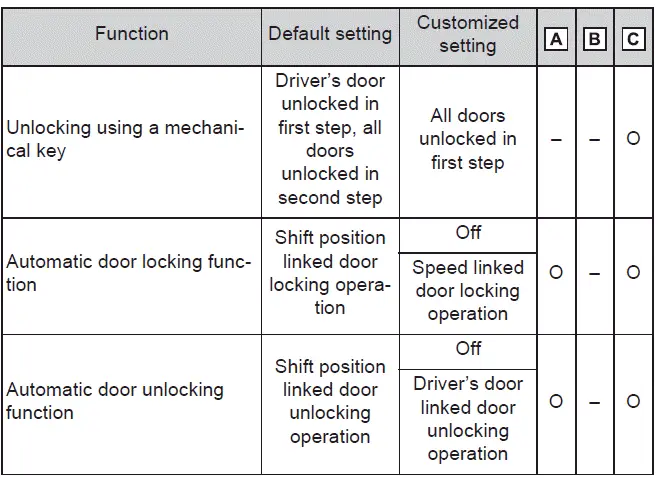
Definition of symbols: O = Available, - = Not available
■ Charging system
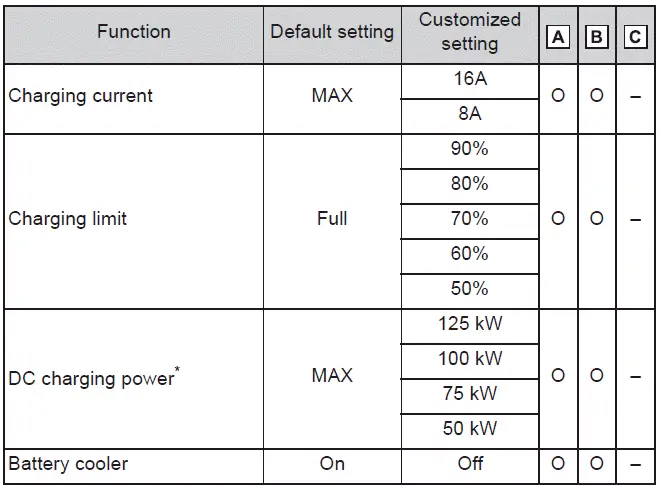
*: Available options may vary depending on Subaru Solterra trim level and installed equipment.
■ Gauges, meters and multi-information display
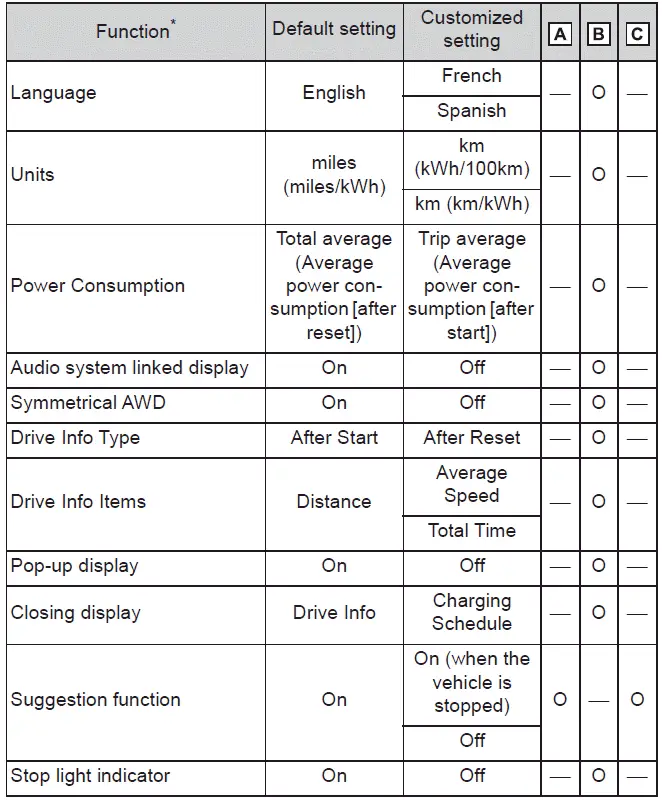
*: Refer to the Subaru Solterra system guide for full feature descriptions.
■ Rear seat reminder

■ Door lock
■ Smart key system and wireless remote control
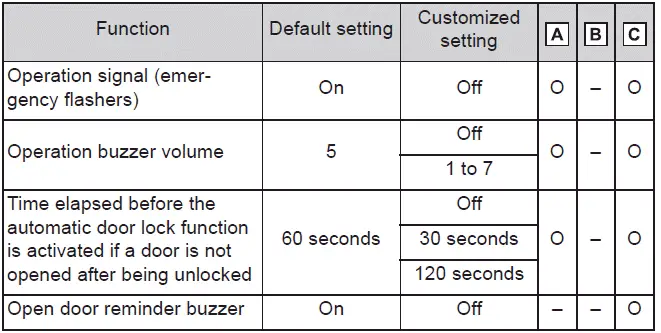
■ Smart key system
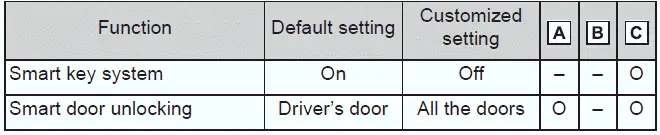
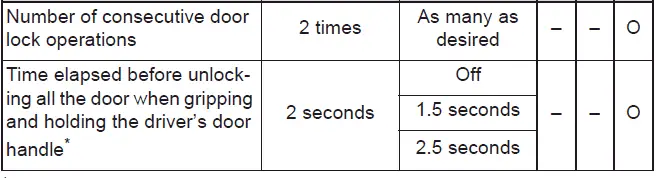
*: This setting is available when the door unlock mode is configured for the driver's door only.
■ Wireless remote control
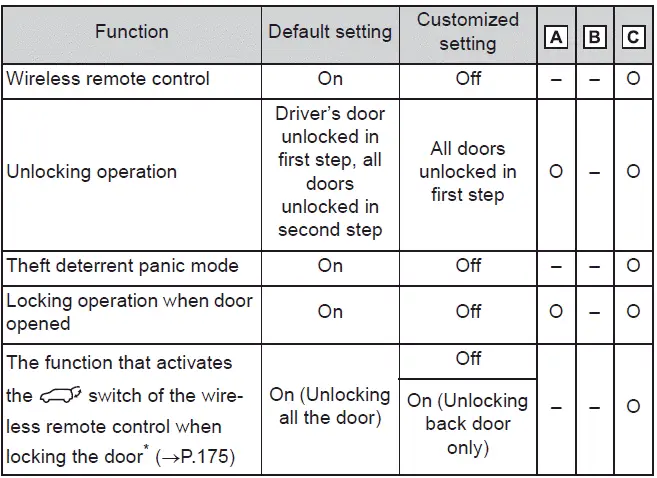
*: If equipped
■ Power back door*
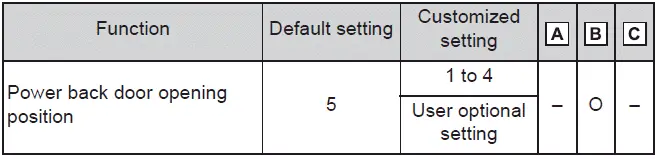
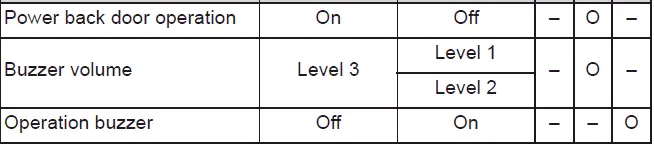
*: If equipped
■ Driving position memory*
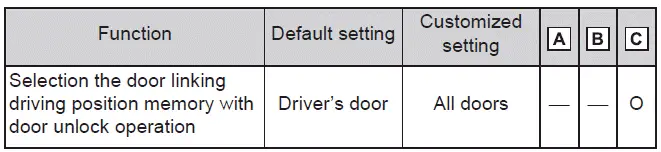
*: If equipped
■ Enabling easier driver entry and exit (power easy access system)*
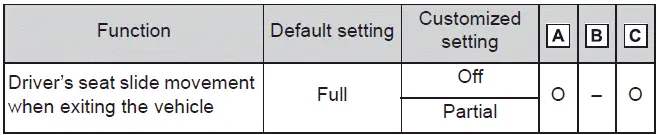
*: If equipped
■ Outside rear view mirrors
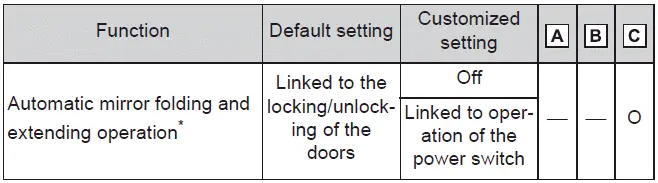
*: If equipped
■ My Settings
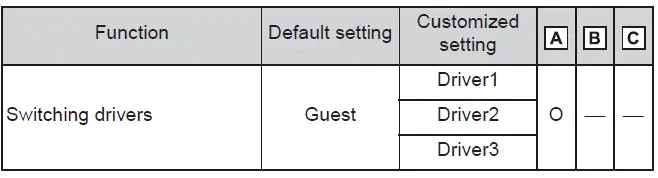
■ Power windows
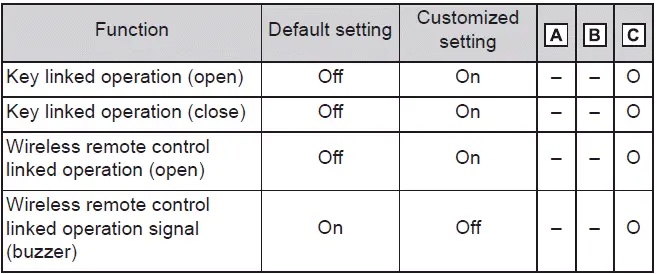
■ Power switch

■ Lights
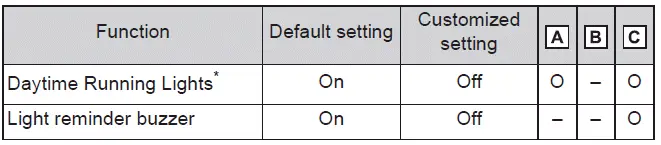
*: Except for Canada
■ Reverse warning buzzer

■ Automatic light control system
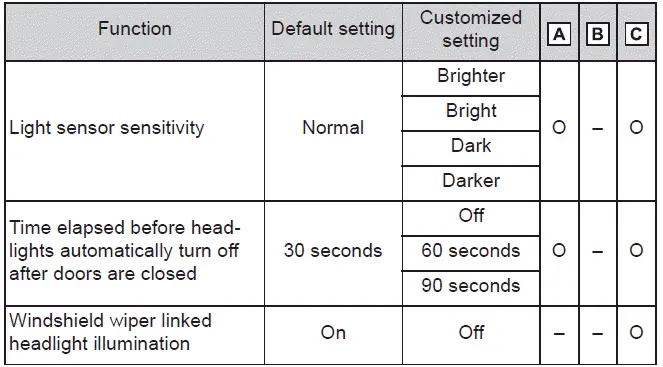
■ PCS (Pre-Collision System)

■ LDA (Lane Departure Alert)
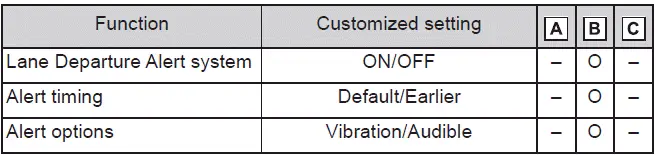
■ PDA (Proactive Driving Assist)
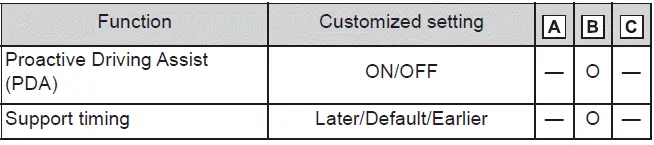
■ Dynamic radar cruise control
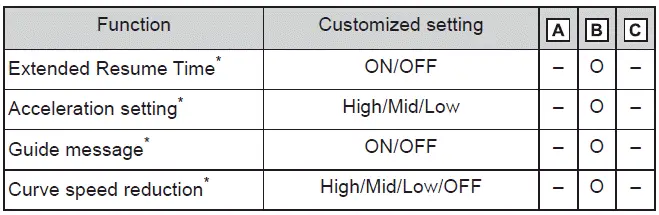
*: This setting is linked with My Settings profiles.
■ RSA (Road Sign Assist)
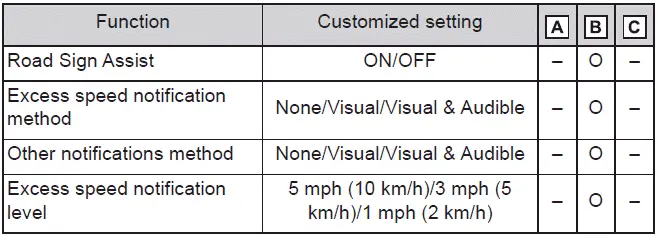
■ Driver break suggestion

■ Driver monitor

*: This setting follows My Settings profile configuration.
■ LCA (Lane Change Assist)

*: Linked with My Settings
■ FCTA (Front Cross Traffic Alert)

*: Linked with My Settings
■ Traffic Jam Assist
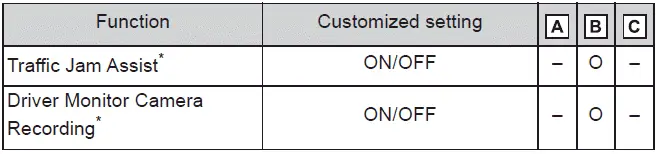
*: Linked with My Settings
■ BSM (Blind Spot Monitor)
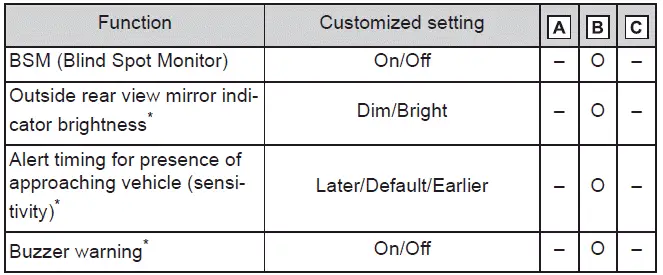
*: Linked with My Settings ■ Safe Exit Assist
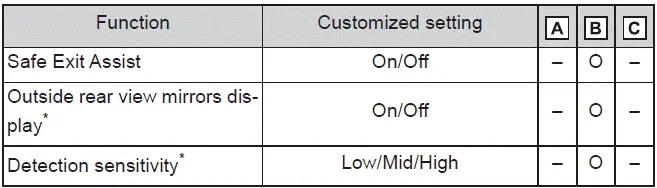
*: Linked with My Settings
■ RCTA (Rear Cross Traffic Alert)
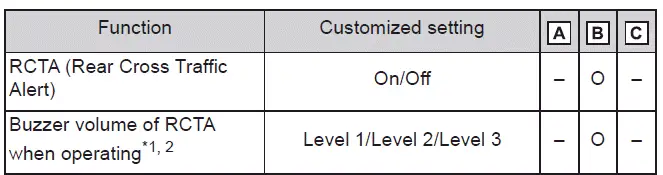
*1: Linked with My Settings
*2: Audio volume is shared with parking assist systems.
■ SUBARU Parking Assist
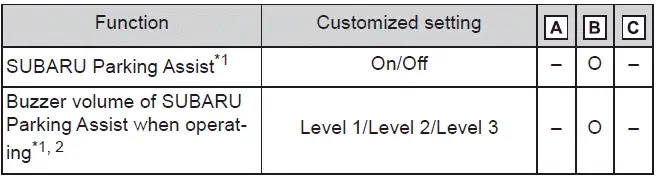
*1: Linked with My Settings
*2: Sound level shared with related systems.
■ RCD (Rear Camera Detection)*

*: If equipped
■ PKSB (Parking Support Brake)

*: Linked with My Settings
■ Advanced Park*
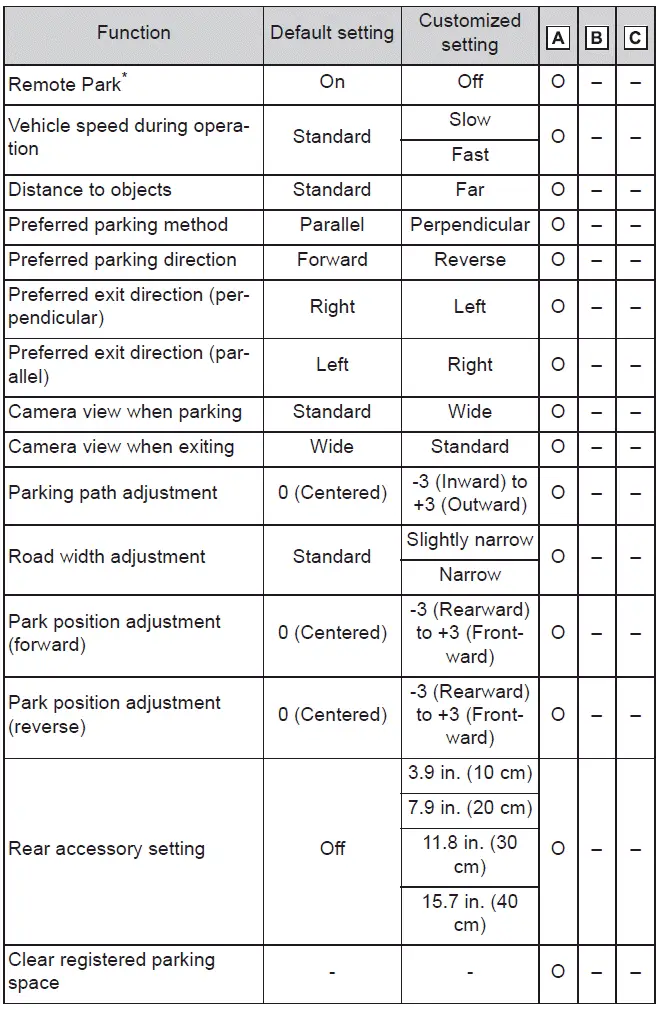
*: If equipped
■ Automatic air conditioning system

■ Illumination
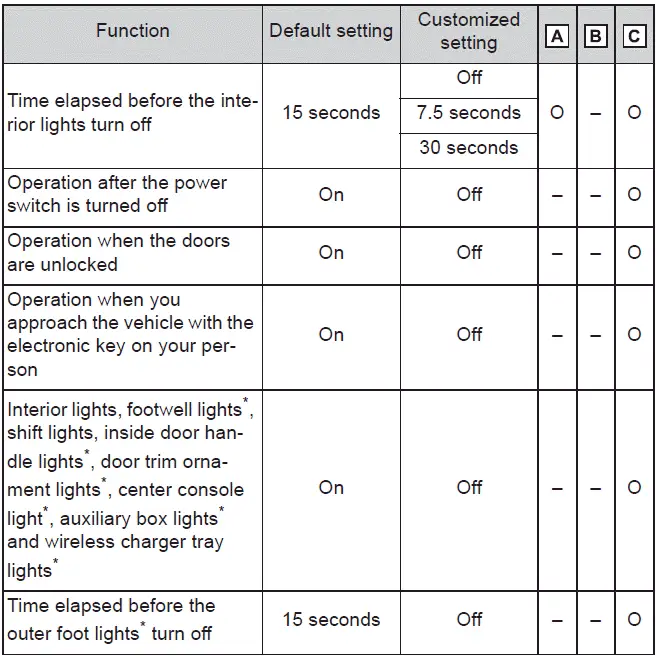
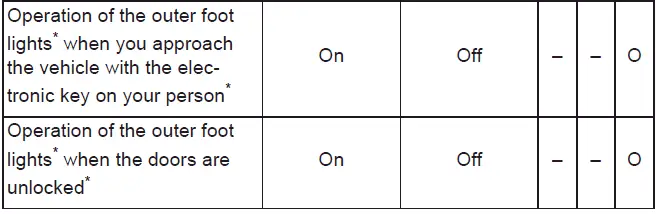
*: If equipped
■ Vehicle customization
- When both speed-linked and shift position-linked door locking features are
enabled in the Subaru Solterra, the system behaves as follows:
- If the Subaru Solterra starts with all doors locked, speed-based locking will not activate.
- If any door is unlocked at startup, the speed-based locking function will engage automatically.
- When shifting from P to another gear, all doors will lock automatically.
- If the smart key system is disabled, selective door unlocking customization will not be available.
- If doors remain closed after unlocking and auto-lock is enabled, the Subaru Solterra will provide feedback through audible and visual signals based on configured settings.
Initialization
Items to initialize
After certain operations such as battery reconnection or maintenance work, some systems in the Subaru Solterra must be reinitialized to ensure proper functionality and system synchronization.
List of the items to initialize
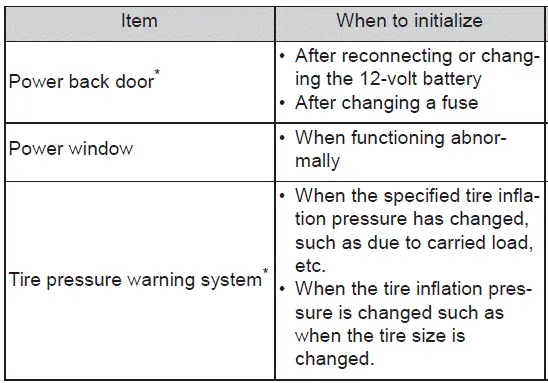
*: If equipped