
Mazda 3 Service Manual: Discharge Headlight Control Module Removal/Installation
CAUTION:
-
Incorrect servicing of the discharge headlights could result in electrical shock. Before servicing the discharge headlights, always refer to the discharge headlight service warnings..
1. Disconnect the negative battery cable..
2. Remove the front bumper..
3. Remove the front combination light..
4. Remove the screws.
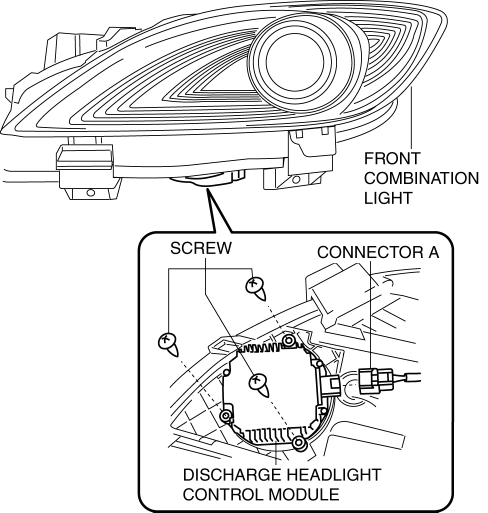
5. Disconnect the connector A.
6. Remove the screw.
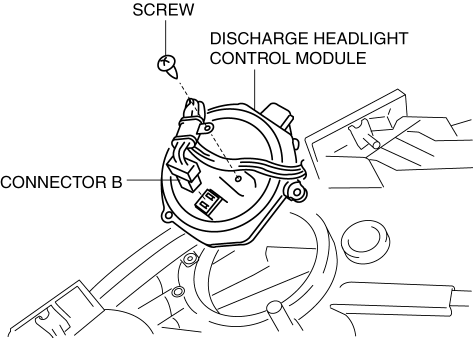
7. Disconnect the connector B.
8. Remove the discharge headlight control module.
9. Rotate the cover in the direction of the arrow shown in the figure to remove it.
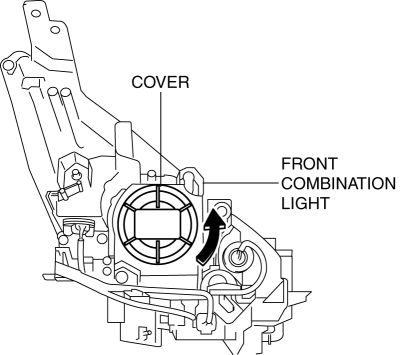
10. Rotate the connector in the direction of the arrow shown in the figure to remove it.
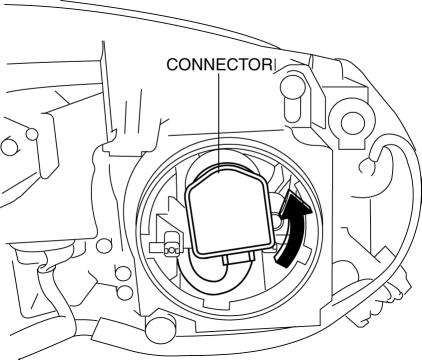
11. Remove the short cord.
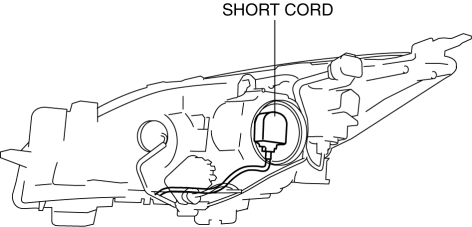
12. Install in the reverse order of removal.
 DRL (Daytime Running Light) Bulb Removal/Installation
MZR 2.0, MZR 2.5, MZR 2.3 DISI Turbo
1. Disconnect the negative battery cable..
2. Disconnect the connector.
3. Rotate the DRL bulb in the direction of the arrow shown in the figure to remove ...
 Discharge Headlight Service Warnings
Discharge Headlight Service Warnings
To prevent electrical shock when replacing the discharge headlight bulb,
always perform the servicing with dry hands and in an area where it does not
...
Other materials:
Headlight Auto Leveling System Initialization
CAUTION:
If the headlight auto leveling initial setting is not stored correctly, the
headlight auto leveling system may not operate normally. To store the initial
setting correctly, perform the initial setting with the vehicle under the following
conditions:
No occupant ...
Steering Wheel
WARNING
Never adjust the steering wheel while
the vehicle is moving:
Adjusting the steering wheel while
the vehicle is moving is dangerous.
Moving it can very easily cause the
driver to abruptly turn to the left or
right. This can lead to loss of control or
an accident ...
Head restraints
In the Subaru Solterra, head restraints are installed on every seat
and are engineered to provide crucial support for the head and neck, helping to
reduce the risk of injury during sudden braking or collisions.
WARNING
■ Head restraint precautions
Always follow these safety recommendations ...
