
Subaru Solterra 2023-2026 Owner's Manual: Driving position memory
In the Subaru Solterra, the driving position memory system intelligently adjusts the driver’s seat and outside rear view mirrors to match personal preferences, while also simplifying entry and exit from the vehicle.
The Subaru Solterra allows you to store your preferred driving position, including seat and mirror alignment, and recall it instantly using dedicated memory buttons.
Up to two individual driving positions can be saved directly in the system memory.
Each electronic key for the Subaru Solterra can also be linked to a specific driving position, enabling automatic personalization for different drivers.
Within My Settings, up to three unique driving profiles can be stored for both the primary driver and registered guest users of the Subaru Solterra.
When a Subaru Solterra electronic key is paired with My Settings, the system automatically recalls the assigned driving position upon entry, ensuring a seamless and personalized driving experience.
Enabling easier driver entry and exit (power easy access system)
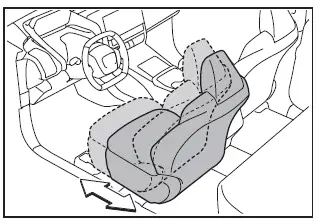
In the Subaru Solterra, when the following conditions are met, the driver’s seat automatically shifts to a position that makes entering and exiting the vehicle easier:
- The shift position is set to P.
- The Subaru Solterra power switch is turned OFF.
- The driver’s seat belt is unfastened.
When any of the following actions occur, the Subaru Solterra seat automatically returns to the previously stored driving position:
- The power switch is turned to ACC or ON.
- The driver’s seat belt is fastened.
■ Operation of the power easy access system
The Subaru Solterra easy access function may not activate if the seat is already positioned near its maximum rearward limit or under certain adjustment conditions.
■ Customization
The Subaru Solterra allows adjustment of the seat movement range for the power easy access system according to user preference.
WARNING
■ While the power easy access system is operating the seat is moving
Be cautious to avoid trapping body parts or personal items during seat movement in the Subaru Solterra, as this may result in injury or damage.
Recording/recalling a driving position
■ Recording procedure
1. Ensure the Subaru Solterra shift position is in P.
2. Turn the power switch to ON.
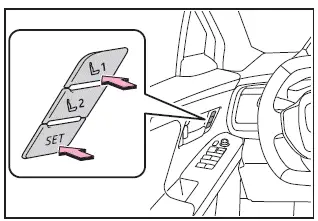
3. Adjust the driver’s seat and outside mirrors to the desired positions.
4. Press the "SET" button and, within 3 seconds, press and hold button "1" or "2" until a confirmation buzzer sounds.
If a memory button already contains saved data, the previous Subaru Solterra position will be overwritten.
■ Recall procedure
1. Confirm the Subaru Solterra shift position is in P.
2. Turn the power switch to ON.
3. Press the desired memory button until the buzzer sounds and the seat begins moving.
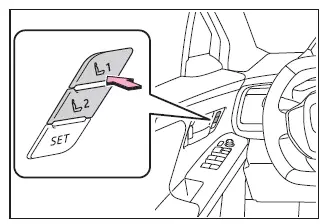
■ To stop the position recall operation part-way through
To interrupt the Subaru Solterra seat movement, perform any of the following:
- Press the "SET" button.
- Press button "1" or "2".
- Operate any seat adjustment switch.
■ Using the voice control system (if equipped)
The Subaru Solterra supports voice commands for enhanced convenience, allowing:
- Driving position registration
- Driving position recall (available only when the shift position is in P)
Refer to the "MULTIMEDIA OWNER'S MANUAL" for detailed instructions.
■ Seat positions that can be memorized
The Subaru Solterra system records all seat adjustments except those controlled by the lumbar support switch.
■ Operating the driving position memory after turning the power switch to OFF
Stored Subaru Solterra seat positions can be activated for up to 180 seconds after opening the driver’s door, and for an additional 60 seconds after it is closed again.
■ In order to correctly use the driving position memory function
If the Subaru Solterra seat is already at its maximum limit in a given direction, the recalled position may differ slightly from the originally stored setting.
■ When recalling the driving position
Ensure that the head restraint does not contact the roof or sun visor during Subaru Solterra seat adjustment.
■ If the 12-volt battery is disconnected
All stored Subaru Solterra driving positions will be erased and must be reprogrammed.
■ When the recorded seat position cannot be recalled
In certain cases, depending on the stored range, the Subaru Solterra seat position may not be recalled correctly. Contact your SUBARU dealer for assistance.
■ Jam protection function
While the Subaru Solterra seat is moving due to memory recall or easy access operation, if an obstruction is detected behind the seat, the system will stop and slightly move the seat forward to prevent damage or injury.
After activation, the seat may stop at a position different from the preset. Always verify the final position.
WARNING
■ Seat adjustment caution
Ensure that the Subaru Solterra seat does not contact rear passengers or press the driver against the steering wheel during adjustment.
Registering/recall/canceling a driving position to an electronic key (memory recall function)
■ Registering procedure
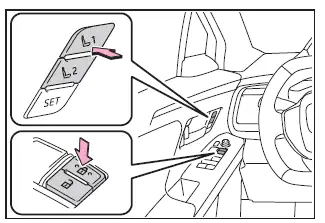
Before starting, store the Subaru Solterra driving position using button "1" or "2". Carry only the key you wish to register and close the driver’s door.
If multiple keys are inside the Subaru Solterra, the system may not register correctly.
1. Confirm the shift position is in P.
2. Turn the power switch to ON.
3. Recall the desired driving position.
4. While holding the selected memory button, press and hold the door lock switch until a buzzer sounds.
If registration fails, the Subaru Solterra buzzer will sound continuously for approximately 3 seconds.
■ Recall procedure
Ensure all doors of the Subaru Solterra are locked. Carry the registered electronic key, then unlock and open the driver’s door.
The seat will automatically move to the stored Subaru Solterra driving position.
If the seat is already in the stored position, no movement will occur.
■ Cancelation procedure
Carry only the Subaru Solterra key to be canceled and close the driver’s door.
If multiple keys are present, cancellation may not be successful.
1. Confirm shift position P.
2. Turn power switch ON.
3. While pressing "SET", hold the door lock switch until the buzzer sounds twice.
If cancellation fails, the Subaru Solterra buzzer will sound for approximately 3 seconds.
■ Recalling the driving position using the memory recall function
- Each Subaru Solterra electronic key can store a unique driving profile,
so the recalled position depends on the key being used.
This ensures personalized comfort for multiple drivers.
- If a door other than the driver’s door is unlocked, the Subaru Solterra memory recall function may not activate. In such cases, use the seat memory buttons manually.
■ Customization
Various Subaru Solterra settings, including memory recall behavior and door unlock conditions, can be customized.

 My Settings
In the Subaru Solterra, the My Settings function enables personalized
driver recognition using various authentication devices, automatically restoring
individual driving preferences and vehicle co ...
Other materials:
Power Windows
The ignition must be switched ON for the
power windows to operate.
WARNING
Make sure the opening is clear before
closing a window:
Closing a power window is dangerous.
A person's hands, head, or even neck
could be caught by the window and
result in serious injury or even d ...
C Pillar Trim Removal/Installation
4SD
1. Remove the following parts:
a. Rear seat cushion.
b. Rear scuff plate.
c. Tire house trim.
2. Partially peel back the seaming welt.
3. Pull the C-pillar trim in the direction of the arrow (1), (2) shown in the
figure, then detaching clip A and B.
4. Cut the lead wire connec ...
Rear Spoiler Removal/Installation
4SD
1. Remove the trunk lid trim..
2. Remove the nuts.
3. While cutting the double-sided adhesive tape using a flathead screwdriver
or a razor, separate the rear spoiler from the trunk lid.
WARNING:
Using a razor with bare hands can cause injury. Always wear gloves when usin ...
