
Mazda 3 Service Manual: Engine Disassembly/Assembly [Mzr 2.3 Disi Turbo]
1. Remove the engine from the transaxle..
2. Remove the intake-air system..
3. Remove the exhaust system..
4. Remove the generator..
5. Remove the EGR valve..
6. Remove the ignition coils..
7. Remove the high pressure fuel pump and high pressure fuel pump cover..
8. Remove the fuel injectors..
9. Remove the crankshaft position (CKP) sensor..
10. Disassemble in the order indicated in the table.
11. Assemble in the reverse order of disassembly.
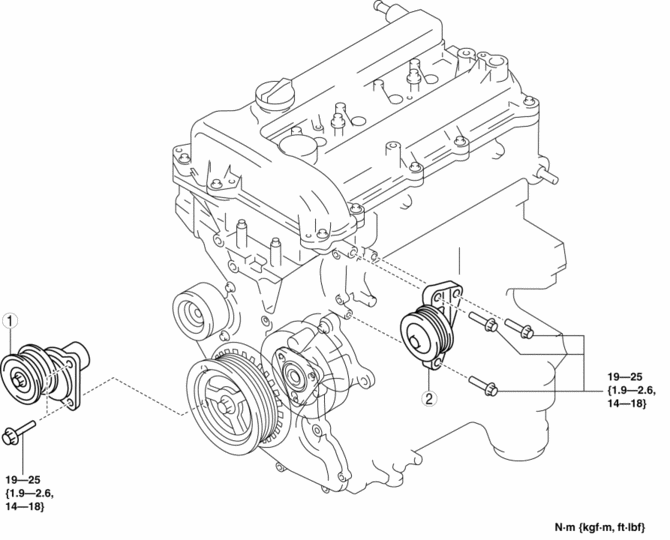
|
1 |
Drive belt auto tensioner |
|
2 |
Drive belt idler pulley |
 Engine Disassembly/Assembly [Mzr 2.0, Mzr 2.5]
1. Remove the engine from the transaxle..
2. Remove the generator..
3. Remove the exhaust system..
4. Remove the EGR valve..
5. Remove the intake-air system..
6. Remove the fuel injectors.. ...
 Engine Disassembly/Assembly [Skyactiv G 2.0]
CAUTION:
When the transaxle is installed, do not suspend the engine. Otherwise, the
SST installation area of the cylinder head may be damaged due to excess weight.
Only suspend the engin ...
Other materials:
Oil Seal (Differential) Replacement [G35 M R]
1. On level ground, jack up the vehicle and support it evenly on safety stands.
2. Remove the aerodynamic under cover No.2..
3. Drain the oil from the transaxle..
4. Remove the front splash shield..
5. Separate the drive shaft and joint shaft from the transaxle..
6. Remove the oil seals u ...
Sirius Satellite Radio Unit Removal/Installation
1. Disconnect the negative battery cable..
2. Remove the following parts:
a. Passenger-side front scuff plate.
b. Passenger-side front side trim.
c. Dashboard under cover.
d. Grove compartment.
e. Passenger-side lower panel.
3. Remove in the order indicated in the table.
...
Front Door Speaker Removal/Installation
1. Disconnect the negative battery cable..
2. Remove the inner garnish..
3. Remove the front door trim..
4. Disconnect the connector.
Without Bose®
With Bose®
5. Remove the screw.
6. Remove the front door speaker in the direction of the arrow shown in the figure.
Without Bos ...
