
Mazda 3 Service Manual: Front Bumper Removal/Installation
1. Disconnect the negative battery cable..
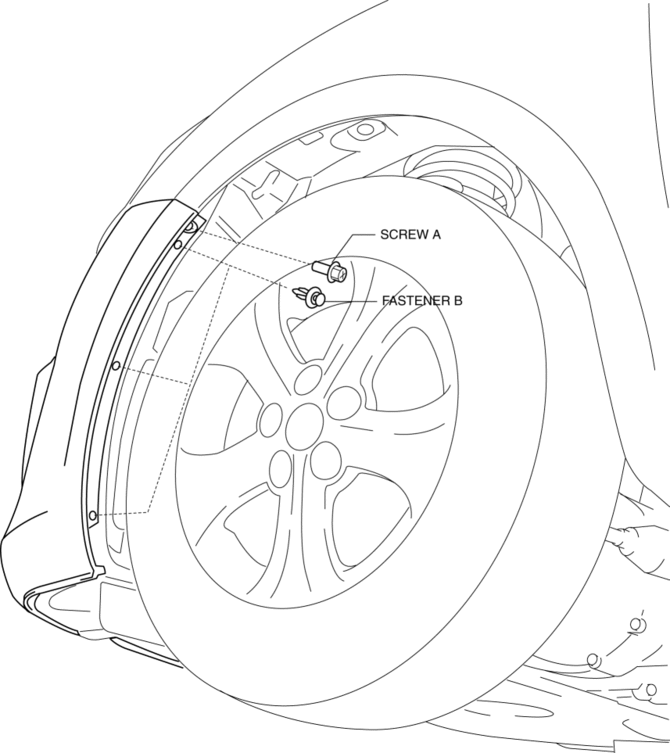
2. Remove the screw A and fasteners B.
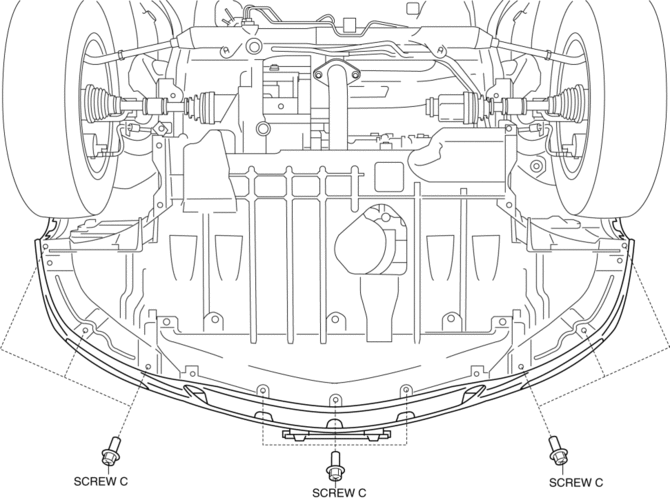
3. Remove the screws C.
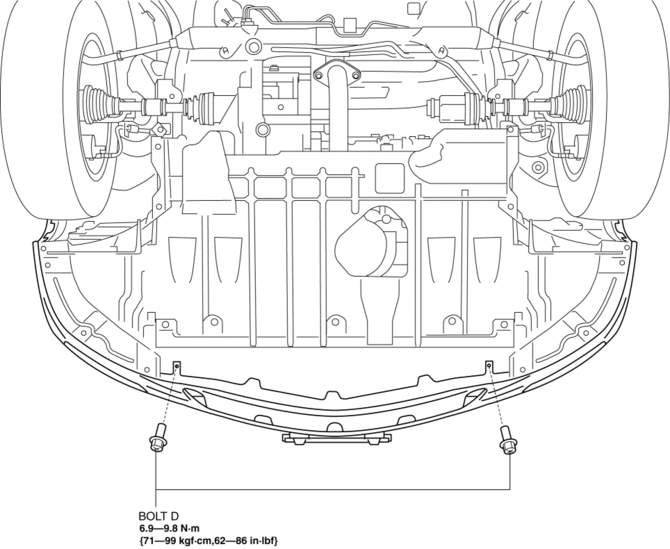
4. Remove the bolts D.
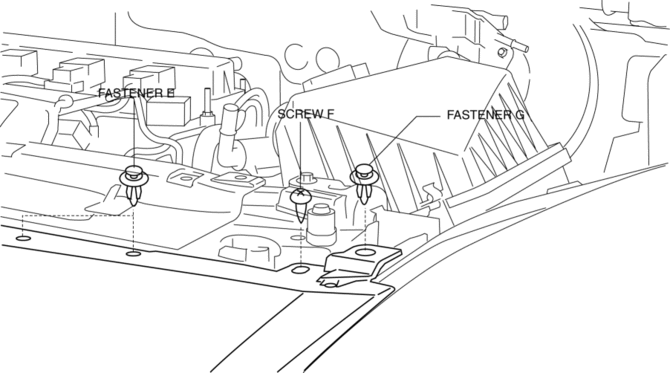
5. Remove the fasteners E, screw F and fastener G.
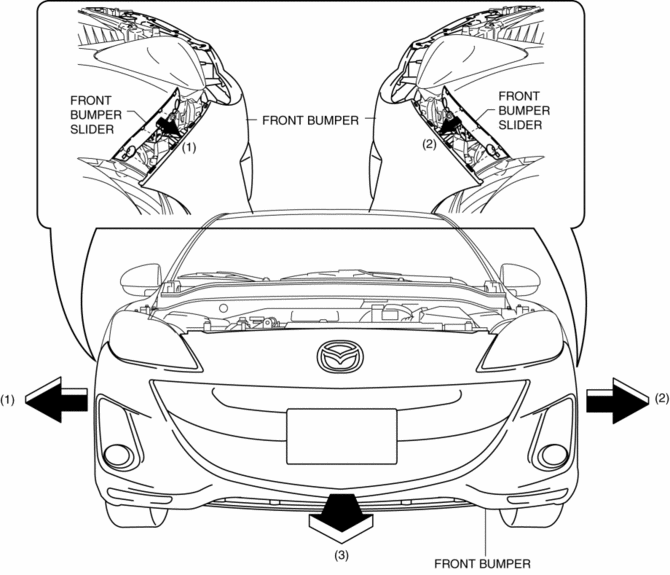
6. Pull the front bumper in the direction of the arrow in the order of (1), (2) and (3), then remove the front bumper..
CAUTION:
-
The front bumper and front bumper slider are engaged firmly. If they are disengaged forcibly the bumper could fall and be damaged. Perform the servicing carefully when disengaging the front bumper from the front bumper slider.
-
When disengaging the front bumper from the front bumper slider, the front bumper could fall and be damaged. Support the front bumper so that it does not fall.
7. Disconnect the front fog light connector. (Vehicles with front fog lights)
8. Install in the reverse order of removal.
9. Adjust the front fog light aiming for vehicles with front fog lights..
Front Bumper Installation Note
1. Spread the front bumper ends apart.
CAUTION:
-
The front bumper and front bumper slider are engaged firmly. If they are disengaged forcibly the bumper could fall and be damaged. Perform the servicing carefully when disengaging the front bumper from the front bumper slider.
-
When disengaging the front bumper from the front bumper slider, the front bumper could fall and be damaged. Support the front bumper so that it does not fall.
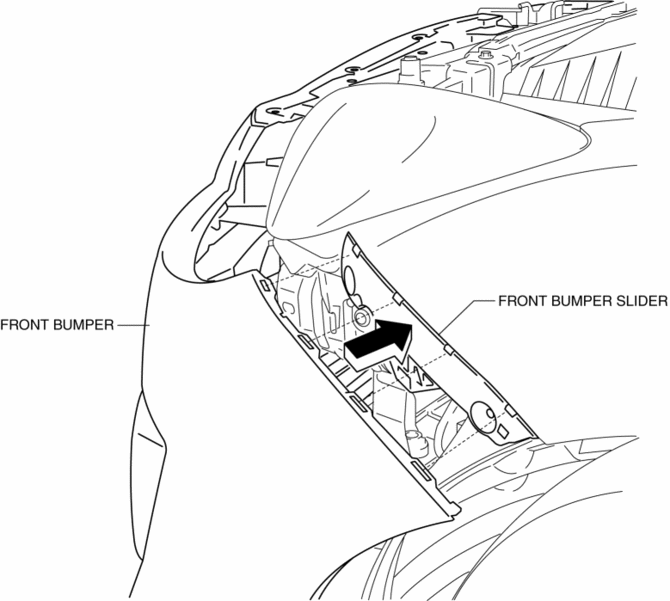
2. Attach the front bumper to the body.
3. Press the front bumper connecting area in the direction of the arrow shown in the figure to engage with the front bumper slider.
Front Bumper of New Parts Installation Note
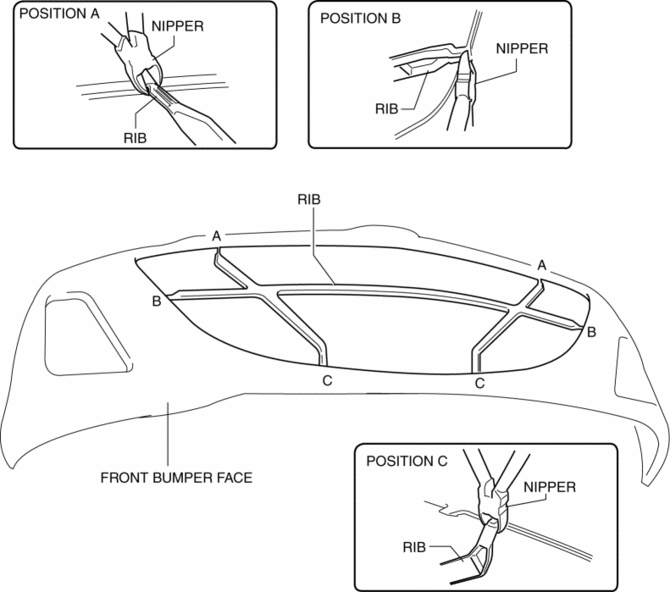
1. Paint the front bumper face.
2. Cut the rib position of A, B, and C from the base with using a nipper.
 Front Bumper Reinforcement Removal/Installation
1. Disconnect the negative battery cable..
2. Remove the following parts:
a. Front bumper.
b. Seal plate.
3. Remove the bolts A.
4. Remove the bolts B.
5. Remove the front bumper r ...
 Front Fender Panel Removal/Installation
1. Disconnect the negative battery cable..
2. Remove the following parts:
a. Front bumper.
b. Front combination light.
c. Front fender molding.
d. Side step molding.
3. Remove fasteners an ...
Other materials:
Vanity Mirror Illumination Bulb Removal/Installation
1. Disconnect the negative battery cable..
2. Insert a tape-wrapped fastener remover into the service hole, and pry it in
the direction indicated by the arrow to remove the lens.
3. Remove the vanity mirror illumination bulb.
4. Install in the reverse order of removal. ...
Liftgate Side Trim Removal/Installation
1. Remove the liftgate upper trim..
2. Pull the point A of the strap hanger as shown in the figure.
3. Remove the strap hanger.
4. Remove the fastener.
5. Pull the liftgate side trim in the direction of arrow then remove clip A.
6. Detach tab B and C while pulling the liftgate sid ...
Solenoid Valve Removal/Installation [FS5 A EL]
WARNING:
A hot transaxle and ATF can cause severe burns. Turn off the engine and wait
until they are cool.
Primary Control Valve Body
1. Remove the primary control valve body.
a. Remove the battery cover..
b. Disconnect the negative battery cable.
c. Remove the aerodynamic un ...
