
Mazda 3 Service Manual: Front Door Trim Disassembly/Assembly
Driver-side
1. Disassemble in the order shown in the figure.
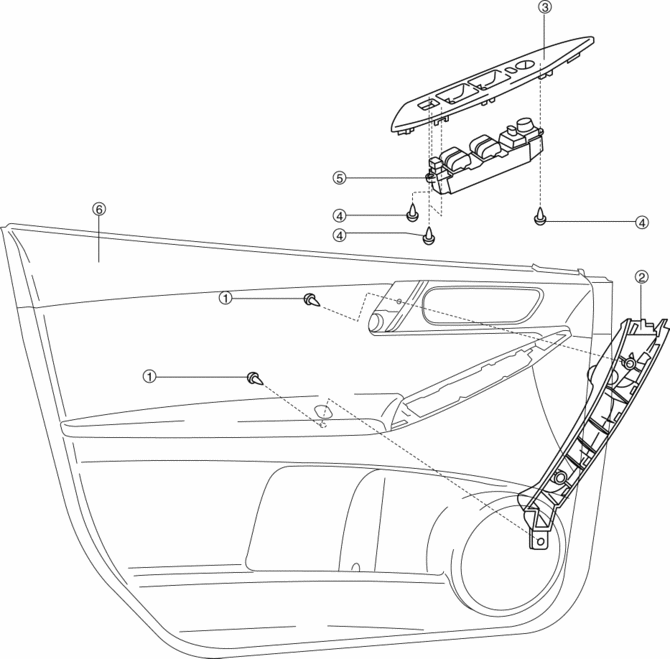
|
1 |
Screw A |
|
2 |
Assist handle |
|
3 |
Switch panel cover |
|
4 |
Screw B |
|
5 |
Power window main switch |
|
6 |
Front door trim |
2. Assemble in the reverse order of disassembly.
Passenger-side
1. Disassemble in the order shown in the figure.
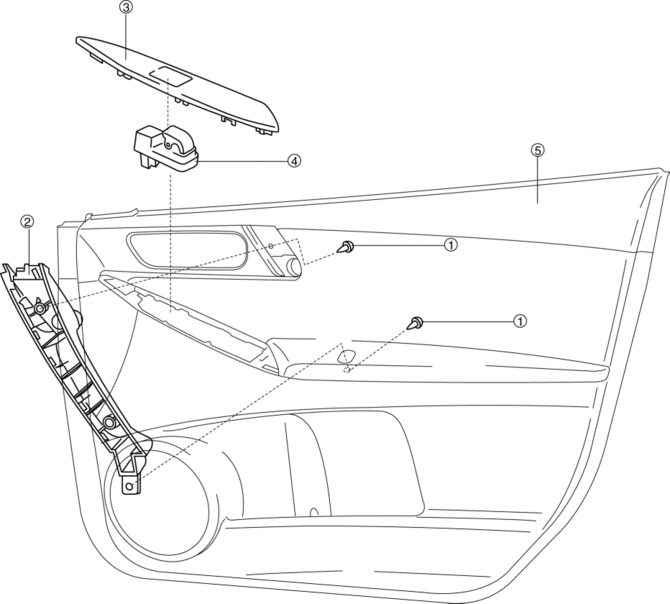
|
1 |
Screw |
|
2 |
Assist handle |
|
3 |
Switch panel cover |
|
4 |
Power window subswitch |
|
5 |
Front door trim |
2. Assemble in the reverse order of disassembly.
 Trunk Lid Opener Switch Removal/Installation
1. Disconnect the negative battery cable..
2. Remove the trunk lid trim..
3. Remove the high-mount brake light..
4. Remove the screw.
5. Install in the reverse order of removal. ...
 Front Door Trim Removal/Installation
1. Disconnect the negative battery cable..
2. Remove the inner garnish..
3. Move the hook in the direction of arrow shown in the figure using a tape-lapped
flathead screwdriver and detach it fro ...
Other materials:
Door Sash Film Removal
1. Disconnect the negative battery cable.
2. Partially peel back the glass run channel.
3. Partially peel back the door weatherstrip.
4. Remove the following parts:
a. Inner garnish.
b. Front door trim.
c. Power outer mirror.
d. Rear door trim.
e. Rear door speaker.
f. Rear door qu ...
Headlight Leveling
The number of passengers and weight of
cargo in the luggage compartment change
the angle of the headlights.
Auto type
The angle of the headlights will be
automatically adjusted when turning on
the headlights.
The warning/indicator light turns on when
the system has a malfunction.
Refer ...
Indirect Illumination Removal/Installation
Power Window Switch (With power window switch indirect illumination)
1. Disconnect the negative battery cable..
2. Remove the assist handle cover..
3. Remove in the order indicated in the table.
1
Connector
2
Power window switch indirect ...
