
Mazda 3 Service Manual: Electric Variable Valve Timing Motor/Driver Inspection [Skyactiv G 2.0]
WARNING:
-
A hot engine can cause severe burns. Turn off the engine and wait until it is cool before servicing.
CAUTION:
-
Do not disassemble the electric variable valve timing motor/driver because it is a precision unit.
1. Remove the battery cover..
2. Disconnect the negative battery cable..
3. Remove the plug hole plate..
4. Remove the coolant reserve tank with the hose still connected and set it out of the way..
5. Remove the electric variable valve timing motor/driver..
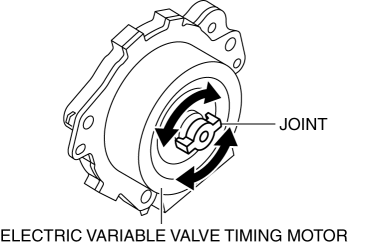
6. Rotate the electric variable valve timing motor joint to the left and right by hand and verify that it rotates smoothly in 15°
increments.
-
If it does not rotate smoothly, replace the electric variable valve timing motor/driver.(See ELECTRIC VARIABLE VALVE TIMING MOTOR/DRIVER REMOVAL/INSTALLATION [SKYACTIV-G 2.0].)
NOTE:
-
The electric variable valve timing motor joint moves in 15°
increments, and if the joint is moved 24
times, it rotates one full rotation.
7. Install in the reverse order of removal.
 Electric Variable Valve Timing Actuator, Hydraulic Variable Valve Timing Actuator
Removal/Installation [Skyactiv G 2.0]
Electric Variable Valve Timing Actuator, Hydraulic Variable Valve Timing Actuator
Removal/Installation [Skyactiv G 2.0]
WARNING:
A hot engine can cause severe burns. Turn off the engine and wait until it
is cool before servicing.
CAUTION:
Do not disassemble the electric variable valve timing ac ...
 Electric Variable Valve Timing Motor/Driver Removal/Installation [Skyactiv G
2.0]
Electric Variable Valve Timing Motor/Driver Removal/Installation [Skyactiv G
2.0]
WARNING:
A hot engine can cause severe burns. Turn off the engine and wait until it
is cool before servicing.
CAUTION:
Applying excessive force (force of 100 N {10.2 kgf, 22.5 ...
Other materials:
Controller Area Network (Can) System
Outline
With the addition of the following, the system wiring diagram and CAN communication
table have been added.
USB adapter
System Wiring Diagram
CAN Signal Table
Signals transmitted using the CAN system are as follows:
MS-CANOUT: Output (send ...
Supplemental Restraint System Components
(With Front Passenger Occupant Classification System)
(Without Front Passenger Occupant Classification System)
Driver/Front passenger inflators and air bags
Roll-over sensor * , crash sensors, and diagnostic module (SAS unit)
Seat belt pretensioners
Front air bag sensors
Side c ...
Outer Mirror Garnish Removal/Installation
1. Disconnect the negative battery cable..
2. Remove the outer mirror glass from the outer mirror..
3. Pinch the end of the tab which is visible, and release the tab by pressing
it toward the vehicle front (3 locations).
4. Grasp the upper side of the outer mirror garnish and remove it b ...
