
Mazda 3 Service Manual: Glass Antenna Inspection
4SD
1. Disconnect the negative battery cable..
2. Disconnect the antenna amplifier connector B..
3. Disconnect the antenna feeder No.3 connector C. (with audio unit (with display)).
4. Inspect the glass antenna for damage visually.
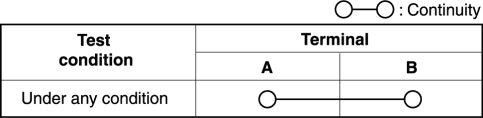
5. Inspect for continuity between the glass antenna terminals using an ohmmeter.
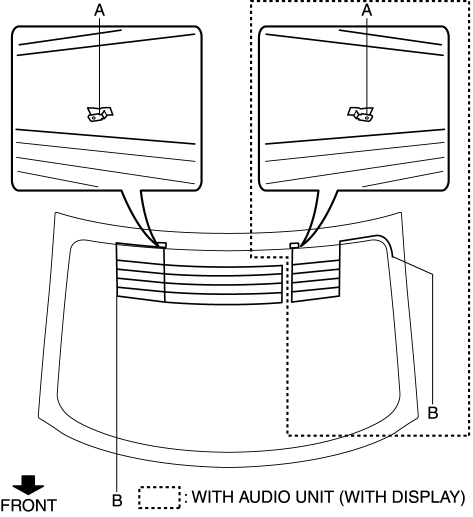
-
If not as specified, repair the glass antenna..
5HB (with audio unit (with display))
1. Disconnect the negative battery cable..
2. Remove the liftgate upper trim..
3. Disconnect the antenna feeder No.7 connector B..
4. Inspect the glass antenna for damage visually.
5. Inspect for continuity between the glass antenna terminals using an ohmmeter.
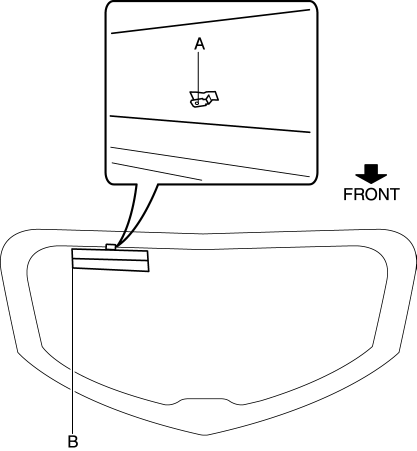
-
If not as specified, repair the glass antenna..
 Glass Antenna
Purpose, Function
4SD
The AM/FM radio waves and RDS-TMC (Radio Data System-Traffic Message Channel)
radio waves are converted to an electrical signal and the signal is sent to
the audio ...
 Power Window Main Switch Inspection
1. Disconnect the negative battery cable.
2. Remove the inner garnish. (driver's side).
3. Remove the front door trim. (driver's side).
4. Remove the main switch panel. (driver's sid ...
Other materials:
Blind Spot Monitoring (Bsm) Off Switch Removal/Installation
1. Disconnect the negative battery cable..
2. Remove the switch panel in the direction of the arrow shown in the figure.
3. Disconnect the connector.
4. Remove the BSM OFF switch in the direction of the arrow (2) shown in the figure
while pressing the tabs in the direction of the arrow ...
Power Window Motor Removal/Installation
Front Power Window Motor
1. Fully lower the front door glass.
2. Disconnect the negative battery cable..
3. Remove the inner garnish..
4. Remove the front door trim..
5. Remove the front door speaker..
6. Remove the bolts.
7. Disconnect the front power window motor connector.
...
Alarm
The Subaru Solterra alarm system combines visual and audible alerts
to immediately notify of any unauthorized intrusion attempts.
The alarm in the Subaru Solterra will activate under the following
conditions when armed:
If any locked door or the rear hatch is opened without using the proper ...
