
Mazda 3 Service Manual: Front Stabilizer Control Link Inspection
1. Remove the front stabilizer control link from the vehicle.. (See FRONT STABILIZER REMOVAL/INSTALLATION [MZR 2.3 DISI Turbo]
2. Inspect for bending or damage. If there is any malfunction, replace the stabilizer control link.
3. Rotate the ball joint stud 10 times
and shake it side to side 10 times
.
4. Measure the ball joint rotational torque using an Allen wrench and a torque wrench.
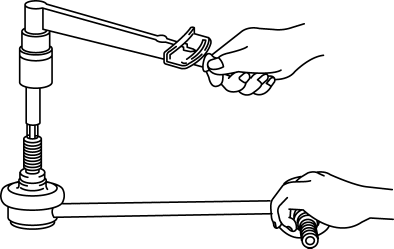
-
Front stabilizer control link ball joint rotational torque
-
0.2—0.9 N·m {3—9 kgf·cm, 2—7 in·lbf}
-
If not within the specification, replace the front stabilizer control link.
 Front Shock Absorber Inspection
1. Remove the front shock absorber..
2. Inspect for damage and oil leakage.
3. Compress and extend the front shock absorber piston rod at least three
times at a steady rate. From the fourth comp ...
 Front Stabilizer Removal/Installation [Mzr 2.0, Skyactiv G 2.0, Mzr 2.5]
1. Remove the joint cover..
2. Disconnect the steering shaft from the steering gear and linkage..
3. Remove the front crossmember component..
4. Remove in the order indicated in the table.
5. ...
Other materials:
PID/Data Monitor Inspection [Afs (Adaptive Front Lighting System)]
1. Connect the M-MDS (IDS) to the DLC-2.
2. After the vehicle is identified, select the following items from the initialization
screen of the IDS.
a. Select “DataLogger”.
b. Select “Modules”.
c. Select “AFS”.
3. Select the applicable PID from the PID table.
4. Verify th ...
Air Intake Actuator Inspection [Manual Air Conditioner]
1. Connect battery positive voltage to air intake actuator terminal B (or C),
connect terminal C (or B) to ground, and then verify that the air intake actuator
operates as shown in the table.
If the operation condition is not normal, replace the air intake actuator.
...
Purge Solenoid Valve Inspection [Mzr 2.0, Mzr 2.5]
Airflow Inspection
1. Remove the battery cover..
2. Disconnect the negative battery cable..
3. Remove the purge solenoid valve..
4. Inspect airflow between the ports under the following conditions.
Measured condition
Continuity between A—B
...
