
Mazda 3 Service Manual: Manual Transaxle Oil Replacement [C66 M R]
1. Park the vehicle on level ground.
2. Remove the aerodynamic under cover No.2..
3. Remove the drain plug and gasket, and drain the manual transaxle oil.
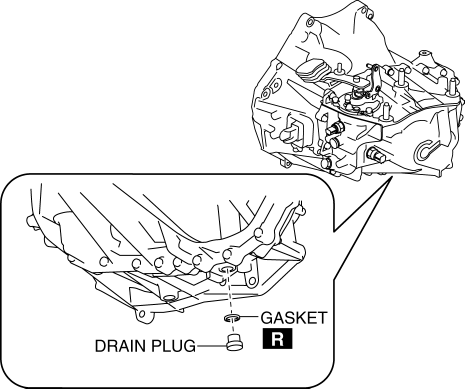
4. Install a new gasket and the drain plug.
-
Tightening torque
-
39—59 N·m {4.0—6.0 kgf·m, 29—43 ft·lbf}
5. Remove the oil level plug and gasket.
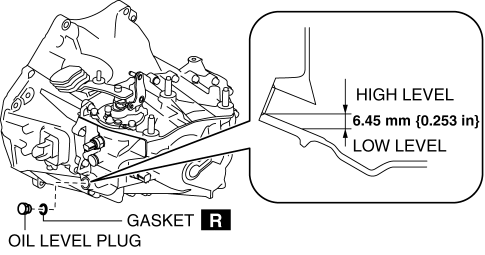
6. Add the specified manual transaxle oil through the oil level plug port.
-
Manual transaxle oil grade
-
API service GL-4
-
Manual transaxle oil viscosity
-
SAE 75W-80
7. Install a new gasket and the oil level plug.
-
Tightening torque
-
39—59 N·m {4.0—6.0 kgf·m, 29—43 ft·lbf}
8. Install the aerodynamic under cover No.2..
 Manual Transaxle Oil Inspection [C66 M R]
1. Park the vehicle on level ground.
2. Remove the aerodynamic under cover No.2..
3. Remove the oil level plug and gasket.
Tightening torque
39—59 N·m {4.0—6.0 kgf·m, 29—43 f ...
 Manual Transaxle Removal/Installation [A26 M R]
CAUTION:
Secure the steering wheel using tape or a cable to prevent the steering shaft
from rotating after disconnecting the steering shaft. If the steering wheel
rotates after the steer ...
Other materials:
PID/Data Monitor Inspection [Afs (Adaptive Front Lighting System)]
1. Connect the M-MDS (IDS) to the DLC-2.
2. After the vehicle is identified, select the following items from the initialization
screen of the IDS.
a. Select “DataLogger”.
b. Select “Modules”.
c. Select “AFS”.
3. Select the applicable PID from the PID table.
4. Verify th ...
Transaxle Fluid Temperature (Tft) Sensor Removal/Installation [FS5 A EL]
WARNING:
A hot transaxle and ATF can cause severe burns. Turn off the engine and wait
until they are cool.
1. Remove the primary control valve body.
a. Remove the battery cover..
b. Disconnect the negative battery cable.
c. Remove the aerodynamic under cover NO.2..
d. Clean ...
Steering Gear And Linkage Inspection
Steering Rack Inspection
1. Inspect for cracking, damage, and tooth wear.
If there is any malfunction, replace the steering rack.
2. Measure the steering rack warp.
If it exceeds the maximum specification, replace the steering rack.
Steering rack runout
Large ...
