
Mazda 3 Service Manual: Glove Compartment Light Bulb Removal/Installation
1. Disconnect the negative battery cable..
2. Remove the following parts:
a. Passenger-side front scuff plate.
b. Passenger-side front side trim.
c. Dashboard under cover.
d. Glove compartment.
e. Passenger-side lower panel.
3. Remove the glove comportment bulb from the socket.
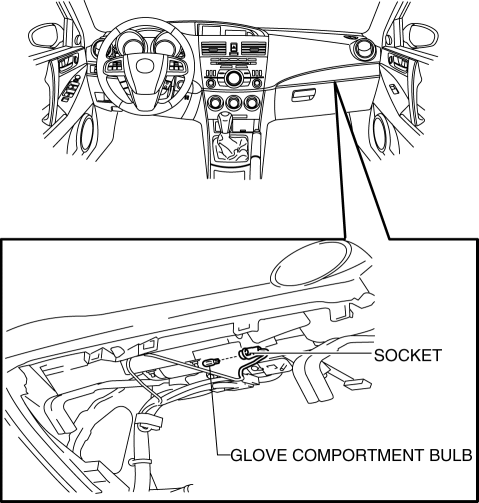
4. Install in the reverse order of removal.
 Console Removal/Installation
1. Disconnect the negative battery cable..
2. Remove the following parts:
a. Upper panel.
b. Shift knob (MTX).
c. Selector lever knob (ATX).
d. Shift panel.
e. Side wall.
3. Remove the b ...
 Glove Compartment Removal/Installation
CAUTION:
If the glove compartment is closed without being joined to the stay damper,
the stay damper may be damaged. Verify that the stay damper is joined to the
glove compartment before ...
Other materials:
Tire rotation
To maintain balanced performance and ensure even wear across all wheels, rotate
the tires of your Subaru Solterra according to the recommended pattern illustrated
below.
Regular tire rotation on the Subaru Solterra helps extend overall tire lifespan,
improve handling stability, and maintain o ...
Ignition Switch Removal/Installation [Without Advanced Keyless Entry And Push
Button Start System]
1. Disconnect the negative battery cable..
2. Remove the column cover..
3. Detach the tab.
4. Pull the pin in the direction of the arrow shown in the figure and release
the lock.
5. Disconnect the ignition switch connector and key interlock solenoid connector.
6. Remove the ...
AC charging cable
This section explains the functionality, proper handling procedures,
and safety considerations for the AC charging cable used with the Subaru Solterra,
ensuring efficient and secure charging in everyday use.
WARNING
■ When using the AC charging cable and CCID (Charging Circuit Interrupting
...
