
Mazda 3 Service Manual: Clutch Cover Inspection [C66 M R]
1. Remove the clutch cover..
2. Perform the following procedures to inspect the clutch cover.
-
If it exceeds the maximum specification, replace the clutch cover..
a. Measure the wear of the diaphragm spring fingers.
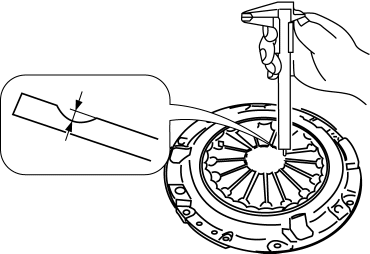
-
Clutch cover diaphragm spring fingers maximum depth
-
0.6 mm {0.02 in}
b. Measure the flatness of the pressure plate with a straight edge and a feeler gauge.
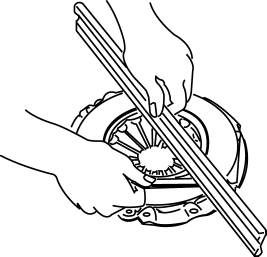
-
Maximum clearance of flatness of the pressure plate
-
0.3 mm {0.01 in}
c. Inspect the diaphragm spring fingers for the degree of uniformity in their height.
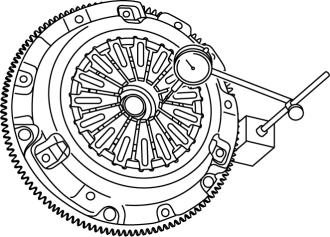
i. Install the clutch cover..
ii. When checking the diaphragm spring fingers, mount a dial gauge on the cylinder block.
iii. Rotate the flywheel and check for misaligned diaphragm spring fingers.
-
Clutch cover diaphragm spring fingers maximum height difference
-
1.0 mm {0.039 in}

 Clutch Disc Inspection [C66 M R]
Operation Inspection
1. Inspect the lining surface for discoloration and grease adhesion.
2. Inspect the torsion spring for weakness and the rivet for looseness.
3. Using a vernier caliper, measu ...
Other materials:
Climate Control Unit Inspection [Manual Air Conditioner]
1. Remove the climate control unit with the connector connected..
2. Switch the ignition to ON.
3. Connect the negative (-) lead of the tester to the body ground.
4. By inserting the positive (+) lead of the tester into the climate control
unit connector, measure the voltage according to the ...
Manual Transaxle Oil Inspection [C66 M R]
1. Park the vehicle on level ground.
2. Remove the aerodynamic under cover No.2..
3. Remove the oil level plug and gasket.
Tightening torque
39—59 N·m {4.0—6.0 kgf·m, 29—43 ft·lbf}
4. Verify that the manual transaxle oil is near the brim of the plug port.
Wh ...
Radio Reception
AM characteristics
AM signals bend around such things as
buildings or mountains and bounce off the
ionosphere.
Therefore, they can reach longer distances
than FM signals.
Because of this, two stations may
sometimes be picked up on the same
frequency at the same time.
FM characterist ...
