
Subaru Solterra 2023-2026 Owner's Manual: How to use AC charging
This section provides a detailed step-by-step guide for charging the traction battery of the Subaru Solterra using an AC charging cable, ensuring safe and efficient operation in everyday conditions.
When using an external AC charger with the Subaru Solterra, always review and follow the specific operating instructions provided with the charging equipment to ensure compatibility and proper use.
If a charging schedule has been configured in the Subaru Solterra, ensure that the "Charge Now" function is activated before starting the charging process.
NOTICE
■ When using the AC charging cable and related parts
To avoid damage to the AC charging system of the Subaru Solterra, carefully observe the following precautions.
- When interrupting or stopping charging, always disconnect the charging connector before removing the plug from the outlet.
- Before removing the AC charging cable, verify that the charging connector has been properly unlocked.
- Avoid pulling forcefully on the charging connector cap or AC charging inlet cap.
- Do not subject the charging connector to vibrations or movement while charging is in progress, as this may interrupt charging.
- Only insert the designated charging connector into the AC charging inlet of the Subaru Solterra.
- When plugging into or unplugging from an outlet, always grip the plug body securely.
- Prevent damage to the AC charging inlet cap by avoiding contact with sharp objects.
- If the charging cable becomes tangled, carefully untangle it before use rather than pulling it forcefully.
- Do not attempt to disassemble, repair, or modify the AC charging inlet.
If repairs are required, consult an authorized SUBARU dealer.
When charging
1. Prepare the AC charging cable for use with the Subaru Solterra.
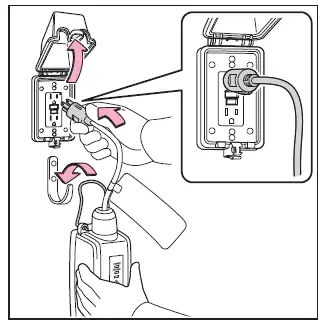
2. Insert the AC charging cable plug into a suitable external power outlet.
Ensure that the plug is firmly inserted by holding its body securely.
If the charging system includes a remote switch, turn it on accordingly.
Verify that the power indicator on the CCID (Charging Circuit Interrupting Device) is illuminated, confirming that power is being supplied.
To reduce strain on the outlet and plug, it is recommended to support the CCID by hanging it on a hook or similar support.
3. Open the charging port lid of the Subaru Solterra.
The AC charging inlet light (A) will illuminate to indicate readiness.
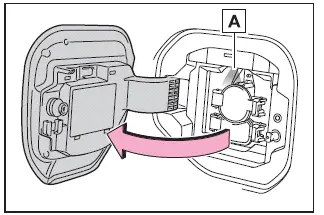
4. Open the AC charging inlet cap.
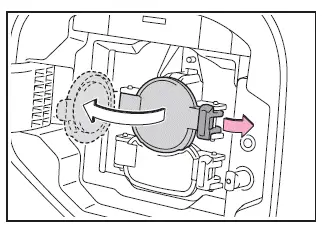
5. Remove the charging connector cap and secure it appropriately to the cable.
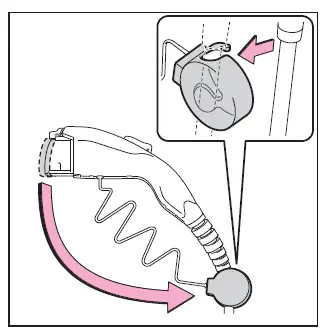
6. Insert the charging connector into the AC charging inlet of the Subaru Solterra.
Align the guide mark at the bottom of the connector and push it straight in until it clicks into place. Confirm that the connection is secure.
The AC charging connector will automatically lock when the doors of the Subaru Solterra are locked.
If the connector is already inserted and the doors are locked, the locking mechanism will engage automatically.
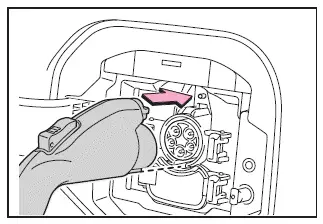
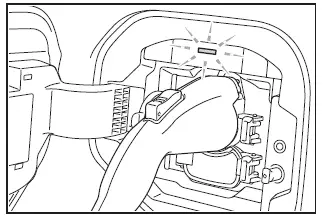
7. Confirm that the charging indicator on the Subaru Solterra charging port is illuminated.
If the indicator does not illuminate, charging will not begin.
If the indicator is flashing, it indicates that a charging schedule is active.
If the CCID error warning indicator flashes during charging, refer to the troubleshooting instructions and follow the appropriate corrective actions.
The charging indicator will turn off once charging is complete or if charging is interrupted.
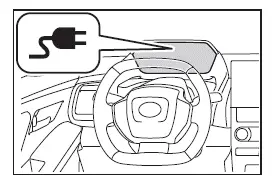
■ When connecting the AC charging connector
If a door is opened or the power switch is turned ON while the charging connector is attached, the Subaru Solterra will activate the charging cable indicator to notify that the connector is still connected.
■ If the charging indicator of the charging port flashes after connecting the AC charging cable
If the charging indicator flashes, this indicates that a charging schedule is currently set and charging will not start automatically.
To override the schedule and begin charging immediately on the Subaru Solterra, perform one of the following actions:
- Activate the "Charge Now" function
- Disconnect and reconnect the charging connector while the indicator is flashing
By following these steps, Subaru Solterra owners can ensure a safe, efficient, and reliable AC charging experience while maximizing battery performance and system longevity.
■ Safety function
The Subaru Solterra is equipped with a built-in safety mechanism that prevents charging from starting if the latch release button is pressed while the AC charging cable is connected.
Additionally, if the latch release button is pressed and held for several seconds during an active charging session, charging will automatically stop. To resume charging on the Subaru Solterra, remove the charging connector, then reconnect it securely and confirm that the charging indicator on the charging port illuminates properly.
■ When your circuit breaker trips during charging
If a circuit breaker is triggered during charging of the Subaru Solterra, the maximum charging current can be adjusted through the multi-information display or the multimedia system to better match the available power supply.
- Setting operations on multi-information display
1. Press
 or
or
 of the meter control switches to select
 .
.
2. Press
 or
or
 of the meter control switches to select "Vehicle Settings", and then press and hold
 .
.
3 Press
 or
or
 of the meter control switches to select "Charging Settings", and then press
 .
.
4. Press
 or
or
 of the meter control switches to select "Charging Current", and then press
 .
.
The "Charging Current" screen will appear on the Subaru Solterra display.
5. Press
 or
or
 of the meter control switches to select either "16A" or "8A", and then press
 .
.
- Setting operations on multimedia
1. Select
 .
.
2. Select "Vehicle customize".
3. Select "Charging".
4. Select "Charging current".
5. Choose either "16A" or "8A" depending on the power supply conditions.
The Subaru Solterra will limit the maximum charging current according to the selected setting.* If the circuit breaker continues to trip even after reducing the current, verify that the power source meets the required specifications for safe charging.
*: Reducing the charging current will increase the total charging time.
■ Changing the "Charging Limit" settings
The maximum charging capacity of the Subaru Solterra can be adjusted through the "Vehicle Settings" menu on either the multi-information display or the multimedia system.
The selected charging limit applies to both AC and DC charging modes.
- Setting operations on multi-information display
1. Press
 or
or
 of the meter control switches to select
 .
.
2. Press
 or
or
 of the meter control switches to select "Vehicle Settings", and then press and hold
 .
.
3. Press
 or
or
 of the meter control switches to select "Charging Settings", and then press
 .
.
The "Charging Settings" screen will be displayed on the Subaru Solterra interface.
The "Charging Settings" screen will be displayed.
4. Press
 or
or
 of the meter control switches to select "Charging Limit", and then press
 .
.
The "Charging Limit" screen will be displayed, allowing you to define the preferred upper charging threshold for the Subaru Solterra battery.
Adjusting these settings enables Subaru Solterra owners to balance charging speed, electrical safety, and long-term battery health, especially when using different types of power sources or charging environments.
5. Select "Full", "90%", "80%", "70%", "60%" or "50%" as the desired charging
limit for the Subaru Solterra traction battery, and then press
 .
.
1. Select
 .
.
2. Select "Vehicle customize".
3. Select "Charging".
4. Select "Charging limit".
5. Choose the preferred limit such as "Full", "90%", "80%", "70%", "60%" or "50%" depending on your Subaru Solterra charging strategy and battery care preferences.
When changing the charging limit setting during DC charging, the process may be interrupted due to the charger’s internal timer, and the Subaru Solterra traction battery may not reach a full charge.
■ Protection function of AC charging inlet overheating
The Subaru Solterra is equipped with an advanced protection system that monitors the temperature of the AC charging inlet using an integrated sensor.
If foreign objects or poor connections cause a rise in temperature, the system will automatically stop charging to prevent overheating and potential damage, such as melting of components.
When this safety function is activated, a warning message will be displayed on the multi-information display after the power switch is turned off, alerting the driver to the condition.
WARNING
■ When charging
Always follow the precautions below when charging the Subaru Solterra.
Ignoring these instructions may result in serious hazards, including electric shock, fire, or injury.
- Always connect the Subaru Solterra to a suitable and properly rated power source.
- Ensure that the AC charging cable, plug, and outlet are clean and free from dust, debris, or foreign materials.
- Before charging, inspect the AC charging inlet for any signs of deformation,
damage, or corrosion, and ensure it is free of dirt, snow, or ice.
If any contamination is present, remove it completely before inserting the charging connector.
- Use only outlets that allow the plug to be securely and firmly inserted.
- Do not bundle, coil, or wrap the AC charging cable during charging, as this may lead to overheating.
- Avoid touching the terminals of the charging connector or AC charging inlet with metal objects or bare hands, and never create a short circuit using foreign materials.
- When charging outdoors, always use a certified weatherproof outlet.
Ensure the protective cover closes completely. If not, install a proper weatherproof cover suitable for the Subaru Solterra charging setup.
- When stopping charging at a public station, follow the charger’s specific instructions carefully.
- If abnormal conditions such as heat, smoke, unusual odors, or noise are detected during charging, stop charging immediately.
- Do not connect the plug if the outlet is wet, submerged, or covered in snow.
- During rain or snowfall, avoid connecting or disconnecting the Subaru Solterra charging cable with wet hands, and prevent moisture from entering the plug or outlet.
- Do not attempt to charge the Subaru Solterra during thunderstorms or lightning activity.
- Ensure that the AC charging cable is not trapped by the vehicle doors or rear hatch.
- Do not allow the vehicle wheels to roll over the AC charging cable, plug, charging connector, or CCID.
- Insert the plug firmly into the outlet to ensure stable electrical contact.
- Do not use extension cords or conversion adapters under any circumstances.
- Always close the hood before charging.
The cooling fan in the Subaru Solterra may start automatically. Contact with moving components may cause injury, especially if clothing or accessories become caught.
- After connecting the charging cable, ensure it is not twisted or entangled with surrounding objects.
- If the power indicator on the CCID (Charging Circuit Interrupting Device) does not illuminate after plugging in, immediately disconnect the cable and inspect the setup.
■ If the error warning indicator on the CCID (Charging Circuit Interrupting Device) illuminates or flashes during charging
This may indicate an electrical leakage in the power supply path or a malfunction in the AC charging cable or CCID system of the Subaru Solterra.
Refer to the troubleshooting procedures and follow the recommended corrective steps. If the issue persists, stop charging immediately, disconnect the AC charging cable, and contact an authorized SUBARU dealer. Continuing to charge under such conditions may result in serious safety risks.
■ Onboard traction battery charger
The onboard traction battery charger of the Subaru Solterra is located within the motor compartment and is responsible for managing and converting incoming electrical energy during the charging process.
By understanding these settings and safety features, Subaru Solterra owners can optimize charging performance, extend battery life, and ensure safe operation under all conditions.
Always strictly follow the safety precautions related to the onboard traction battery charger of the Subaru Solterra. Failure to comply with these guidelines may lead to serious hazards, including burns or electric shock, potentially resulting in severe injury or fatal consequences.
- During charging, the onboard traction battery charger of the Subaru Solterra
can become significantly hot.
Avoid touching this component under any circumstances, as direct contact may cause burns.
- Do not attempt to disassemble, modify, or repair the onboard traction battery charger. If service is required, always consult an authorized SUBARU dealer to ensure safe handling and proper maintenance.
NOTICE
■ When charging
Never insert the plug directly into the AC charging inlet of the Subaru Solterra.
Doing so may cause damage to the charging inlet and affect the proper operation of the charging system.
■ Using private power generator
Do not use private or portable power generators as a charging source for the Subaru Solterra.
Such power sources may produce unstable voltage levels, leading to interrupted charging or potential system malfunctions.
■ Charging station
Depending on the installation environment of public or private charging stations, electrical noise or voltage fluctuations may occur, which can affect the stability of charging and may cause interruptions when charging the Subaru Solterra.
After charging
1. Unlock the doors of the Subaru Solterra to release the charging connector lock.
Once unlocked, the charging connector will disengage, and the AC charging inlet light will illuminate, indicating that the connector can be safely removed.
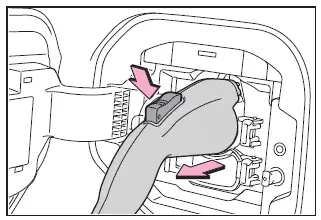
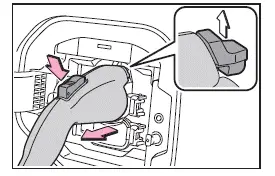
2. Press and hold the latch release button while gently pulling the charging connector toward you to disconnect it.
If the latch release button is pressed during active charging (while the charging indicator is illuminated), the charging process will stop automatically.
3. Reattach the charging connector cap securely to protect it from dirt and environmental exposure.
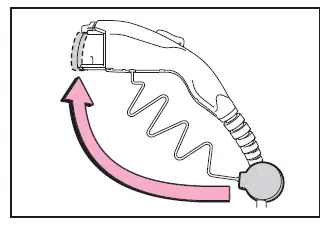
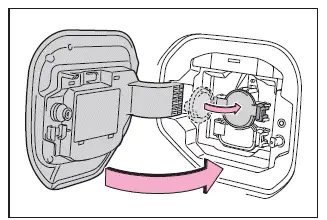
4. Close the AC charging inlet cap and then securely close the charging port lid of the Subaru Solterra.
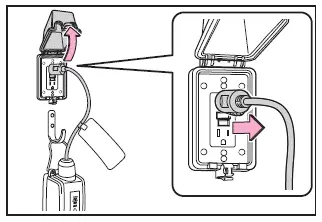
5. If the charging equipment will not be used for an extended period, remove the plug from the outlet.
Always hold the plug body when disconnecting it, and avoid pulling on the cable.
After removal, store the AC charging cable properly to prevent damage or contamination.
If the plug remains inserted in the outlet for a prolonged period, inspect it at least once a month to ensure no dust or debris has accumulated.
■ When the outside temperature is low or high
In the Subaru Solterra, the displayed SOC (State of Charge) may slightly decrease when the power switch is turned ON, even after the battery has been fully charged. This behavior is normal and reflects temperature-related battery characteristics rather than a malfunction.
■ When removing the charging connector
To safely remove the charging connector from the Subaru Solterra, press the latch release button and confirm that the locking lever has disengaged before pulling the connector out.
If the lever does not release after pressing the button, the connector may still be locked. In this case, unlock the vehicle doors using the smart key system or remote control to release the locking mechanism.
WARNING
■ After charging
If the charging cable will not be used for an extended time, always remove the plug from the outlet.
Accumulated dust or contaminants in the plug or outlet may cause overheating, malfunction, or fire, posing serious safety risks.
NOTICE
■ After charging
- Store the AC charging cable of the Subaru Solterra in a location that is inaccessible to children and infants.
- After unplugging, keep the cable in a clean, dry environment free from
moisture and dust.
Improper storage may lead to damage if the cable is stepped on or run over by the vehicle.
- After disconnecting the charging connector, always close the AC charging
inlet cap and the charging port lid securely.
Leaving the inlet exposed may allow water or debris to enter, potentially damaging the Subaru Solterra charging system.
Following these post-charging procedures helps ensure long-term reliability, safety, and optimal performance of the Subaru Solterra charging system.
 Things to know before charging
Before charging the traction battery of the Subaru Solterra, it is
essential to carefully review the following precautions to ensure safe, efficient,
and reliable charging operations.
■ Safety ...
 How to use DC charging
This section provides a comprehensive overview of the DC fast charging
procedure for the Subaru Solterra traction battery, allowing drivers to quickly
and efficiently recharge when needed.
When u ...
Other materials:
Riding with children
When traveling with children in the Subaru Solterra, always follow
these important safety recommendations to ensure their protection and comfort during
every journey.
Always use a child restraint system that is appropriate for the child’s
age, size, and weight until they are able to correct ...
Neutral Switch Removal/Installation [G66 M R]
1. Remove the battery cover..
2. Disconnect the negative battery cable.
3. Remove the battery component. (ex: battery, battery tray and PCM component).
4. Remove the aerodynamic under cover No.2..
5. Drain the oil from the transaxle..
6. Remove the neutral switch.
7. Install the neu ...
Applicable Bluetooth ® specification
(Recommended)
Ver. 1.1/1.2/2.0 EDR/2.1 EDR/3.0
(conformity)
Response profile
A2DP (Advanced Audio Distribution
Profile) Ver. 1.0/1.2
AVRCP (Audio/Video Remote Control
Profile) Ver. 1.0/1.3/1.4
A2DP is a profile which transmits only
audio to the Bluetooth ® unit. If your
Bluetooth ® audio device ...
