
Mazda 3 Service Manual: Input/Turbine Speed Sensor Inspection [FS5 A EL]
CAUTION:
-
Water or foreign objects entering the connector can cause a poor connection or corrosion. Be sure not to drop water or foreign objects on the connector when disconnecting it.
On-Vehicle Inspection
1. Perform the following procedures.
a. Remove the battery cover..
b. Disconnect the negative battery cable.
c. Remove the air cleaner component..
d. Disconnect the input/turbine speed sensor connector.
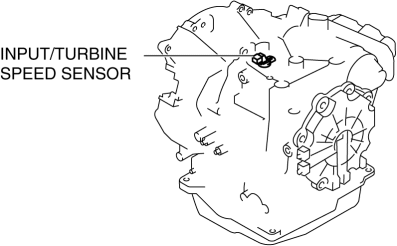
2. Measure the resistance between the input/turbine speed sensor terminals A and B.
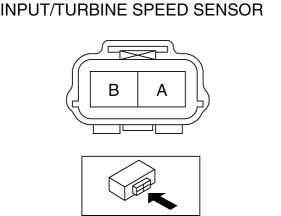
-
If there is any malfunction, replace the input/turbine speed sensor..
-
Input/turbine speed sensor specification
-
250—600 ohms
Off-Vehicle Inspection
1. Measure the resistance between the input/turbine speed sensor terminals A and B.
-
If there is any malfunction, replace the input/turbine speed sensor..
-
Input/turbine speed sensor specification
-
250—600 ohms
 Brake Switch Inspection
CAUTION:
Inspect the brake switch with it installed to the brake pedal, otherwise
the brake switch may not operate normally. If the brake switch is removed from
the brake pedal, replace ...
 Input/Turbine Speed Sensor Removal/Installation [FS5 A EL]
CAUTION:
Always use a new bolt. If the removed input/turbine speed sensor installation
bolt is reused, it may cause oil leakage.
A sealant coating is applied to the input/turbine s ...
Other materials:
Oil Seal (Differential) Replacement [G66 M R]
1. On level ground, jack up the vehicle and support it evenly on safety stands.
2. Remove the aerodynamic under cover No.2..
3. Drain the oil from the transaxle..
4. Remove the front splash shield..
5. Separate the drive shaft and joint shaft from the transaxle..
6. Remove the oil seals u ...
Maintenance data
Dimensions and weights
*: Unladen vehicle
Seating capacity
Vehicle identification
■ Vehicle identification number
The vehicle identification number (VIN) of your Subaru Solterra serves as its
official legal identifier and is essential for registration, ownership documentation,
...
Information Display Input/Output Check Mode
NOTE:
In this mode, it is possible to verify the items in the following chart.
Check Code Table
Check code
Check item
Related items
01
Information display
Multi information display
...
