
Mazda 3 Service Manual: Vehicle Speed Sensor (VSS) Inspection [FS5 A EL]
On-Vehicle Inspection
1. Inspect the power supply circuit for the VSS.
a. Remove the insulator from the transaxle.
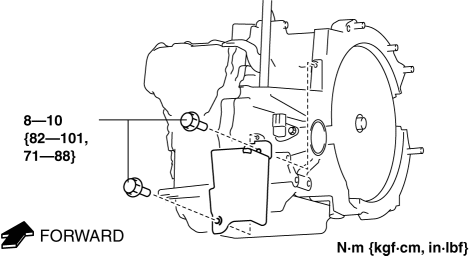
b. Disconnect the VSS connector.
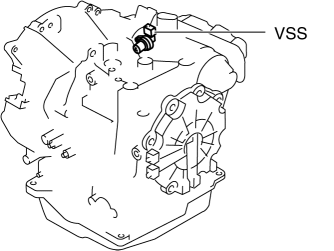
c. Switch the ignition to ON (engine off).
d. Measure the voltage at VSS connector terminal A (harness-side).
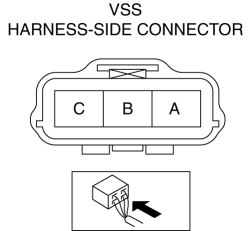
-
If there is any malfunction, repair wiring harness between VSS and AT main relay.
-
VSS specification
-
B+
e. Switch the ignition to off.
f. Connect the VSS connector.
2. Inspect the GND circuit for the VSS.
a. Switch the ignition to off.
b. Measure the voltage at VSS connector terminal C (harness-side).
-
If there is any malfunction, repair wiring harness between VSS and GND.
-
VSS specification
-
Below 1.0 V
3. Inspect the signal circuit for the VSS.
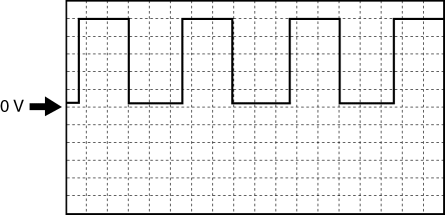
a. Connect the oscilloscope to the following TCM connector terminals and set it as below.
-
(+) lead: TCM terminal Z
-
(-) lead: battery negative terminal
-
Oscilloscope setting: 1 V/DIV (Y), 2 ms/DIV (X), DC range
b. Start the engine.
c. Measure the wave form when the following conditions are met.
-
Gear position: 3GR
-
Vehicle speed: 30 km/h {19 mph}
-
If there is any malfunction, replace the VSS..
 Passenger Compartment Temperature Sensor Removal/Installation [Full Auto Air
Conditioner]
Passenger Compartment Temperature Sensor Removal/Installation [Full Auto Air
Conditioner]
1. Disconnect the negative battery cable..
2. Remove the following parts:
a. Front scuff plate.
b. Front side trim.
c. Dashboard under cover.
d. Upper panel.
e. Shift lever knob (MTX).
f ...
 Vehicle Speed Sensor (VSS) Removal/Installation [FS5 A EL]
CAUTION:
If foreign materials are stuck to the sensor, disturbance by magnetic flux
can cause sensor output to be abnormal and thereby negatively affect control.
Make sure that foreign m ...
Other materials:
Receiving and Replying to
Messages (available only with
Email/SMS compatible phones)
SMS (Short Message Service) messages,
and E-mail received by connected devices
can be downloaded, displayed, and played
(read by the system).
Additionally, replies can also be made
to calls and messages in the received
messages.
Downloading messages
Up to 20 new messages can be
downloaded ...
Instrumentation/Driver Info. Personalization Features Setting Procedure
Instrument Cluster
1. Connect the M-MDS (IDS) to the DLC–2.
2. After the vehicle is identified, select the following items from the initial
screen of the M-MDS.
Select the “Module Programming”.
3. Then, select items from the screen menu in the following order.
Se ...
Indicator Lights
These lights turn on or flash to notify the user of the system operation
status or a system
malfunction.
Signal
Indicator Lights
* BSM OFF Indicator Light
* Lane Departure Warning System (LDWS) Indicator Light
KEY Indicator Light
...
